
Can Routers Track Internet History? What WiFi Owners Can (and Can’t) See
You’re using someone else’s WiFi — maybe your parents’, your employer’s, or a café network — and you start wondering: can whoever owns this router see what I’m doing online? Can they see the websites I visit, what I search for, the messages I send?
Or maybe you own the router, and you’re wondering the opposite: can you see what everyone in your house is actually looking at?
These are completely reasonable questions, and the honest answer is more nuanced than a simple yes or no. Routers can log internet activity — but what they can actually see is significantly limited by modern HTTPS encryption. What they can see is still more than most people realise, and it’s worth understanding clearly.
This guide explains exactly what a router can and cannot track, what a WiFi owner can see with logging enabled, what protects you, and what doesn’t.
📋 Quick Answer — Can Routers Track Internet History?
Yes — with conditions. A router can log the domain names of every website you visit (e.g.,
reddit.com,youtube.com), the timestamps of those visits, your device’s MAC address and IP, and your data usage volumes.What a router cannot see (when HTTPS is active): the specific pages within a site, your search terms, your messages, passwords, or any content you enter into a form.
Incognito mode does NOT hide your activity from the router. A VPN does — the router only sees encrypted traffic going to the VPN server.
What Does a Router Actually Do With Your Traffic?
To understand what a router can track, it helps to understand what it actually does every time you visit a website.
When you type bbc.co.uk into your browser, several things happen in rapid sequence:
- Your device asks the DNS server to translate the domain name into an IP address — this DNS request passes through the router
- Your device sends a connection request to that IP address — this also passes through the router
- Data flows back and forth between your device and the website’s server — all of it routed through the router
The router is the gateway for all of this traffic. Every packet of data that travels to or from your device passes through it. The question is: how much of that traffic does the router log, and how much of it can the router actually read?
What Can a Router See? The Complete Breakdown
What a Router CAN See (and Log)
| Information | What It Reveals | Example |
|---|---|---|
| Domain names (via DNS) | Every website you visit by name | reddit.com, netflix.com, banking-site.com |
| IP addresses | The server IPs your device connects to | Can cross-reference to identify sites |
| Timestamps | Exactly when you visited each site | 11:43 PM — accessed reddit.com |
| Session duration | How long you stayed on each site | 47 minutes on youtube.com |
| Data volume | How much data uploaded/downloaded | 2.3 GB download — likely streaming video |
| Device identifiers | Which device did what | MAC address A4:C3:F0:12:3D:7E visited these sites |
| Connection frequency | How often you visit sites | Patterns of daily use |
| App activity | DNS requests reveal apps used | api.whatsapp.com = WhatsApp usage |
What a Router CANNOT See (Thanks to HTTPS)
When you visit an HTTPS website (the padlock icon in your browser — now essentially universal), the connection between your device and the website’s server is encrypted end-to-end. The router sits in the middle but cannot decrypt this traffic.
This means the router cannot see:
- The specific pages you visit within a site (the full URL after the domain)
- What you search for on Google, Bing, or YouTube
- The content of your messages, emails, or DMs
- Passwords, payment details, or any form data you enter
- What you read or watch within a streaming service
- The content of encrypted chat apps (WhatsApp, Signal, iMessage)
The practical distinction: A router can see that you visited reddit.com at 11:43 PM and spent 47 minutes there. It cannot see which subreddit you were on, which posts you read, or what comments you wrote.
Real-world analogy: Think of it like a phone exchange operator in the 1950s. They can see which number you called, when you called, and how long the call lasted — but they can’t hear the conversation itself.
The DNS Loophole — Why Domain Visibility Matters
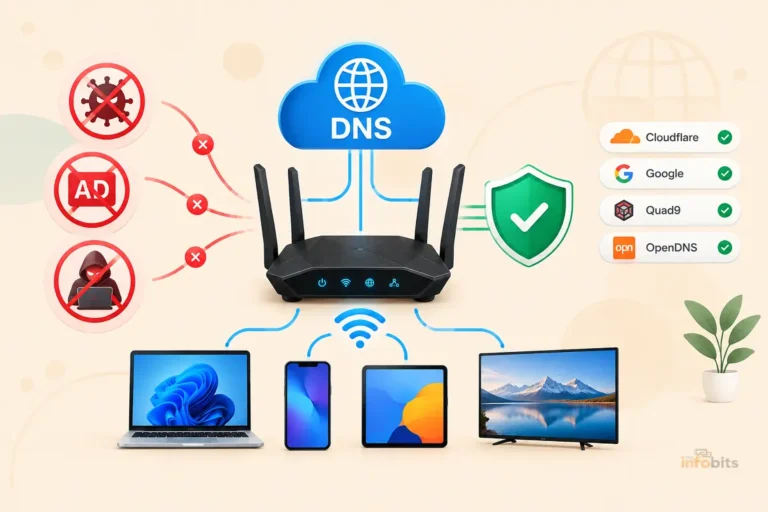
Even with HTTPS protecting the content of your traffic, standard DNS queries are sent in plain text. When your device asks “what’s the IP address for reddit.com?”, that request travels through the router unencrypted — making the domain name clearly visible in router logs.
This is why a router can see which websites you visit even when the content is encrypted. The DNS lookup happens before the encrypted connection is established.
The exception: If your browser uses DNS-over-HTTPS (DoH) — which Chrome, Firefox, and Edge all support — DNS queries are also encrypted and bypass the router’s DNS server entirely. This significantly reduces what a router can log. DoH is increasingly enabled by default in modern browsers, but it’s not universal.
Related: How to Secure Your Home WiFi Network
Does Logging Happen by Default on Home Routers?
This is an important practical distinction: most home routers do not log browsing activity by default.
Standard consumer routers from TP-Link, ASUS, Netgear, and others do maintain basic connection logs (device connections, IP assignments, timestamps) but typically do not enable detailed URL or DNS logging out of the box. The logging storage on most consumer routers is also limited — many store only a few hours or days of logs before overwriting them.
For detailed logging to happen, a network administrator or the router’s owner must:
- Explicitly enable logging in the router’s admin settings
- Configure a logging level that captures DNS queries or traffic data
- Potentially use third-party firmware (like DD-WRT, OpenWrt, or Tomato) or a dedicated network monitoring appliance (like Pi-hole or pfSense) to capture more granular data
The scenarios where detailed logging is most common:
| Environment | Logging Likelihood | Who Can See It |
|---|---|---|
| Home network (parental controls off) | Low — not enabled by default | Router admin only |
| Home network (parental controls on) | High for child devices | Router admin / parent |
| Workplace / corporate network | Very high — standard practice | IT department, employer |
| School / university network | High — policy requirement | Network administrators |
| Public WiFi (café, hotel, airport) | Variable — often logged | Network owner, potentially third parties |
| ISP network (upstream) | Yes — legally required in many countries | Your ISP, government with legal process |
Related: How to Monitor Network Traffic on Your Home Router
What Can a WiFi Owner See in Practice?
Let’s answer the specific questions people actually search for.
Can My Parents See My Browsing History on Their Router?
Yes — if logging is enabled. A parent who knows how to access the router’s admin panel can see the domain names of every site visited on their home network. Modern routers with parental control features (like ASUS’s AiProtection, TP-Link’s HomeCare, or Netgear’s Circle) make this even easier — they provide app-based dashboards showing per-device browsing activity.
However, even with logging enabled, they can see that you visited a site, not what you did there (thanks to HTTPS).
Related: How to Set Up Parental Controls on Your Router (Without Apps)
Can My Boss or School See What I Browse?
Almost certainly yes. Corporate and institutional networks typically run dedicated network monitoring software. Unlike home routers, these systems are specifically configured to capture detailed traffic metadata, sometimes including SSL inspection (deep packet inspection) that can decrypt HTTPS traffic on managed devices.
If you’re using a company-issued laptop on a corporate network, assume your browsing is monitored. The monitoring may go beyond the router — many employers install monitoring software directly on company devices.
Can the Café or Hotel WiFi Owner See My Activity?
Yes, to the domain level — they can see which websites you connect to. Large commercial WiFi operators (airports, hotel chains, coffee shop franchises) often run commercial network management software that logs more detail than a home router. Some public WiFi networks are specifically set up to harvest data for advertising purposes.
What to do: Use a VPN on any public WiFi network. Full stop.
Can My Roommate or Someone on the Same Network See My Activity?
Not directly, on a standard home network. Your roommate’s device doesn’t have access to the router’s logs. To see your browsing activity, they would need admin access to the router. If they set up the router and know the admin password, they could theoretically enable logging and view activity — but this would require deliberate action, not passive snooping.
The Big One: Does Incognito Mode Hide Your Activity from the Router?
No. Incognito mode does not hide your activity from the router.
Incognito (or Private Browsing) only prevents your browser from saving a local record of your session on your own device. It does not change what data is transmitted to the router. Every DNS request, every IP connection, every data packet still passes through the router in the same way.
The router (and anyone with access to its logs) sees your activity identically whether you’re in incognito mode or not.
This is one of the most widely misunderstood concepts in online privacy, and it’s worth being direct about: incognito mode is not a privacy tool against network-level monitoring.
| What Incognito Does | What Incognito Does NOT Do |
|---|---|
| Prevents browser from saving local history | Hide activity from router/network admin |
| Doesn’t save cookies after session ends | Hide activity from your ISP |
| Keeps session separate from signed-in accounts | Makes you anonymous online |
| Doesn’t store form data or passwords locally | Encrypt your traffic |
| Useful for private shopping or shared devices | Prevent DNS logging |
What Actually Protects Your Privacy on a WiFi Network?
1. HTTPS Encryption (Automatic on Modern Sites)
As covered above, HTTPS encrypts the content of your traffic. The router can see the domain you visit but not what you do there. Modern browsers now warn users when a site isn’t using HTTPS, and the vast majority of websites have adopted it. This is your baseline protection — and it’s already working for you on most sites without any action required.
2. A VPN (Virtual Private Network)
A VPN is the most effective tool for hiding your activity from a router owner.
When you connect to a VPN:
- Your device establishes an encrypted tunnel to the VPN server before sending any traffic
- All subsequent traffic — including DNS queries — travels through this encrypted tunnel
- The router can only see one thing: encrypted data going to the VPN server’s IP address
- The router cannot see which websites you visit, what you search, or any content of your traffic
From the router’s perspective, it looks like you’re having one continuous encrypted conversation with a single IP address. Nothing more.
Important caveat: Switching traffic monitoring from the router to the VPN provider. Your VPN provider can see your activity — which is why choosing a reputable no-logs VPN (one that doesn’t record or store your traffic data) is critical.
A reputable no-logs VPN like NordVPN or Mullvad VPN encrypts all your traffic and prevents your router, ISP, or WiFi owner from seeing your browsing activity — both are available via subscription on Amazon and their official sites, with apps for all devices.
3. DNS-over-HTTPS (DoH)
Enabling DoH in your browser encrypts DNS queries, removing one of the main ways routers identify which sites you visit. Enable it in:
- Chrome: Settings > Privacy and Security > Security > Use secure DNS
- Firefox: Settings > Privacy & Security > Enable DNS over HTTPS
- Edge: Settings > Privacy, search, and services > Security > Use secure DNS
This doesn’t encrypt your traffic as comprehensively as a VPN, but it does close the DNS visibility gap.
4. Using Mobile Data Instead of WiFi
If you’re on someone else’s WiFi and concerned about monitoring, switching to your phone’s mobile data removes the WiFi router from your traffic path entirely. Your mobile carrier can see your activity instead (as your ISP), but the WiFi owner cannot.
Who Else Can See Your Browsing History? (Beyond the Router)
The router is just one potential observer. Understanding the full picture of who can see your traffic helps you make better privacy decisions.
| Party | What They Can See | Legal Basis |
|---|---|---|
| Router/WiFi owner | Domain names, timestamps, data volumes, device IDs | Network admin access |
| Internet Service Provider (ISP) | All traffic at the network level | Varies by country — many legally required to retain logs |
| DNS provider (if not using DoH) | Every domain lookup your devices make | Terms of service |
| Google/Search engines | Your search queries and clicked results | Terms of service |
| Websites you visit | Your activity within their site | Analytics, cookies, T&Cs |
| Social media platforms | Extensive cross-site tracking via pixels and cookies | Terms of service |
| Government agencies | ISP logs, router logs with legal process | Court order, warrant |
| Hackers on same network | All traffic on unencrypted connections | Illegal but technically possible |
This broader picture explains why a VPN on public WiFi is so important — the risks aren’t limited to the router owner.
Related: Can a VPN Make Your Home WiFi More Secure?
How to Check If Your Router Is Logging Your Activity
If you own the router and want to see what it’s logging (or confirm it isn’t), here’s how:
- Open a browser and navigate to your router’s admin panel (typically
192.168.1.1or192.168.0.1) - Log in with your admin credentials.
- Look for sections labelled Logs, System Log, Traffic Log, Network Monitoring, or Diagnostics.
- Review what information is being recorded — common entries include connection events, DHCP assignments, and DNS queries
- Look for a logging level setting — most routers allow you to adjust how much detail is captured
To disable logging or clear existing logs:
- Find the log settings and change the level to minimal or disable DNS/traffic logging
- Look for a Clear Logs button to delete stored history
- Note that on most home routers, logs are cleared automatically when the router reboots
Related: How to Block Specific Devices from Accessing Your Router
How to Delete Router History (If You’re the Owner)
If you want to clear the activity logs from your own router:
- Log in to the router’s admin panel
- Go to the Logs or System Log section
- Look for a Clear, Delete, or Flush Logs button
- Save and confirm
Alternatively — reboot your router. Most consumer routers store logs in RAM only and clear all logs on a restart.
Important: Clearing router logs only removes the local copy. If your ISP or network monitoring software captures logs upstream, those copies are unaffected by clearing your router’s logs.
Myth vs. Fact: Router Tracking Edition
Myth: Clearing your browser history hides your activity from the router. Fact: Clearing browser history only removes the local copy on your device. The router’s logs (if enabled) are separate and unaffected by what you do in your browser.
Myth: Incognito mode makes you invisible to the router. Fact: Incognito only prevents your browser from saving a local record. The router sees your traffic identically whether you’re in incognito mode or not.
Myth: HTTPS means nobody can see what you’re doing online. Fact: HTTPS protects the content of your traffic but not the destination. The router can still see which domains you visit through DNS queries. HTTPS is important but not comprehensive privacy protection.
Myth: Using someone’s WiFi means they can read your messages. Fact: Encrypted messaging apps (WhatsApp, Signal, iMessage) use end-to-end encryption independent of HTTPS. The router cannot decrypt these messages. The router owner can see that your device connected to WhatsApp’s servers — not what you said.
Myth: A VPN makes you completely anonymous online. Fact: A VPN hides your activity from the router and your ISP — but transfers some trust to the VPN provider. It also doesn’t make you anonymous to websites you log into, or to services that track via cookies and fingerprinting.
Myth: Home routers automatically log everything. Fact: Most home routers do not enable detailed browsing logs by default due to storage limitations and default settings. Active logging requires deliberate configuration by the router admin.
Privacy Protection Checklist
Use this as a practical reference for protecting your privacy on WiFi networks:
On your own home network:
- Change your router admin password from the default
- Check whether logging is enabled and at what level
- Enable DNS-over-HTTPS in your browser settings
- Use HTTPS sites (your browser warns you when a site isn’t secure)
- Consider a VPN for sensitive activities (banking, personal research)
Related: Latest Router Security Features to Protect Your Online Privacy
On someone else’s network (parents, employer, school):
- Assume domain-level logging is possible — behave accordingly
- Use a VPN if you need genuine privacy
- Avoid logging into personal accounts on employer-issued devices
- Use mobile data for genuinely private activities
On public WiFi (café, hotel, airport):
- Always use a VPN — this is non-negotiable on public WiFi
- Avoid accessing banking or sensitive accounts without a VPN
- Verify the network name before connecting (fake hotspots are a real threat)
- Turn off auto-connect to open networks in your device’s WiFi settings
Conclusion
The honest summary: routers can see more than most people realise, but less than many people fear.
With standard HTTPS, a router can see which websites you visit (domain names) and when — but not what you do there, what you search for, or any content you transmit. That’s a meaningful limitation that didn’t exist when most of the internet was unencrypted.
Incognito mode does nothing against router-level monitoring. A VPN does a great deal.
The practical takeaways: on your own home network, detailed logging is unlikely unless you’ve explicitly set it up. On a workplace, school, or public network, assume that domain-level activity is visible to the network administrator and behave accordingly. On public WiFi specifically, use a VPN — the risks go well beyond the router owner.
Understanding what your router can and can’t see isn’t about paranoia — it’s about making informed decisions about where and how you use the internet.
Frequently Asked Questions
Can a WiFi router track internet history?
Yes, a router can log internet activity — specifically the domain names of websites visited, connection timestamps, device identifiers, and data volumes. However, HTTPS encryption prevents the router from seeing the content of your traffic, specific pages visited, search terms, or messages.
Can my parents see my internet history through the router?
Yes, if they have access to the router’s admin panel and logging is enabled. Modern routers with parental controls provide per-device browsing dashboards that show domain-level activity. They can see which sites were visited and when, but not the specific content on those sites.
Can a WiFi owner see your browsing history after you delete it?
Yes. Deleting browser history on your device only removes the local copy in your browser. The router’s logs (if they exist) are stored on the router and are completely independent of your browser’s history. Clearing your browser doesn’t affect the router’s records.
Does incognito mode hide browsing from a router?
No. Incognito mode only prevents your browser from saving a local record on your device. All traffic still passes through the router in the same way. The router can log domain names and connection metadata regardless of whether incognito mode is active.
Can a router see HTTPS traffic?
A router can see the domain name of an HTTPS website (e.g., amazon.com) but cannot see the specific pages, content, search terms, or data within the encrypted connection. HTTPS encrypts the content of traffic but not the DNS lookup that reveals the domain.
Can my employer see what I browse at home?
If you’re on your home network using your personal devices, your employer cannot see your browsing through the router — they don’t have access to it. However, if you’re using a company-issued device with monitoring software installed, that software may capture activity regardless of which network you’re on.
What does a WiFi router log by default?
Most home routers log basic information like device connections, IP address assignments, and connection events by default. Detailed DNS and traffic logging is typically not enabled by default on consumer routers due to storage limitations. Check your router’s admin panel under Logs or System Log to see what yours records.
How do I stop my router from logging my history?
Log into your router’s admin panel, go to the Logs or System Settings section, and reduce the logging level or disable DNS logging. Most home routers also clear their logs automatically on reboot. For comprehensive privacy from the router, use a VPN with DNS-over-HTTPS enabled in your browser.
Can a VPN hide my browsing from a router?
Yes, effectively. A VPN encrypts all traffic — including DNS queries — before it leaves your device. The router can only see encrypted data going to the VPN server’s IP address. It cannot see which websites you visit, what you do on them, or any content of your traffic.
Can a router see activity on encrypted apps like WhatsApp?
The router can see that your device is connecting to WhatsApp’s servers (via DNS), but it cannot see the content of your messages. WhatsApp, Signal, and iMessage use end-to-end encryption, meaning even WhatsApp’s own servers cannot read message content — let alone a router.
Can a router track what you watch on streaming services?
The router can see that you’re connected to Netflix, YouTube, or Disney+ (via domain name), and how much data you’re transferring (which might suggest streaming). It cannot see which shows or videos you watch — that content is protected by HTTPS encryption.
How long does a router store browsing history?
It varies significantly. Most home routers store logs in RAM and clear them on reboot — often within hours to days. Enterprise routers may store logs externally for months or years. Check your specific router’s documentation or admin panel for its retention settings.
Can someone hack my router to see my browsing history?
If your router has a weak admin password or outdated firmware with known vulnerabilities, an attacker could gain access to its logs and settings. Using a strong admin password, updating firmware regularly, and enabling WPA3 encryption significantly reduces this risk.
Does using mobile data instead of WiFi prevent the router from seeing my activity?
Yes. When using your phone’s mobile data, traffic bypasses the WiFi router entirely. Your mobile carrier becomes your ISP for that traffic instead. This is a simple way to keep sensitive activities private from a WiFi network owner.
What is DNS-over-HTTPS and does it help privacy?
DNS-over-HTTPS (DoH) encrypts DNS queries so that the router cannot see which domain names your device is looking up. It closes one of the main ways routers identify visited websites. It’s not as comprehensive as a VPN but adds a meaningful layer of privacy. Most modern browsers support it, and it can be enabled in browser settings.
Found this helpful? Share it with someone who thinks incognito mode makes them invisible online. Follow us on Facebook and Twitter, and subscribe to our free newsletter for more practical privacy and networking guides.
We also ask that you bookmark this page for future reference, as we are constantly updating our articles with new information.
Disclosure: Some links in this article are affiliate links. If you purchase through them, we may earn a small commission at no additional cost to you.




%20See)