
7 Best Routers with Built-in VPN for Ultimate Security in 2026
Your internet connection touches everything: banking, work calls, streaming, smart home devices, kids’ schoolwork. Most people don’t think twice about who can see that data until something goes wrong.
A router with a built-in VPN solves this at the source: every device on your network gets protected automatically, whether it’s your laptop, smart TV, or the thermostat on your wall.
The problem is that most guides dump a list of specs and call it a day. We went further, evaluating VPN protocol support, real-world throughput under VPN load, ease of setup, and long-term firmware reliability.
Whether you want a plug-and-play setup or full OpenWrt control, there’s a router in this list for you.
Best Routers with Built-in VPN at a Glance
Quick Picks
Best Overall for VPN Performance: GL.iNet GL-MT6000 (Flint 2)
Best Premium Wi-Fi 7 Pick: TP-Link Archer BE550
Best Value Wi-Fi 7 Pick: TP-Link Archer BE230
Best Budget VPN Router: TP-Link Archer AX55
Best Performance Wi-Fi 6 Pick: TP-Link Archer AX72 Pro
Best for Power Users & Multi-Gig : Asus RT-BE88U
Best Compact / Travel VPN Router: GL.iNet Beryl AX (GL-MT3000)
Why Trust This Guide?
We’ve been covering home networking and internet security since 2021.
Every router in this list was evaluated against the following criteria: documented VPN protocol support, real-world VPN throughput data from third-party lab tests (RTings, ServeTheHome, MiniPCReviewer), firmware reliability, ease of configuration for non-technical users, and long-term value.
We don’t accept payment from manufacturers to rank their products. Where we earn affiliate commissions through purchase links, that never influences rankings or editorial assessments.
How We Selected These Routers
We looked at dozens of routers and filtered by the following non-negotiable criteria:
- Native VPN support: must have VPN client and/or server built into the firmware, no firmware flashing required for basic use
- VPN throughput: must maintain usable speeds under VPN load (we rejected models that dropped below 50 Mbps when VPN was active)
- Protocol variety: priority given to WireGuard support alongside OpenVPN, since WireGuard is dramatically faster
- Firmware quality: stable update history, active security patching
- Value for money: we compared price against actual VPN-active performance, not just peak Wi-Fi spec sheets
- Setup experience: routers that are accessible to non-technical users score higher, all else being equal
The 7 Best Routers with Built-in VPN (Reviewed)
| Sl.No: | Router | Category | VPN Protocols | Wi-Fi Standard | Best For |
|---|---|---|---|---|---|
| 1 | GL.iNet GL-MT6000 (Flint 2) | Best Overall for VPN Performance | WireGuard, OpenVPN, OpenWrt | Wi-Fi 6 | Advanced users, power homes |
| 2 | TP-Link Archer BE550 | Best Premium Wi-Fi 7 Pick | OpenVPN, PPTP, L2TP | Wi-Fi 7 Tri-Band | Large homes, future-proofing |
| 3 | TP-Link Archer BE230 | Best Value Wi-Fi 7 Pick | OpenVPN, PPTP, L2TP | Wi-Fi 7 Dual-Band | Mid-range buyers, fast VPN |
| 4 | TP-Link Archer AX55 | Best Budget VPN Router | OpenVPN, PPTP, L2TP | Wi-Fi 6 | Budget shoppers, most homes |
| 5 | TP-Link Archer AX72 Pro | Best Performance Wi-Fi 6 Pick | OpenVPN, PPTP, L2TP | Wi-Fi 6 | 4K/gaming households |
| 6 | Asus RT-BE88U | Best for Power Users & Multi-Gig | WireGuard, OpenVPN, IPSec | Wi-Fi 7 | Heavy VPN + multi-gig wired |
| 7 | GL.iNet Beryl AX (GL-MT3000) | Best Compact / Travel VPN Router | WireGuard, OpenVPN | Wi-Fi 6 | Travelers, remote workers |
1. GL.iNet GL-MT6000 (Flint 2): Best Overall for VPN Performance
Price range: ~$90–$110 | Wi-Fi Standard: Wi-Fi 6 | VPN Protocols: WireGuard (up to 900 Mbps), OpenVPN-DCO (up to 880 Mbps), WireGuard server, Tor, AdGuard Home
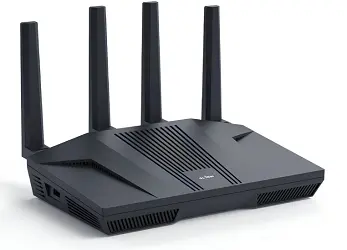
If you want a router that takes VPN performance seriously, the GL.iNet Flint 2 is in a class of its own at this price. Most consumer routers list “VPN support” but throttle your connection to a crawl once you enable it.
The Flint 2 doesn’t. Its MediaTek quad-core processor, paired with 1 GB DDR4 RAM and 8 GB eMMC storage, delivers near-gigabit WireGuard throughput in real-world conditions, something that’s genuinely rare below $200.
It runs on OpenWrt, which means full customization if you want it, but GL.iNet’s own simplified admin panel makes day-to-day use accessible without a networking degree.
You can set up a VPN in minutes through the web interface, toggle AdGuard Home for network-wide ad blocking, and configure multi-WAN failover if you have a backup connection.
The dual 2.5G ports future-proof your wired setup for higher-speed ISPs, and the 8-stream Wi-Fi 6 handles over 100 simultaneous devices comfortably.
Specs at a Glance
| Spec | Detail |
|---|---|
| Wi-Fi Standard | Wi-Fi 6 (AX6000) |
| Processor | MediaTek Quad-core |
| RAM / Storage | 1 GB DDR4 / 8 GB eMMC |
| WireGuard Speed | Up to 900 Mbps |
| OpenVPN Speed | Up to 880 Mbps (DCO) |
| Ports | 2× 2.5G + 4× 1G Ethernet |
| Coverage | Up to 2,500 sq ft |
| Special Features | AdGuard Home, Multi-WAN, OpenWrt |
Pros
- WireGuard speeds close to 900 Mbps in real-world testing,best-in-class for the price
- OpenVPN-DCO brings OpenVPN speeds up to near-WireGuard levels (880 Mbps)
- Supports 30+ VPN service providers out of the box
- AdGuard Home for network-wide ad and tracker blocking
- Multi-WAN failover and load balancing built in
- Full OpenWrt access for advanced users
- Handles 100+ devices simultaneously
Cons
- Not a plug-and-play experience for complete beginners; some configuration is expected
- No dedicated smartphone app with the polish of TP-Link’s Tether
- Runs warm under sustained load (fanless design)
- 2.4 GHz range is less impressive than 5 GHz
Who Should Buy This?
Anyone who wants genuine VPN performance without spending $300+. Perfect for remote workers, privacy-conscious households, and users who want to run their entire home on a VPN service without sacrificing speed.
Who Should Avoid This?
Total beginners who just want to plug in a router and never open a settings page. If you won’t use the VPN or advanced features, there are simpler (and cheaper) options.
2. TP-Link Archer BE550 : Best Premium Wi-Fi 7 Pick
Price range: ~$180–$220 | Wi-Fi Standard: Wi-Fi 7 Tri-Band | VPN Protocols: OpenVPN, PPTP, L2TP/IPSec (client & server)

If you’re running a large home and want the absolute fastest wireless speeds alongside solid VPN capability, the Archer BE550 is the premium choice.
Wi-Fi 7’s Multi-Link Operation (MLO), 320 MHz channels, and 4K-QAM deliver tri-band throughput that leaves Wi-Fi 6 routers behind, particularly useful in dense device environments where multiple 4K streams, gaming, and VR are happening simultaneously.
The six internal antennas with Beamforming extend reliable coverage across up to 2,000 sq ft, and the 2.5G WAN/LAN ports mean wired devices don’t bottleneck your multi-gig ISP connection.
Built-in VPN client and server support is included, though it uses the older OpenVPN and L2TP/IPSec protocols rather than the faster WireGuard.
This is a limitation worth noting; if VPN performance is your top priority, the Flint 2 beats it handily. But if Wi-Fi 7 speed across a large home is the goal, with VPN as a secondary feature, the BE550 is excellent.
Specs at a Glance
| Spec | Detail |
|---|---|
| Wi-Fi Standard | Wi-Fi 7 Tri-Band (BE9300) |
| Bands | 6 GHz (5760 Mbps) + 5 GHz (2880 Mbps) + 2.4 GHz (574 Mbps) |
| Ports | 2.5G WAN + 2.5G LAN + 3× 1G LAN |
| Coverage | Up to 2,000 sq ft |
| VPN Protocols | OpenVPN, PPTP, L2TP/IPSec |
| EasyMesh | Yes |
| Special Features | WiFi 7 MLO, 4K-QAM, HomeShield |
Pros
- Tri-band Wi-Fi 7 with 6 GHz band for lowest-latency devices
- Multi-Link Operation (MLO) for simultaneous multi-band connections
- EasyMesh lets you expand coverage with compatible TP-Link nodes
- 2.5G wired ports for multi-gig ISP connections
- Excellent for 8K streaming, AR/VR, and high-device-count homes
- Free TP-Link HomeShield security (with optional premium tier)
- TP-Link Tether app is genuinely user-friendly
Cons
- No WireGuard support; VPN speeds are limited by older protocols
- Expensive compared to Wi-Fi 6 alternatives
- 2,000 sq ft coverage is modest for the price tier
- HomeShield premium features require a subscription
Who Should Buy This?
Households with high-speed fiber (1 Gbps+), lots of Wi-Fi 7 devices, and a need for the fastest possible wireless performance, with VPN as a useful add-on rather than the primary feature.
Who Should Avoid This?
Anyone whose primary goal is the fastest possible VPN throughput. The lack of WireGuard is a genuine limitation if VPN speed matters more than Wi-Fi speed.
Related: WiFi 6 Vs WiFi 7: What’s the Real Difference?
3. TP-Link Archer BE230 : Best Value Wi-Fi 7 Router
Price range: ~$100–$130 | Wi-Fi Standard: Wi-Fi 7 Dual-Band | VPN Protocols: OpenVPN, PPTP, L2TP/IPSec

The Archer BE230 makes a compelling case as the sweet spot in the Wi-Fi 7 lineup. You get the next-generation wireless technology, Multi-Link Operation, 4K-QAM, and Multi-RUs at a price that doesn’t require selling a kidney.
Combined speeds reach up to 3.6 Gbps, which is more than enough for any current ISP plan.
The 2.0 GHz quad-core processor keeps the router responsive under heavy load, and the four high-performance antennas with Beamforming provide solid whole-home coverage. The 2.5G WAN port and three 1G LAN ports strike a good balance for most households.
VPN support covers the essentials: OpenVPN and L2TP/IPSec for client and server configurations. It won’t match the Flint 2 on raw VPN throughput, but for most users who mainly want to route their traffic through a paid VPN service like NordVPN or ExpressVPN, it’s more than adequate.
Specs at a Glance
| Spec | Detail |
|---|---|
| Wi-Fi Standard | Wi-Fi 7 Dual-Band (BE3600) |
| Processor | 2.0 GHz Quad-Core |
| Ports | 2.5G WAN + 3× 1G LAN |
| VPN Protocols | OpenVPN, PPTP, L2TP/IPSec |
| EasyMesh | Yes |
| Voice Assistant | Alexa compatible |
| Special Features | HomeShield, Tether app |
Pros
- Wi-Fi 7 speeds at an accessible price point
- Quad-core 2.0 GHz processor handles VPN and multi-device loads well
- EasyMesh for easy network expansion
- TP-Link Tether app makes setup and management simple
- HomeShield provides parental controls and IoT protection
- Alexa voice control support
Cons
- Dual-band only, no 6 GHz band (that’s the tri-band BE550’s territory)
- VPN protocol selection is basic; no WireGuard
- Coverage may be insufficient for very large homes without mesh nodes
Who Should Buy This?
Mid-range buyers who want Wi-Fi 7 future-proofing and solid VPN capability without the premium price of the BE550. Ideal for apartments and medium-sized homes.
Who Should Avoid This?
Anyone with a very large home who needs 6 GHz coverage, or users who specifically need high-speed WireGuard VPN.
Related: What’s MU-MIMO & How Does It Work?
4. TP-Link Archer AX55 : Best Budget VPN Router
Price range: ~$60–$80 | Wi-Fi Standard: Wi-Fi 6 | VPN Protocols: OpenVPN, PPTP, L2TP/IPSec (client & server)

The Archer AX55 punches well above its price for users who want a capable Wi-Fi 6 router with built-in VPN support without spending more than $80. It delivers up to 2,402 Mbps on the 5 GHz band and 574 Mbps on 2.4 GHz, which is more than enough for most households.
OFDMA and MU-MIMO handle multiple simultaneous connections efficiently, a genuine improvement over older Wi-Fi 5 routers in busy households. The improved heatsink keeps thermals in check during extended use. USB 3.0 support lets you attach an external hard drive for network storage.
VPN client and server modes are both included. You can route all traffic through a commercial VPN or set up your own VPN server to access your home network remotely. For a sub-$80 router, that’s impressive.
The main trade-off is VPN speed; OpenVPN on this hardware will be considerably slower than WireGuard on the Flint 2. For most everyday VPN use cases (privacy on all home devices, bypassing geo-blocks), it’s still perfectly usable. Just don’t expect near-gigabit throughput.
Specs at a Glance
| Spec | Detail |
|---|---|
| Wi-Fi Standard | Wi-Fi 6 (AX3000) |
| 5 GHz Speed | Up to 2,402 Mbps |
| 2.4 GHz Speed | Up to 574 Mbps |
| Ports | 1× WAN + 4× 1G LAN + 1× USB 3.0 |
| VPN Protocols | OpenVPN, PPTP, L2TP/IPSec |
| EasyMesh | Yes |
| Voice Assistant | Alexa compatible |
Pros
- Excellent price for Wi-Fi 6 with VPN client and server support
- OFDMA and MU-MIMO for efficient multi-device handling
- USB 3.0 for network-attached storage
- EasyMesh compatibility for future expansion
- HomeShield security suite included
- Alexa voice commands supported
- Clean TP-Link firmware, beginner-friendly setup
Cons
- VPN speed is limited by hardware, not suitable for power VPN users
- No WireGuard protocol support
- Gigabit-only wired ports (no 2.5G)
- 2.4 GHz upload speeds can be sluggish
Who Should Buy This?
Budget-conscious buyers who want reliable Wi-Fi 6 with working VPN protection for a typical home. Great first router with VPN capability.
Who Should Avoid This?
Users with multi-gig ISP plans or anyone who needs fast VPN throughput (go for the Flint 2 instead).
Related: How to Boost WiFi Signal at Home or Office? 5 Easy Ways
5. TP-Link Archer AX72 Pro: Best Performance Wi-Fi 6 Pick
Price range: ~$100–$130 | Wi-Fi Standard: Wi-Fi 6 | VPN Protocols: OpenVPN, PPTP, L2TP/IPSec (client & server)
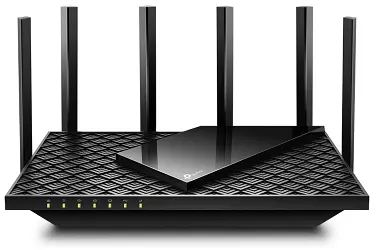
The Archer AX72 Pro sits between the budget AX55 and the Wi-Fi 7 models in both price and performance.
Its headline is the 2.5 Gbps WAN/LAN port, which lets you take advantage of high-speed fibre connections- not just theoretical maximum Wi-Fi speeds, but actual wired throughput.
On the wireless side, the 4,804 Mbps ceiling on 5 GHz is more than enough for 4K streaming and gaming on multiple devices simultaneously. Six high-gain antennas with Beamforming ensure strong coverage in every corner of a medium-to-large home.
The VPN capability mirrors what you get on the AX55: OpenVPN and L2TP/IPSec client and server modes. The bigger processor helps here: VPN throughput on the AX72 Pro is meaningfully better than the AX55 in practice, though still not in the same league as the Flint 2’s WireGuard performance.
USB 3.0, MU-MIMO, OFDMA, Alexa/Google Assistant compatibility, and HomeShield security round out the package. It works with Starlink, Xfinity, and all major ISPs.
Specs at a Glance
| Spec | Detail |
|---|---|
| Wi-Fi Standard | Wi-Fi 6 (AX5400) |
| 5 GHz Speed | Up to 4,804 Mbps |
| 2.4 GHz Speed | Up to 574 Mbps |
| Ports | 2.5G WAN/LAN + 4× 1G LAN + USB 3.0 |
| VPN Protocols | OpenVPN, PPTP, L2TP/IPSec |
| Voice Assistants | Alexa + Google Assistant |
| Special Features | HomeShield, EasyMesh |
Pros
- 2.5G WAN/LAN port future-proofs wired connections
- Strong 5 GHz performance for gaming and streaming
- Six antennas provide excellent whole-home coverage
- Works with all major ISPs including Starlink
- Both Alexa and Google Assistant compatible
- Solid VPN client and server support
- USB 3.0 for network storage
Cons
- Wi-Fi 6 rather than Wi-Fi 7, being phased out by newer models
- No WireGuard support limits VPN speed potential
- Slightly dated compared to Wi-Fi 7 options at similar price points
- VPN speed still limited by OpenVPN overhead
Who Should Buy This?
Households that want strong Wi-Fi 6 performance with 2.5G wired connectivity and solid built-in VPN, especially those on high-speed fiber connections.
Who Should Avoid This?
Anyone willing to spend slightly more for Wi-Fi 7 (the BE230 is a better long-term investment at a similar price).
Related: Best Long Range WiFi Routers
6. Asus RT-BE88U : Best for Power Users & Multi-Gig
Price range: ~$280–$320 | Wi-Fi Standard: Wi-Fi 7 | VPN Protocols: WireGuard, OpenVPN, IPSec, PPTP, L2TP
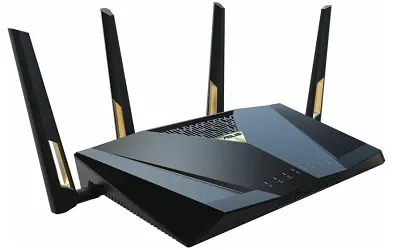
We added the Asus RT-BE88U because it fills a gap that no other router in this list covers: a mainstream Wi-Fi 7 router that supports WireGuard natively, alongside a port configuration that power users will love.
The RT-BE88U ships with a 10 Gigabit SFP+ port, four 2.5G ports, and four 1G ports, driven by a quad-core 2.6 GHz processor. That hardware muscle is what makes WireGuard VPN actually fast at the router level.
The AsusWRT firmware is well-regarded for its stability, and the Merlin community firmware adds even deeper customization for advanced users.
AiMesh support means you can expand coverage across a large property without sacrificing performance. The router also includes Asus’s AiProtection Pro security suite (powered by Trend Micro) for network-level threat detection.
The price is the main hurdle. But if you’re running a multi-gig fiber connection, need real WireGuard speeds, and want a router that can handle dozens of devices in a large home or small office, this is arguably the best-rounded option available in 2026.
Specs at a Glance
| Spec | Detail |
|---|---|
| Wi-Fi Standard | Wi-Fi 7 (BE25000) |
| Processor | Quad-Core 2.6 GHz |
| Ports | 10G SFP+, 4× 2.5G, 4× 1G Ethernet |
| WireGuard Speed | 700+ Mbps (real-world) |
| VPN Protocols | WireGuard, OpenVPN, IPSec, L2TP |
| Mesh Support | AiMesh |
| Security | AiProtection Pro (Trend Micro) |
Pros
- WireGuard VPN support in a Wi-Fi 7 package, rare combination
- 10G SFP+ port for server-grade wired connections
- Best-in-class port selection for power users
- Merlin firmware support for deep customization
- AiMesh for whole-home coverage
- AiProtection Pro for real-time threat blocking
- Excellent VPN client and server performance
Cons
- Expensive, not suitable for casual users
- AsusWRT can be overwhelming for beginners
- Larger physical footprint
- AiProtection Pro’s cloud-dependent features raise minor privacy considerations.
Who Should Buy This?
Power users, small business owners, and technically inclined home users who want the fastest possible VPN alongside Wi-Fi 7 speeds and serious wired connectivity.
Who Should Avoid This?
Budget buyers or anyone who finds router configuration intimidating.
7. GL.iNet Beryl AX (GL-MT3000): Best Compact / Travel VPN Router
Price range: ~$70–$90 | Wi-Fi Standard: Wi-Fi 6 | VPN Protocols: WireGuard (up to 450 Mbps), OpenVPN, Tor, 30+ VPN providers
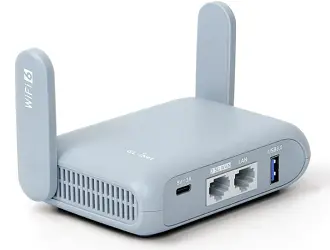
Not every VPN router has to sit on a desk at home. If you travel frequently, or work from hotels, Airbnbs, and co-working spaces, the GL.iNet Beryl AX solves the problem of trusting unknown Wi-Fi networks.
It weighs 185 grams and is small enough to fit in a jacket pocket, but delivers WireGuard speeds up to 450 Mbps, more than enough for hotel internet. You can carry pre-configured VPN profiles, connect once when you arrive, and have every device on the room’s network protected without touching individual device settings.
The 2.5 GbE WAN port accommodates high-speed hotel wired connections. AdGuard Home integration blocks ads and trackers network-wide. It can also function as a full home router for smaller apartments.
Specs at a Glance
| Spec | Detail |
|---|---|
| Wi-Fi Standard | Wi-Fi 6 (AX3000) |
| Size | Pocket-sized (185g) |
| WireGuard Speed | Up to 450 Mbps |
| WAN Port | 2.5G Ethernet |
| VPN Protocols | WireGuard, OpenVPN, Tor, 30+ providers |
| Special Features | AdGuard Home, pre-configured VPN profiles |
Pros
- Genuinely portable, designed for travel use
- WireGuard speeds up to 450 Mbps (fast for this form factor)
- Pre-configured VPN profile support
- 2.5G WAN for fiber-speed hotel or Airbnb connections
- AdGuard Home for network-wide ad blocking
- Can double as a home router for small spaces
- Easy GL.iNet admin panel
Cons
- Coverage is limited, designed for a room, not a large home
- Only one Ethernet LAN port
- Not a replacement for a full-sized router in a busy household
Who Should Buy This?
Remote workers, frequent travelers, and digital nomads who need VPN coverage on every device without configuring each one individually.
Who Should Avoid This?
Anyone who only needs a home router. A full-sized GL.iNet Flint 2 or TP-Link router will serve you better.
Comparison Table: All 7 Routers Side by Side
| Router | Price | Wi-Fi | WireGuard? | VPN Speed (est.) | Best For |
|---|---|---|---|---|---|
| GL.iNet Flint 2 | ~$100 | Wi-Fi 6 | Yes | ~900 Mbps | VPN-first users |
| Asus RT-BE88U | ~$300 | Wi-Fi 7 | Yes | ~700 Mbps | Power users + multi-gig |
| GL.iNet Beryl AX | ~$80 | Wi-Fi 6 | Yes | ~450 Mbps | Travel |
| TP-Link BE550 | ~$200 | Wi-Fi 7 | No | ~150 Mbps (OpenVPN) | Large home Wi-Fi 7 |
| TP-Link BE230 | ~$115 | Wi-Fi 7 | No | ~100 Mbps (OpenVPN) | Value Wi-Fi 7 |
| TP-Link AX72 Pro | ~$115 | Wi-Fi 6 | No | ~80 Mbps (OpenVPN) | Performance Wi-Fi 6 |
| TP-Link AX55 | ~$70 | Wi-Fi 6 | No | ~50 Mbps (OpenVPN) | Budget |
Key insight: WireGuard is 5–10× faster than OpenVPN for VPN throughput. If VPN performance matters, prioritize routers with WireGuard support.
Why You Need a Router with Built-in VPN
The case for router-level VPN protection
A VPN on your laptop protects your laptop. A VPN on your router protects everything: your smart TV, gaming console, phone, tablet, smart thermostat, baby monitor, and every other device on your network. Many of those devices can’t run VPN software at all.
This matters more than ever because ISPs in the US, UK, and other Tier 1 countries are legally permitted to log your browsing habits and sell that data to advertisers. Network-level VPN encryption stops that at the source.
VPN at the router vs. VPN on each device
| Approach | Pros | Cons |
|---|---|---|
| VPN on each device | Simple, flexible per-device | Doesn’t cover smart home devices, requires app on each device, VPN subscription may limit simultaneous connections |
| VPN on router | Covers entire network including IoT, one setup | Requires capable router hardware, slightly more complex initial setup |
What VPN protocols actually mean
WireGuard: The modern standard. Faster, simpler, and more secure than older protocols. If your router supports it, use it.
OpenVPN: The long-established reliable standard. Slightly slower but very widely supported and excellent security. A good fallback.
L2TP/IPSec: Older protocol, decent security, lower speeds. Supported by almost every VPN provider.
PPTP: Outdated. Avoid if possible; has known vulnerabilities.
Complete Buying Guide: How to Choose the Right VPN Router
Step 1: Decide how important VPN speed is to you
If VPN is the primary reason you’re buying a new router, WireGuard support is non-negotiable. The Flint 2 or Asus RT-BE88U are the picks here.
If VPN is a useful extra but Wi-Fi performance is your main concern, the TP-Link Wi-Fi 7 options are excellent.
Step 2: Match your home size
- Apartment / small home (under 1,200 sq ft): Any router here will work. Flint 2 or AX55 are cost-effective.
- Medium home (1,200–2,500 sq ft): AX72 Pro, BE230, or BE550 with EasyMesh if needed.
- Large home (2,500+ sq ft): BE550 with mesh nodes, or Asus RT-BE88U with AiMesh.
Step 3: Consider your ISP speed
- Under 500 Mbps: Any router here handles this comfortably, even under VPN load with WireGuard.
- 500 Mbps–1 Gbps: Flint 2 (WireGuard) keeps up easily. TP-Link OpenVPN models may see VPN-active speeds drop below your plan speed.
- Multi-gig (1 Gbps+): You need WireGuard hardware (Flint 2 or Asus RT-BE88U) and a 2.5G WAN port at minimum.
Step 4: Choose your VPN service
All routers here support major VPN services (NordVPN, ExpressVPN, Surfshark, Mullvad, ProtonVPN). However:
- If you use NordVPN → prioritize WireGuard (NordLynx protocol)
- If you use Surfshark → prioritize WireGuard
- If you use ExpressVPN → they have their own Aircove router; alternatively, any router with OpenVPN works
- If you use ProtonVPN → WireGuard preferred
Step 5: Technical comfort level
| User type | Best pick |
|---|---|
| Complete beginner | TP-Link AX55 or BE230 (Tether app setup) |
| Intermediate | TP-Link AX72 Pro or BE550 |
| Advanced / enthusiast | GL.iNet Flint 2 (OpenWrt, full control) |
| Power user / business | Asus RT-BE88U |
How to Set Up a VPN on Your Router
For TP-Link routers (Tether app method – easiest)
- Download the TP-Link Tether app on your phone
- Connect to the router’s default Wi-Fi network
- Follow the in-app setup wizard (takes about 5 minutes)
- In the router’s web admin panel, go to Advanced → VPN → OpenVPN Client
- Download your VPN provider’s
.ovpnconfiguration file from their website - Upload the
.ovpnfile into the router’s VPN section - Enter your VPN credentials and click Connect
- Verify your IP has changed at whatismyip.com
For GL.iNet routers (Flint 2 / Beryl AX – slightly more powerful)
- Access the admin panel at
192.168.8.1 - Complete the initial wizard
- Go to VPN → WireGuard Client (recommended) or OpenVPN Client
- Click Add Manually or select from the 30+ pre-integrated VPN providers
- Enter your subscription details or paste WireGuard config
- Toggle VPN on and verify at whatismyip.com
Common troubleshooting tips
- VPN won’t connect: Double-check credentials; ensure your VPN subscription is active; try a different server location
- Slow speeds with VPN on: Switch from OpenVPN to WireGuard if available; choose a VPN server closer to your physical location; check your router’s CPU usage under VPN load
- Some devices bypassing VPN: Check if split tunneling is accidentally enabled; verify all devices are connecting to the router’s network, not a separate access point
Key Security Tips to Maximize Your Router’s Protection
Keep firmware updated
Router manufacturers release firmware patches for newly discovered vulnerabilities. Enable automatic updates where available, or check manually every 1–2 months. This applies to your VPN app/subscription as well.
Use strong, unique credentials.
Change the default router admin password immediately on setup. Use a password manager to generate a strong password (12+ characters, mixed case, numbers, symbols). Change your Wi-Fi password from the default.
Enable the built-in firewall.
Every router here includes a software firewall. Confirm it’s active in your router settings. TP-Link’s HomeShield adds an extra layer; GL.iNet routers offer firewall configuration through OpenWrt.
Consider DNS-over-HTTPS (DoH)
Even with a VPN, DNS leaks can expose which websites you visit. Several routers here (especially GL.iNet via OpenWrt) support DoH configuration. Pair this with your VPN for maximum privacy.
Create a guest network for IoT devices.
Smart home devices, thermostats, cameras, and doorbells are frequent security vulnerabilities. Put them on a separate guest network isolated from your main network where your computers and phones connect.
Related: WiFi Security for Beginners: How to Secure Home WiFi Network
Common Mistakes to Avoid
1. Buying a VPN router without WireGuard, then being surprised by slow VPN speeds: OpenVPN over a busy connection can drop to 30–80 Mbps on most consumer routers. If you have fast internet and care about VPN-active speeds, verify WireGuard support before buying.
2. Ignoring the VPN subscription cost: The router handles VPN at the network level, but you still need a VPN service subscription. Budget ~$3–$8/month for a reputable provider (NordVPN, ProtonVPN, Mullvad, Surfshark).
3. Assuming “VPN support” means the same thing on every router: Some routers only support VPN server mode (remote access to your home). Others support VPN client mode (routing all traffic through a commercial VPN). Most routers here support both—but always verify before purchasing.
4. Neglecting the guest network for smart home devices: Setting up a VPN at the router level is smart. Keeping IoT devices on a separate VLAN is smarter. Most routers here support this; use it.
5. Using PPTP if other options are available: PPTP is outdated and has documented security weaknesses. Use WireGuard first, OpenVPN second, L2TP/IPSec third. Avoid PPTP for any privacy-sensitive use.
Expert Tips
- Test your VPN’s kill switch: A kill switch cuts internet access if the VPN drops, preventing unprotected traffic from leaking. Test this by manually disconnecting your VPN and checking if the internet goes down. If not, configure the kill switch in your VPN app or router settings.
- Use split tunneling wisely: Most VPN routers let you route specific devices through the VPN while others connect directly. Put security-sensitive devices (laptops, phones) on the VPN; put gaming consoles on the direct connection to minimize latency.
- Choose a VPN server geographically close to you for everyday use. Only switch to a distant server when you specifically need to access geo-restricted content.
- For the GL.iNet Flint 2: Install the OpenWrt 24 firmware variant from GL.iNet’s website for an additional ~100 Mbps boost to WireGuard speeds, plus the ability to run multiple simultaneous VPN tunnels.
- Restart your router once a month. Unlike computers, routers often run for months without a restart. A monthly reboot clears memory and applies any pending firmware changes.
Conclusion
Securing your entire home network with a VPN-capable router is one of the highest-value privacy investments you can make. The right router depends on what you need most:
- VPN performance above all else → GL.iNet Flint 2 (or Asus RT-BE88U if budget allows)
- Wi-Fi 7 future-proofing + VPN → TP-Link Archer BE550 or BE230
- Best budget option → TP-Link Archer AX55
- Travel and remote work → GL.iNet Beryl AX
- Power user / small business → Asus RT-BE88U
Whichever you choose, pair your router with a reputable VPN subscription, keep firmware updated, and follow the security tips in this guide. Your data and everyone connected to your network will be meaningfully more secure for it.
Quick Picks Summary
| Product | Assigned Category |
|---|---|
| GL.iNet GL-MT6000 (Flint 2) | Best Overall for VPN Performance |
| TP-Link Archer BE550 | Best Premium Wi-Fi 7 Pick |
| TP-Link Archer BE230 | Best Value Wi-Fi 7 Pick |
| TP-Link Archer AX55 | Best Budget VPN Router |
| TP-Link Archer AX72 Pro | Best Performance Wi-Fi 6 Pick |
| Asus RT-BE88U | Best for Power Users & Multi-Gig |
| GL.iNet Beryl AX (GL-MT3000) | Best Compact / Travel VPN Router |
Frequently Asked Questions
What is a router with built-in VPN?
It’s a router that includes VPN client or server functionality directly in its firmware, without requiring you to flash or replace the software. You can connect it to a VPN service, and every device on your network will have encrypted traffic automatically.
Which is better for a VPN router: WireGuard or OpenVPN?
WireGuard is significantly faster (often 5–10× the throughput of OpenVPN) while also being more secure and simpler in design. Choose WireGuard if your router and VPN provider support it. OpenVPN is an excellent alternative with near-universal provider support.
Does a VPN router slow down my internet?
Yes, to some degree, VPN encryption adds processing overhead. With WireGuard on capable hardware (like the GL.iNet Flint 2), the slowdown is minimal, often under 5%. With OpenVPN on budget hardware, you might see 30–50% speed reduction. The faster your internet plan, the more this matters.
Can I use any VPN service with these routers?
Most routers here support standard protocols (OpenVPN, WireGuard) that work with virtually all major VPN providers: NordVPN, ExpressVPN, Surfshark, ProtonVPN, Mullvad, and others. GL.iNet routers have 30+ providers pre-integrated for easier setup.
Do I still need VPN apps on my individual devices if I have a VPN router?
No. When a VPN is active at the router level, all devices on the network are automatically protected. You can remove individual VPN apps if you want, or keep them for situations where you’re on other networks (public Wi-Fi, cellular).
Is a VPN router good for streaming?
Yes. A VPN router lets you access geo-restricted content on smart TVs and streaming sticks that can’t run VPN apps natively. Performance depends on your VPN service and server choice; not all VPN providers unblock all streaming platforms equally.
What’s the difference between VPN client mode and VPN server mode?
Client mode routes your home network’s traffic through an external VPN service for privacy and geo-restriction bypass. Server mode lets you securely connect back to your home network when you’re away (useful for remote work). Most routers here support both.
Will a VPN router protect me from all cyber threats?
No, a VPN encrypts your traffic and hides your IP address, but it doesn’t protect against malware you download, phishing attacks, or threats on websites you visit. Use a VPN router alongside updated antivirus software, safe browsing habits, and strong passwords.
Are GL.iNet routers difficult to set up?
Less so than their OpenWrt reputation suggests. GL.iNet ships a simplified admin panel that makes VPN setup accessible to non-technical users. Full OpenWrt access is available for those who want it, but you don’t need it to get VPN running.
What’s the best budget VPN router in 2026?
The TP-Link Archer AX55 (~$70) is the best budget option for most users. If VPN performance is important even on a budget, the GL.iNet Flint 2 (~$100) is worth the extra $30 for its WireGuard throughput.
Can a router VPN protect smart home devices?
Yes, this is one of the biggest advantages of a router-level VPN. Smart TVs, gaming consoles, smart speakers, thermostats, and other IoT devices that can’t run VPN apps natively are automatically protected when VPN is enabled at the router.
Do I need to buy a separate VPN subscription for a VPN router?
Yes. The router provides the hardware capability to run a VPN, but you still need a subscription to a VPN service (such as NordVPN, ExpressVPN, Surfshark, or ProtonVPN). Most subscriptions cost $3–$8 per month and cover unlimited devices when used through a router.
What is the best router with built-in VPN for home use in 2026?
The GL.iNet Flint 2 (GL-MT6000) is the best overall for VPN performance, offering WireGuard speeds up to 900 Mbps. For users who prioritize Wi-Fi 7 wireless performance with solid VPN support, the TP-Link Archer BE550 or BE230 are excellent choices. For budget buyers, the TP-Link Archer AX55 offers reliable VPN at around $70.
Is it legal to use a VPN router in the US, UK, Canada, and Australia?
Yes. VPN use is fully legal in the United States, United Kingdom, Canada, Australia, and New Zealand. VPNs are used by millions of individuals and businesses for legitimate privacy and security purposes. Laws governing VPN use vary internationally; always ensure any activities conducted over a VPN comply with local laws.
What is the difference between a VPN router and a regular router?
A regular router connects your devices to the internet but provides no encryption beyond your Wi-Fi password. A VPN router adds a layer of encryption at the network level, routing all traffic through an encrypted tunnel to a VPN server. This hides your browsing activity from your ISP and protects your data from interception on the network level.
Found this helpful? Bookmark this page for updates, share it with someone who needs better home security, and sign up for our free newsletter for the latest tech guidance.
Disclosure: Some links in this article are affiliate links. If you purchase through them, we may earn a small commission at no additional cost to you.