Best Gaming Router in 2026: Top Picks + How to Choose the Right One
If you’ve ever lost a ranked match because of a lag spike, not because of your aim, your reflexes, or your game sense, you know exactly why your router matters.
A bad or outdated router won’t just slow down your downloads. It can cause jitter, packet loss, and those infuriating rubber-band moments that cost you matches in Valorant, Call of Duty, or Apex Legends.
But here’s the truth most articles won’t tell you upfront: a gaming router won’t give you superhuman reflexes, and it can’t fix the latency your ISP introduces between your home and a distant game server.
What it can do is eliminate the performance-robbing problems inside your home network. In a busy household, that difference can be 20–40ms less ping and a dramatically more stable connection.
This guide cuts through the marketing noise.
You’ll find our top gaming router recommendations for 2026, a clear explanation of what specs actually matter (and which are just spec-sheet fluff). A buying decision framework for your specific situation, and practical tips for squeezing every last millisecond out of whatever hardware you choose.
Quick Answer: Best Gaming Routers in 2026 at a Glance
| Router | Best For | Wi-Fi Standard | Price Range |
|---|---|---|---|
| ASUS ROG Rapture GT-BE98 Pro | Competitive esports, overall best | Wi-Fi 7 (Quad-band) | $$$$ |
| NETGEAR Nighthawk XR1000 | Best value gaming router | Wi-Fi 6 (Dual-band) | $$ |
| TP-Link Archer GE800 | Best dedicated gaming hardware | Wi-Fi 7 (Tri-band) | $$$ |
| GL.iNet GL-MT6000 (Flint 2) | Best budget pick/power users | Wi-Fi 6 (Dual-band) | $ |
| ASUS ROG Rapture GT6 | Best gaming mesh system | Wi-Fi 6 (Tri-band) | $$$ |
| ASUS RT-AX82U | Best mid-range gaming Wi-Fi 6 | Wi-Fi 6 (Dual-band) | $$ |
Do Gaming Routers Actually Make a Difference?
Before spending $300–$800 on a router, this is worth understanding clearly.
What a gaming router can improve:
- Latency stability and jitter within your local network
- Prioritization of your gaming traffic over streaming, downloads, and background app updates
- Handling congestion when 15+ devices are all active simultaneously
- Wi-Fi signal consistency and coverage for wireless gaming
What a gaming router cannot improve:
- The physical distance between your home and game servers
- Your ISP’s backbone routing quality
- Server-side lag or performance
- Your internet plan’s base speed limit
Independent testing has found that upgrading from a basic ISP-provided gateway to a mid-tier gaming router can reduce ping by 20–40ms in multi-device households where local network congestion is the bottleneck.
In a single-device, wired setup with a decent existing router, the improvement may be minimal.
The bigger truth: the single most impactful upgrade you can make for gaming is connecting via Ethernet rather than Wi-Fi.
Even the best Wi-Fi 7 router introduces jitter that Ethernet doesn’t. For competitive play – ranked FPS, fighting games, esports – wire your rig. If that’s not possible, a quality gaming router with Wi-Fi 6E or Wi-Fi 7 is your best wireless option.
Ping reference guide for gamers:
- Under 20ms: Excellent ; most competitive games feel seamless
- 20–40ms: Very good ; solid for ranked play
- 40–60ms: Acceptable for most games; noticeable in fast-paced shooters
- 60–100ms: Problematic for competitive play; you’ll feel the delay
- 100ms+: Severely impacts all real-time gameplay
Top Gaming Router Recommendations for 2026
1. ASUS ROG Rapture GT-BE98 Pro: Best Overall Gaming Router
Who it’s for: Competitive gamers, streamers, and households where multiple people game simultaneously
The ASUS ROG Rapture GT-BE98 Pro is the gold standard for dedicated gaming routers in 2026. This quad-band Wi-Fi 7 powerhouse operates across 2.4 GHz, 5 GHz, 5 GHz, and 6 GHz simultaneously.
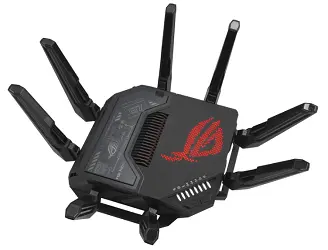
Crucially, that extra 5 GHz band means one band can be dedicated entirely to gaming traffic while the rest of your household uses the others.
In real-world testing, the GT-BE98 Pro consistently delivers 8–12ms latency in competitive gaming environments, the tightest numbers on the current market. It achieves this through three-tiered game acceleration.
ASUS GameFirst VI optimizes gaming packet priority at the firmware level, a dedicated gaming LAN port provides a hardware-level fast lane for your PC or console, and optional WTFast GPN routes game traffic through optimized network paths worldwide.
The dual 10 Gbps ports future-proof your setup for multi-gig internet plans, and VPN Fusion lets you route gaming traffic on a direct connection while other devices use a VPN, eliminating VPN overhead from your game data entirely.
Standout features: Quad-band Wi-Fi 7, dedicated gaming port, WTFast integration, ASUS AiProtection Pro (free, lifetime security), full AiMesh compatibility
The ASUS ROG Rapture GT-BE98 Pro represents the pinnacle of gaming router performance. If you’re serious about competitive play and want a router that will remain relevant through the next Wi-Fi generation, this is the one to get.
The trade-off: It’s expensive and genuinely oversized for casual gamers or single-person setups. If you don’t need the absolute lowest latency on the market, there are better-value options below.
2. NETGEAR Nighthawk XR1000 : Best Value Gaming Router
Who it’s for: Gamers who want powerful software features without paying flagship prices
The Nighthawk XR1000 runs DumaOS 3.0, which many network experts consider the most sophisticated gaming-focused router firmware available.
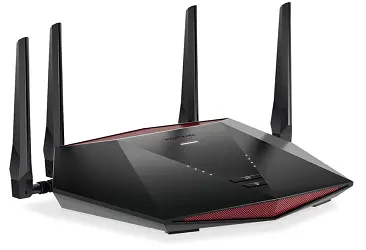
Its Geo-Filter feature is genuinely unique. It lets you draw a radius on a world map and force your game to only connect to servers within that geographic area, directly eliminating high-ping matchmaking with players across the globe.
In multi-user testing with two simultaneous gaming sessions, the XR1000 delivered consistent 12–15ms latency for both players with zero spikes. The ping heatmap shows real-time latency to every game server, so you can make genuinely informed decisions about server selection.
Yes, it’s Wi-Fi 6 rather than Wi-Fi 7, but for the vast majority of gamers, the difference in actual gameplay experience is 2–4ms, an amount that’s functionally imperceptible unless you’re competing at a professional level.
The XR1000 delivers what matters for gaming: software depth, stable prioritization, and competitive latency at roughly half the price of flagship Wi-Fi 7 gaming routers.
Pre-enabled security through NETGEAR Armor protects your network from DDoS attacks. It is a real concern for streamers and competitive players who worry about targeted lag attacks.
Standout features: DumaOS 3.0, Geo-Filter, ping heatmaps, AX5400 Wi-Fi 6, NETGEAR Armor security, four 1G LAN ports
The NETGEAR Nighthawk XR1000 is available on Amazon and is frequently discounted. It hits a rare sweet spot of genuine gaming-focused features at a mid-range price, making it the top recommendation for most gamers who don’t need the absolute bleeding edge.
3. TP-Link Archer GE800 : Best Dedicated Gaming Hardware
Who it’s for: Gamers who want Wi-Fi 7 speeds, a dedicated gaming port, and impressive hardware specs
The TP-Link Archer GE800 is the router that tech reviewers at Tom’s Hardware named their pick for best gaming Wi-Fi router, and it earns that recognition through hardware that feels genuinely overengineered in the best possible way.
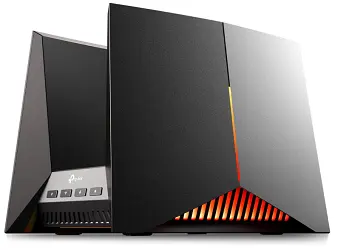
Its tri-band Wi-Fi 7 setup delivers theoretical speeds up to 19 Gbps across three bands and 12 streams, supported by 320MHz channels and Multi-Link Operation (MLO), Wi-Fi 7’s landmark feature that lets devices connect across multiple bands simultaneously to cut lag.
The port situation is exceptional: two 10 Gbps ports, four 2.5 Gbps ports, and a dedicated gaming port that automatically prioritizes traffic from whatever device is connected to it.
The quad-core processor and 2GB RAM ensure the router doesn’t become a bottleneck even when the hardware is working hard.
Its real-time game panel gives you live network health stats for connected gaming devices, and EasyMesh compatibility means you can expand coverage to larger homes without sacrificing performance.
Standout features: Wi-Fi 7 BE19000, 10G and 2.5G multi-gig ports, dedicated gaming LAN port, MLO, real-time game dashboard, RGB lighting, EasyMesh compatible
If you want top-tier gaming hardware with Wi-Fi 7 future-proofing and multi-gig wired connectivity without paying ASUS ROG flagship prices, the TP-Link Archer GE800 is a genuinely compelling alternative.
Note: As of 2026, there are ongoing regulatory discussions around TP-Link equipment in the US market. Check current availability and any relevant compliance updates before purchasing.
4. GL.iNet GL-MT6000 (Flint 2): Best Budget Pick for Power Users
Who it’s for: Budget-conscious gamers and tech-savvy users who want flexibility

The GL.iNet Flint 2 punches significantly above its price. Its Wi-Fi 6 speeds reach up to 6 Gbps via 8-stream 802.11ax technology; it has two 2.5G multi-gig ports, 1GB DDR4 RAM, and 8GB eMMC storage. Specs that embarrass routers costing two or three times as much.
What makes it genuinely special for performance-focused users is its OpenWRT-based firmware and SQM (Smart Queue Management) support.
SQM is one of the most effective anti-bufferbloat tools available, managing traffic queues intelligently so that someone downloading a 50GB game update can’t spike your gaming ping from 20ms to 200ms.
Built-in WireGuard VPN support reaching 900 Mbps and Tailscale integration make it a remarkable value for privacy-conscious gamers.
In independent testing by experienced reviewers, the Flint 2 consistently showed measurable latency improvements due to its bufferbloat control, real gains that many routers costing three times as much can’t match.
Standout features: Wi-Fi 6, dual 2.5G ports, OpenWRT flexibility, SQM bufferbloat control, WireGuard VPN at 900 Mbps, Tailscale integration
The GL.iNet GL-MT6000 Flint 2 is one of the most impressive value plays in networking hardware right now. Highly recommended for technically comfortable gamers who want maximum performance per dollar.
5. ASUS ROG Rapture GT6 (2-pack): Best Gaming Mesh System
Who it’s for: Large homes where dead zones are killing your gaming experience
For multi-story homes or spaces where a single router can’t cover the whole area, the ASUS ROG Rapture GT6 mesh system solves a problem most gaming routers can’t: maintaining gaming-grade latency across satellite nodes.
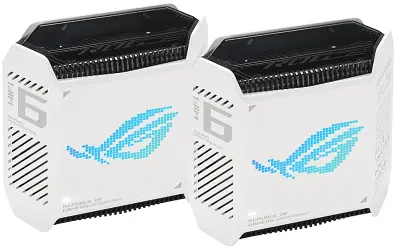
Standard mesh systems often increase latency at satellite nodes because your game data has to hop through additional wireless links.
The GT6 addresses this with a dedicated gaming backhaul band, a separate wireless channel specifically for communication between nodes that keeps your gaming data separate from the mesh traffic overhead.
In real-world testing across a 5,200 sq ft home with concrete block walls, the GT6’s two-pack covered the entire space plus a detached workshop 100 feet away, with only 1ms of latency difference between the main router and satellite node, which is a remarkable consistency for a mesh system.
The dedicated gaming backhaul is what makes that number possible.
ASUS AiProtection Pro security is included at no subscription cost, and AiMesh compatibility means you can add additional ASUS routers to expand coverage further.
Standout features: Wi-Fi 6 tri-band, dedicated gaming backhaul, AiMesh, AiProtection Pro, ROG Rapture-grade QoS, compact design
The ASUS ROG Rapture GT6 2-pack is the best choice for large-home gamers who need consistent low latency in every room without running Ethernet cables everywhere.
6. ASUS RT-AX82U (AX5400): Best Mid-Range Gaming Router
Who it’s for: Gamers who want solid Wi-Fi 6 performance with gaming features at a sensible price
The RT-AX82U sits in the sweet spot for gamers who don’t need flagship performance but want noticeably better than a budget router.
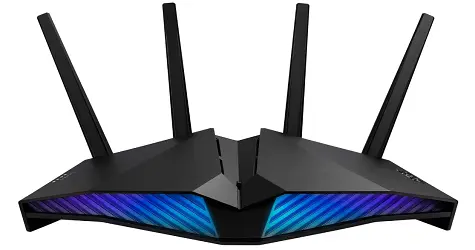
Its 1.5 GHz tri-core processor keeps latency low under load, and the ASUS Router app makes it remarkably easy to enable gaming mode; one tap prioritizes gaming traffic with zero configuration required.
AiProtection Pro (powered by Trend Micro) provides lifetime free security coverage, a genuine advantage over competitors who charge $99/year for equivalent protection. AiMesh compatibility means it can later become part of a larger coverage network if your needs change.
The customizable ASUS Aura RGB lighting is a purely aesthetic touch, but for gamers who care about their setup’s look, it adds personality that most routers don’t bother with.
Standout features: Wi-Fi 6 AX5400, 1.5 GHz tri-core processor, gaming mode one-tap activation, AiProtection Pro (free), AiMesh compatible, RGB lighting
The ASUS RT-AX82U represents the best value proposition in ASUS’s gaming lineup; solid Wi-Fi 6 performance, great software, and lifetime security without the premium price of ROG flagship models.
Related: Must-Have Router Features: What to Look for Before You Buy
Gaming Router Buyer’s Guide: What Actually Matters
The Specs That Genuinely Affect Gaming Performance
1. Quality of Service (QoS): The Most Important Feature
QoS is the single most impactful feature in any gaming router. It allows the router to identify and prioritize gaming traffic over everything else. So when someone else starts a 4K stream or a large game download starts in the background, your game packets still get processed first.
Without QoS, a standard router treats a “move player character” game packet identically to a Netflix stream chunk. Both wait in the same queue. A gaming router with proper QoS pushes your game packets to the front of the line regardless of what else is happening on the network.
Look for: Adaptive QoS (ASUS), DumaOS Congestion Control (NETGEAR), or hardware-level QoS with per-device prioritization.
2. CPU and RAM: The Router’s Brain
Gaming routers manage significantly more complex traffic than standard routers. A weak processor gets overloaded and introduces processing delays even when your internet connection is fast. Look for:
- Quad-core processor at 1.5 GHz or higher for demanding setups
- At least 512MB RAM (1–2GB preferred for flagships)
- Hardware NAT acceleration for plans over 200 Mbps
3. Wi-Fi Standard: Wi-Fi 6 vs. Wi-Fi 6E vs. Wi-Fi 7
| Standard | Key Benefit for Gamers | Best For |
|---|---|---|
| Wi-Fi 6 | MU-MIMO, OFDMA; handles many devices efficiently | Most gamers; great value in 2026 |
| Wi-Fi 6E | Adds 6 GHz band; less interference, faster nearby | Large households; dense device environments |
| Wi-Fi 7 | MLO, 320MHz channels; lowest latency, future-proof | Competitive gamers; future-proofing |
Practical note: The latency gap between Wi-Fi 6E and Wi-Fi 7 is approximately 2–4ms in real-world gaming conditions. Unless you’re competing at an esports level where every millisecond is measurable, Wi-Fi 6 or Wi-Fi 6E offers better value for most gamers.
4. Port Speeds: Don’t Bottleneck Your Wired Connection
| Port Type | Max Speed | Who Needs It |
|---|---|---|
| 1 Gbps (Gigabit) | 1 Gbps | Standard; adequate for most plans |
| 2.5 Gbps | 2.5 Gbps | Multi-gig internet plans; NAS users |
| 10 Gbps | 10 Gbps | Power users; future-proofing; fiber plans |
If you have a multi-gig internet plan (1.5 Gbps, 2 Gbps, or higher), make sure your router’s WAN port matches. A gigabit router on a 2 Gbps fiber plan will cap your speeds at 1 Gbps.
5. Dedicated Gaming Port
Some gaming routers include a designated LAN port that provides hardware-level traffic prioritization to whatever device is plugged into it.
This means your game console or gaming PC gets automatic priority without requiring any QoS configuration. If you game on a wired connection, this is worth seeking out.
6. Dual-Band vs. Tri-Band vs. Quad-Band
| Configuration | Bands | Best For |
|---|---|---|
| Dual-band | 2.4 GHz + 5 GHz | Smaller homes; fewer devices; budget picks |
| Tri-band | 2.4 GHz + 5 GHz + 5 GHz or 6 GHz | Larger homes; 15+ devices; one band dedicated to gaming |
| Quad-band | 2.4 GHz + 5 GHz + 5 GHz + 6 GHz | Multi-gamer households; maximum traffic separation |
For most gaming households, tri-band is the sweet spot. It allows one 5 GHz band to be dedicated exclusively to gaming devices while the other handles general household traffic.
How to Choose the Right Gaming Router for Your Situation
Use this decision framework rather than defaulting to the most expensive option:
I’m a casual gamer in a small apartment with a few devices: → A solid Wi-Fi 6 dual-band router (ASUS RT-AX82U, GL.iNet Flint 2) is more than adequate. Don’t overspend.
I play ranked competitive games and share bandwidth with family: → Prioritize strong QoS above all else. The NETGEAR XR1000 (DumaOS) or ASUS GT-BE98 Pro (GameFirst VI + dedicated gaming port) are your best options.
I have a large or multi-story home with dead zones: → A gaming mesh system (ASUS ROG GT6 2-pack) will do more for your gaming experience than any single high-end router placed in the wrong location.
I’m future-proofing and want Wi-Fi 7: → The TP-Link Archer GE800 or ASUS ROG GT-BE98 Pro. Wi-Fi 7 prices dropped ~40% from launch in 2025–2026, making the upgrade more practical now.
I’m technically comfortable and want maximum value: → GL.iNet Flint 2 with OpenWRT and SQM configured. Outperforms routers costing 3x as much on latency stability.
I game on multiple platforms (PC + PS5 + Xbox): → Look for a router with multiple dedicated gaming ports or per-device QoS, like the ASUS ROG GT-BE98 Pro or NETGEAR XR1000.
Common Gaming Router Mistakes That Hurt Your Performance
Buying the most expensive router without addressing wired vs. wireless first. No router eliminates the latency advantage of a wired Ethernet connection. If you’re gaming over Wi-Fi from another room, run a cable before spending $600 on a new router.
Placing the router in a bad location. Even the best gaming router performs poorly from inside a cabinet or in a far corner of the house. Central, elevated, open placement is non-negotiable.
Never configuring QoS. Buying a gaming router and never setting up QoS is like buying a sports car and leaving it in second gear. Spend 10 minutes prioritizing your gaming device; it makes a genuine difference.
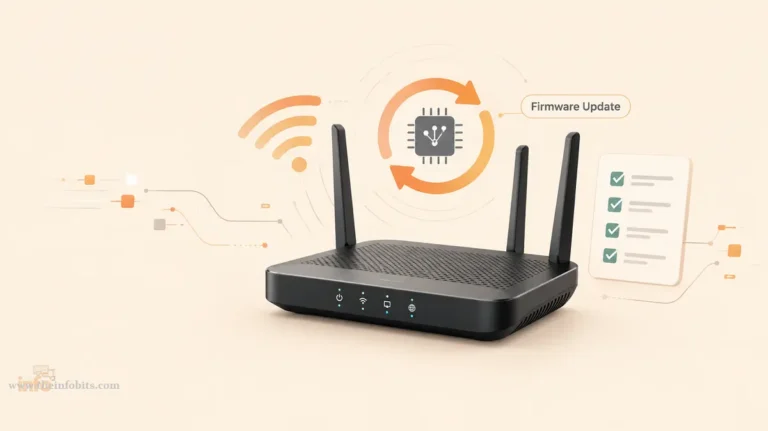
Ignoring firmware updates. Router firmware updates frequently include latency improvements and security patches. Enable automatic updates, or check monthly.
Assuming more antennas = better performance. Antenna count is one of the most misleading specs in router marketing. A router with 4 well-designed antennas often outperforms one with 8 cheap ones.
Using the 2.4 GHz band for gaming. The 2.4 GHz band is crowded, slower, and higher-latency than 5 GHz or 6 GHz. Always connect your gaming device to 5 GHz or 6 GHz bands.
Connecting through a satellite mesh node when you could use the primary router. Mesh satellite nodes add latency at each hop. If you can run an Ethernet cable to the primary router, do that. If not, use wired backhaul between mesh nodes.
Setting Up Your Gaming Router for Maximum Performance
Essential Settings to Configure After Setup
Step 1: Enable and configure QoS. Navigate to your router’s QoS or traffic management settings. Prioritize your gaming device’s IP address or MAC address as the highest priority. If your router has a dedicated gaming mode, enable it.
Step 2: Connect your gaming device via Ethernet. If possible, use the router’s dedicated gaming LAN port. For consoles, purchase a good quality Cat6 Ethernet cable. This alone may be the most impactful upgrade you make.
A flat Cat6 Ethernet cable (available on Amazon) runs discreetly along baseboards and under carpet, making it practical to wire a console or PC even in a furnished room. The performance gain over Wi-Fi makes it worth the minor installation effort.
Step 3: Set your gaming band. Dedicate one band (typically the second 5 GHz band on tri-band routers) exclusively to gaming devices. Change its SSID to something like “Gaming_5GHz” and connect only your gaming hardware to it.
Step 4: Configure DNS for gaming. Changing your router’s DNS servers can slightly improve response times. Common choices:
- Cloudflare: 1.1.1.1 / 1.0.0.1
- Google: 8.8.8.8 / 8.8.4.4
- Your ISP’s DNS (sometimes fastest for your specific connection)
Related: 7 Best DNS Servers for Gaming
Step 5: Enable the gaming port (if available). If your router has a dedicated gaming LAN port, connect your primary gaming device to it. This provides hardware-level priority that overrides all other QoS settings.
Step 6: Geo-filter your game servers (NETGEAR XR1000 / DumaOS routers). Use the DumaOS Geo-Filter to restrict matchmaking to nearby servers. This directly eliminates high-ping lobbies with players on the other side of the world.
Step 7: Update firmware. Before doing anything else after setting up a new router, check for and install firmware updates. Gaming routers in particular receive performance optimizations in early firmware releases.
Related: How to Set Up a Router at Home: A Complete Beginner’s Guide
Wi-Fi vs. Ethernet for Gaming: The Definitive Answer
This debate is settled. Here’s the complete breakdown:
Ethernet advantages:
- 1–3ms average latency vs. 3–7ms for Wi-Fi 6E under optimal conditions
- Zero jitter from interference or channel congestion
- Consistent performance at all hours (no degradation when neighbors are online)
- Immune to microwave, Bluetooth, and neighboring network interference
When Wi-Fi is acceptable:
- Casual and co-op gaming where 5–10ms extra latency is imperceptible
- When running cables genuinely isn’t possible (rental apartments, rented rooms)
- Modern Wi-Fi 7 with MLO has narrowed the gap significantly for casual play
The bottom line: For ranked FPS, fighting games, and competitive play, wire your gaming device. For MMOs, co-op, and casual online gaming, a quality Wi-Fi 6 or Wi-Fi 6E connection is fine.
Gaming Router Maintenance: Keeping Performance Consistent
Monthly: Restart your router if you notice performance degrading. A simple power cycle clears memory and refreshes connections.
Quarterly: Check for firmware updates manually if automatic updates aren’t enabled.
Annually: Review your connected device list. Unauthorized or forgotten devices consuming bandwidth are a common, overlooked cause of gaming performance issues.
Ongoing: Keep the router in an open, ventilated location. Overheating is a genuine performance and reliability killer. Gaming routers run hotter than standard routers due to their more powerful processors.
If performance suddenly degrades: Before assuming the router is failing, check whether your ISP is having issues (your modem’s connection to the ISP is separate from your router’s performance), run a wired speed test to isolate variables, and check whether a firmware update was installed that might need adjustment.
Related: The Ultimate Guide to Troubleshooting Common Router Issues
Myth vs. Fact: Gaming Router Edition
Myth: A gaming router will make you a better player. Fact: A gaming router eliminates network-side disadvantages. It won’t improve your aim, game sense, or reaction time. It ensures your skills aren’t undermined by lag.
Myth: You need the most expensive gaming router to play competitively. Fact: A well-configured mid-range gaming router with proper QoS and a wired connection outperforms an expensive router with poor settings and a wireless connection.
Myth: Wi-Fi 7 is essential for gaming in 2026. Fact: Wi-Fi 7’s latency advantage over Wi-Fi 6E is 2–4ms, below the threshold of human perception in gameplay. Wi-Fi 7 is worth buying for future-proofing, not for an immediate competitive edge.
Myth: More antennas mean better Wi-Fi coverage. Fact: Antenna quality, placement, beamforming capability, and router placement matter more than raw antenna count. A 4-antenna router in a central location beats an 8-antenna router in a corner cabinet.
Myth: Gaming routers are only for PC gamers. Fact: Gaming routers work equally well with PlayStation, Xbox, Nintendo Switch, and mobile gaming. The QoS and prioritization features benefit any device.
Myth: Resetting your router regularly improves gaming performance. Fact: A monthly restart is fine. Frequent resets indicate an underlying problem (overheating, firmware issue, or failing hardware) that should be diagnosed and fixed.
Gaming Router Checklist
Before assuming you need a new router, confirm you’ve done these things with your current one:
- [1] Configured QoS to prioritize your gaming device
- [2] Connected your gaming device via Ethernet (not Wi-Fi)
- [3] Updated your router’s firmware to the latest version
- [4] Placed the router centrally and in an open, elevated location
- [5] Connected your gaming device to the 5 GHz band (not 2.4 GHz)
- [6] Changed DNS to a faster option (Cloudflare 1.1.1.1 or Google 8.8.8.8)
- [7] Run a speed test to verify your ISP is delivering your subscribed plan speed
- [8] Checked for unauthorized devices consuming your bandwidth
If you’ve done all of the above and still experience lag spikes, packet loss, or jitter, a router upgrade is genuinely warranted.
Related: How to Boost Wi-Fi Signal at Home: 5 Easy Ways
Summary
The best gaming router in 2026 depends on your specific situation more than it depends on the spec sheet. The ASUS ROG Rapture GT-BE98 Pro is the overall performance champion for serious competitive gamers.
The NETGEAR XR1000 delivers the best value with DumaOS software depth that genuinely impacts game performance.
The TP-Link Archer GE800 offers the best dedicated gaming hardware with Wi-Fi 7. For large homes, the ASUS ROG GT6 mesh system is the only realistic choice that maintains gaming-grade latency across satellite nodes.
But whichever router you choose, the biggest performance gains come from the same places: a wired connection over Ethernet, properly configured QoS, and a router positioned where it can actually do its job.
Get those fundamentals right, and even a mid-range gaming router will transform your online experience.
Related: Best OpenWrt Routers
Frequently Asked Questions (FAQ)
What is the best gaming router in 2026?
For most gamers, the NETGEAR Nighthawk XR1000 offers the best combination of gaming-specific software (DumaOS 3.0 with Geo-Filter), reliable latency (12–15ms), and value. For competitive esports players where every millisecond matters, the ASUS ROG Rapture GT-BE98 Pro delivers the tightest latency (8–12ms) available. For large homes, the ASUS ROG GT6 mesh system is the best gaming-specific option.
Does a gaming router actually reduce ping?
Yes; in specific situations. Gaming routers reduce ping most effectively when local network congestion is the bottleneck: multiple devices competing for bandwidth, background downloads running during matches, or heavy household internet usage. They cannot reduce ping caused by distance to game servers or ISP routing quality. In multi-device households, upgrading from a basic ISP router to a gaming router with proper QoS can reduce ping by 20–40ms.
Is Wi-Fi 7 worth it for gaming in 2026?
For future-proofing, yes. For an immediate competitive advantage, probably not. The latency difference between Wi-Fi 6E and Wi-Fi 7 in real-world gaming conditions is approximately 2–4ms, below the threshold of human perception during gameplay. Wi-Fi 7 becomes worth the premium if you’re buying a router you plan to use for 5+ years and want to be ready for next-generation devices.
What is the most important feature in a gaming router?
Quality of Service (QoS). This is the feature that prioritizes your gaming traffic over all other network activity, preventing downloads, streams, and other household devices from spiking your ping during matches. Even a mid-range router with excellent QoS will outperform a flagship router with QoS disabled.
Is wired Ethernet still better than Wi-Fi 7 for gaming?
Yes. Wired Ethernet delivers 1–3ms latency versus 3–7ms for Wi-Fi 6E under optimal conditions, and more importantly, Ethernet eliminates jitter, the inconsistent ping that causes micro-stutters and rubber-banding. Wi-Fi 7 with MLO has narrowed the gap significantly for casual gaming, but for ranked competitive play, Ethernet remains the clear choice.
What ping is good for gaming?
Under 20ms is excellent; most games feel seamless. 20–40ms is very good for ranked play. 40–60ms is acceptable for most games but noticeably impacts fast-paced shooters. 60–100ms is problematic for competitive gaming. Above 100ms severely impacts all real-time gameplay.
Do gaming routers work with PlayStation, Xbox, and Nintendo Switch?
Yes. Gaming routers work with all major gaming platforms. The QoS, prioritization, and latency-reduction features benefit consoles, PCs, and mobile gaming devices equally. Connect consoles via Ethernet to the dedicated gaming port for maximum benefit.
What is DumaOS and why does it matter?
DumaOS is the firmware used in NETGEAR Nighthawk gaming routers (notably the XR1000). It’s considered the most sophisticated gaming-focused router software available, featuring Geo-Filter (restrict matchmaking by geography), real-time ping heatmaps for game servers, Congestion Control, and per-device prioritization. It’s the primary reason the XR1000 is recommended for value gaming performance.
Should I use a gaming router or a mesh system?
It depends on your home size. For homes under 2,500 sq ft with the router centrally placed, a single gaming router will give you lower and more consistent latency than a mesh system. For larger or multi-story homes with dead zones, a gaming-specific mesh system (like the ASUS ROG GT6) with wired backhaul provides better coverage while maintaining gaming-grade latency. Standard mesh systems without dedicated gaming backhaul add latency at satellite nodes.
What is the difference between a gaming router and a regular router?
Gaming routers include hardware and software specifically designed for low-latency gaming: dedicated gaming ports with hardware-level traffic priority, gaming-optimized QoS, faster CPUs for handling traffic without queuing delays, gaming-specific firmware features (Geo-Filter, game server pings), and in some cases, game acceleration networks (GPN/WTFast integration). Regular routers treat all traffic equally, fine for browsing and streaming, but suboptimal when gaming traffic competes with household bandwidth.
How much should I spend on a gaming router?
For casual gamers in smaller homes: $80–$150 (Wi-Fi 6 dual-band) is sufficient. For serious competitive gamers with busy households: $200–$400 gets you excellent gaming-focused features. For competitive esports with multiple gamers and multi-gig internet: $500–$800 for Wi-Fi 7 flagship models. The sweet spot for most gamers is $200–$350, where you get all the meaningful gaming features without paying for diminishing returns.
What is bufferbloat and why does it matter for gaming?
Bufferbloat is a network problem where large buffers in routers and modems cause excessive latency spikes during high-bandwidth activity. When someone downloads a large file on your network, bufferbloat can spike your gaming ping from 20ms to 200ms or more. Gaming routers with SQM (Smart Queue Management) or robust QoS specifically address bufferbloat by managing traffic queues intelligently. The GL.iNet Flint 2 with OpenWRT and SQM is particularly effective at addressing this issue.
Can a gaming router fix lag caused by my ISP?
No. A gaming router only controls what happens inside your local network. Lag caused by your ISP’s backbone routing, distance to game servers, or server-side issues cannot be fixed by any router. If your ping to a game server is high even with one device on a wired connection and no other household network activity, the problem is external to your router and should be addressed with your ISP.
What is a gaming port on a router?
A dedicated gaming port is a specific LAN port on gaming routers that provides hardware-level traffic priority to whatever device is connected to it. Unlike software QoS (which prioritizes at the firmware level), a dedicated gaming port prioritizes traffic at the hardware level, faster and more reliable. Connect your PC or primary console to this port for automatic, zero-configuration gaming optimization.
Is it worth upgrading from Wi-Fi 5 to Wi-Fi 6 for gaming in 2026?
Absolutely, yes. Wi-Fi 5 routers lack OFDMA, MU-MIMO efficiency improvements, and modern QoS capabilities that significantly benefit gaming in multi-device households. If your current router is Wi-Fi 5 (especially if it’s more than 4 years old), upgrading to Wi-Fi 6 is one of the most impactful networking upgrades available. Wi-Fi 6 routers have also dropped substantially in price, making the value proposition extremely strong.
Do I need a gaming router if I’m on fibre internet?
It depends. Fibre internet typically provides excellent base latency. However, if your household has multiple active devices, a basic ISP-provided fibre gateway often lacks the QoS capabilities to prevent other devices from impacting gaming traffic. Upgrading to a dedicated gaming router with proper QoS can still meaningfully improve gaming consistency even on fibre, particularly in busy households.
How long should a gaming router last?
A quality gaming router typically provides 4–6 years of relevant performance before hardware limitations or discontinued firmware support make upgrading worthwhile. Wi-Fi 7 routers purchased in 2025–2026 should remain capable through at least 2030. Signs it’s time to replace: the router no longer receives firmware updates, it can’t handle your internet plan’s speed, or it lacks WPA3 security support.
Please share this article with your friends and relatives if you find it useful.
We also ask that you bookmark this page for future reference, as we are constantly updating our articles with new information.
Sign up for our free newsletter as well to receive fresh information immediately in your inbox and keep technically up to date.
Disclosure: If you follow our links to a retailer’s website and make a purchase, we will get an affiliate commission on some, but not all, of the items or services we promote. This will cause no price change for you.