
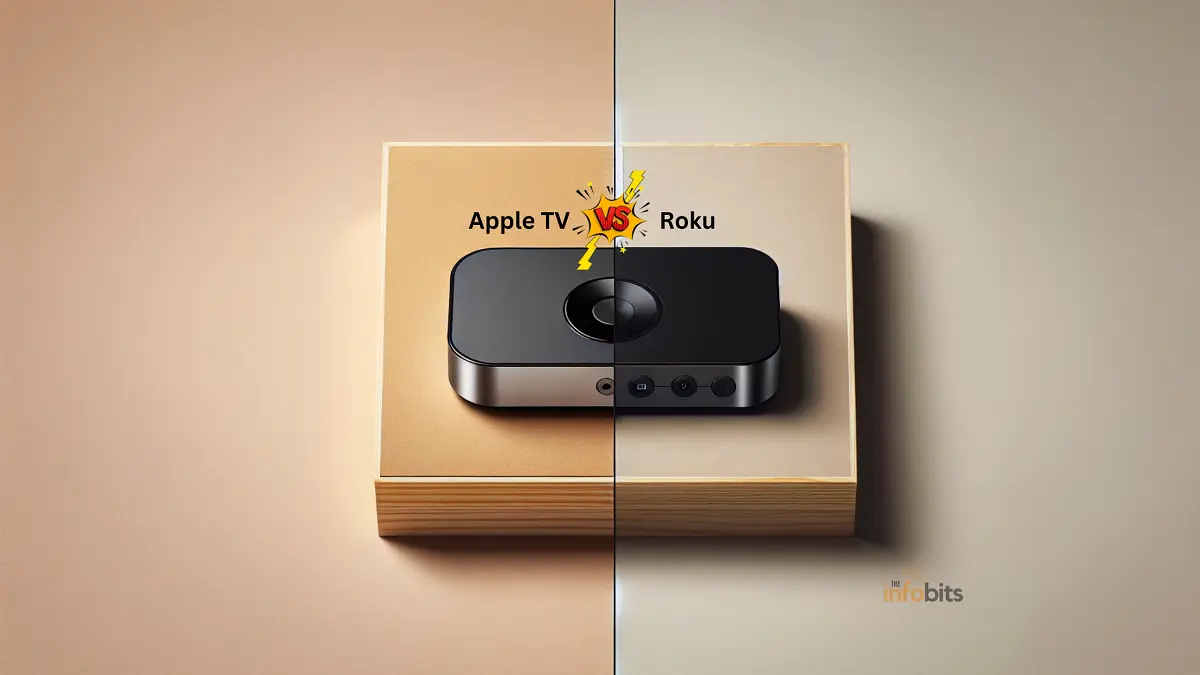
Apple TV vs Roku (2026): Which Streaming Device Actually Wins?
Apple TV vs Roku: The Quick Answer
Roku is the better pick for most people; it’s cheaper, works with virtually every streaming app, and doesn’t require buying into any ecosystem. Apple TV is the better pick if you already own iPhones, iPads, or a Mac; the AirPlay integration, HomeKit hub, and cross-device continuity are genuinely hard to replicate elsewhere, but you’ll pay a real premium for them.
That’s the quick summary. But 2026 has been an unusually eventful year for both platforms. Roku is being acquired by Fox in a $22 billion deal, and Apple just raised Apple TV hardware prices while everyone waits on a long-overdue refresh.
Both of those developments actually matter if you’re buying right now, so let’s get into the details.
Apple TV vs Roku at a Glance
| Apple TV 4K | Roku (Stick 4K / Ultra) | |
|---|---|---|
| Starting price | $199 (64GB) / $249 (128GB) | $25–$50 (Stick 4K) / $79–$100 (Ultra) |
| Max resolution | 4K HDR, Dolby Vision, HDR10+ | 4K HDR, Dolby Vision, HDR10+ (Ultra/Stick 4K) |
| Audio | Dolby Atmos, Spatial Audio | Dolby Atmos (Ultra) |
| Chip | A15 Bionic (current gen) | Varies by model |
| Remote | Siri Remote (USB-C) | Voice Remote / Voice Remote Pro |
| Ecosystem lock-in | Deep (Apple devices) | None; works with any TV/brand |
| Free content library | Limited | Extensive (The Roku Channel + free channel store) |
| Subscription required to use device | No | No |
| Best for | Apple households, gamers wanting Arcade | Budget buyers, app-agnostic streamers |
What Is Apple TV?
Apple TV is Apple’s streaming media player, a small black box that plugs into your TV over HDMI and gives you access to streaming apps, AirPlay casting from your other Apple devices, and Apple’s own subscription service.
First launched in 2007, it’s gone through several hardware generations, with the current model supporting full 4K HDR playback.
Where Apple TV really sets itself apart is ecosystem integration. If you already own an iPhone, HomePod, or Mac, Apple TV becomes a hub that ties everything together, casting photos and video from your phone, controlling HomeKit-connected smart home devices, and syncing watch progress across every Apple device tied to your account.
Related: Apple TV vs Google TV: Which is right for you?
What Is Roku?
Roku was one of the original players in home streaming, and its whole philosophy has stayed consistent since day one: keep it simple, keep it cheap, and stay neutral about which streaming services you actually use.
Roku devices come in several form factors: streaming sticks, set-top boxes, soundbars with a built-in player, and full Roku-OS smart TVs made by partner brands.
Unlike Apple TV, Roku isn’t trying to sell you on an ecosystem. It’s platform-agnostic by design, which is exactly why it’s remained one of the most-used streaming platforms in the US by hours streamed, even as bigger tech companies have tried to out-feature it.
Related: Chromecast vs Apple TV: The Battle of the Streaming Devices
The Big 2026 Shakeups You Should Know About Before Buying
This is the part most comparison guides are missing right now, and it genuinely affects the buying decision.
Fox is acquiring Roku. In June 2026, Fox Corporation agreed to acquire Roku in a cash-and-stock deal valued at roughly $22 billion, combining Fox’s live sports and news content, plus its Tubi streaming service, with Roku’s connected TV platform and its 100+ million global households.
The deal is expected to close in the first half of 2027, pending regulatory approval. Nothing changes for current Roku owners today, but it’s worth knowing that the Roku you buy now may sit inside a very different company by the time your next hardware upgrade rolls around.
Fox has said it intends to keep Roku’s platform open and partner-friendly, but ad-supported content and channel prioritization are reasonable things to keep an eye on as the deal progresses.
Apple just raised Apple TV hardware prices, and a refresh is overdue. As of June 2026, the current Apple TV 4K jumped from $129/$149 to $199/$249 for the 64GB and 128GB models.
The hardware itself hasn’t changed; this is the same third-generation box from 2022. A next-generation Apple TV with a newer A17 Pro chip, more RAM, and Apple’s own wireless chip has reportedly been ready for a while.
But Apple is holding it back until a more capable version of Siri is ready, which points to a launch around September 2026, alongside the iPhone 18 and iOS 27. If you don’t need a new Apple TV immediately, it’s worth waiting; you’d otherwise be paying a higher price for hardware Apple is actively about to replace.
Design and Remote
Apple TV keeps its familiar minimalist black box design; small, quiet, and easy to tuck away. The Siri Remote uses a touchpad for navigation, plus voice search via Siri, USB-C charging, and dedicated volume and power buttons that can control your TV directly.
It’s elegant, though its small size makes it easy to misplace in a couch cushion.
Roku’s hardware varies more by model. The Streaming Stick line plugs directly into your TV’s HDMI port and stays out of sight; the Roku Ultra is a small set-top box with Ethernet for wired stability.
Roku’s Voice Remote Pro (included with the Ultra) adds backlit buttons, a rechargeable battery, hands-free “Hey Roku” activation, and a lost-remote finder; a small but genuinely useful feature Apple’s remote doesn’t have.
Interface and Navigation
Apple TV’s tvOS is visually polished, leaning heavily on large cover art and a clean, magazine-style layout. It supports multiple user profiles, so different family members get their own recommendations and watchlists; a real advantage for shared households.
Roku’s interface prioritizes function over flash: a straightforward grid of app tiles (“channels”) that you can rearrange freely. It’s less visually dramatic than tvOS, but it’s fast, familiar, and easy for less tech-savvy users to navigate without a learning curve.
Streaming Quality and App Availability
Both platforms support up to 4K resolution with HDR10, HDR10+, and Dolby Vision on their higher-end hardware, and both handle Dolby Atmos audio on capable models.
In day-to-day use, picture quality differences between the two are minor and mostly come down to your TV and internet connection rather than the streaming box itself.
Where they differ is app philosophy. Apple TV supports all the major services: Netflix, Amazon Prime Video, Disney+, Max, and, of course, Apple’s own Apple TV app, through the App Store, plus Apple Arcade games.
Roku takes an intentionally neutral, agnostic approach: virtually every streaming service is available, and Roku’s free channel store adds a long tail of niche and ad-supported options that Apple’s more curated App Store doesn’t really compete with.
Unique Features
Apple TV’s strengths come from ecosystem depth: AirPlay for casting from your iPhone or Mac, HomeKit integration for smart home control, Apple Arcade for gaming, and tight integration with Apple Music and iCloud.
The Apple TV app itself has become a genuine draw beyond originals like Severance and Ted Lasso; it’s now the exclusive US home for Formula 1 racing and includes Friday Night Baseball and every MLS match at no extra cost to subscribers.
Roku’s strengths lean practical: an unbiased universal search that compares prices across services instead of favoring one provider, a mobile app that doubles as a remote with private headphone listening.
The “My Feed” tool tracks when a show or movie becomes available or drops in price. Roku also launched its own low-cost ad-free subscription, Howdy, in 2025, for viewers who want a lighter-weight premium option without committing to a full streaming service.
Myth vs Fact
Myth: You need Apple products to use Apple TV. Fact: Apple TV works with any HDMI television. You don’t need an iPhone or Mac to use it. You just won’t get the AirPlay, HomeKit, and Continuity features that make it worth the premium.
Myth: Roku is a “budget” device that skimps on quality. Fact: The Roku Ultra delivers the same 4K HDR10+, Dolby Vision, and Dolby Atmos support as Apple TV. What Roku actually cuts is ecosystem extras, not core picture and sound quality.
Myth: You need a Roku subscription to use the device. Fact: There’s no mandatory subscription for either platform’s hardware. You pay once for the device itself; ongoing costs come only from whichever streaming apps you choose to subscribe to.
Myth: Since Fox is buying Roku, current devices will stop working or lose features soon. Fact: The acquisition isn’t expected to close until the first half of 2027, and there’s no indication existing hardware or software support is changing in the near term. It’s worth monitoring, not panicking over.
Pricing and Value for Money
Apple TV: The hardware itself now starts at $199, a notable jump from its long-standing $129 price point.
If you also want Apple’s original content, Apple TV+ runs $12.99/month or $99.99/year, with bundle options like Apple TV + Peacock starting at $14.99/month.
If you’re set on the current-generation box despite the price hike, checking Amazon and other third-party retailers for open-box or sale pricing is worth doing before buying direct from Apple, since discounts of $30–$50 aren’t unusual around major shopping events.
Roku: Roku’s lineup is deliberately tiered to fit almost any budget. The Express and Premiere sit in the $15–$30 range for secondary TVs, the Streaming Stick 4K (the most popular option for most households) runs $25–$50, and the Ultra tops out around $79–$100 with Ethernet and the fastest processor in the lineup.
You can check the latest price of Roku devices on Amazon before buying, since pricing fluctuates with sales fairly often.
For most buyers, Roku wins clearly on upfront cost. Apple TV’s higher price only pays for itself if you’re actually going to use the ecosystem features, AirPlay, HomeKit, Arcade, and cross-device syncing, which Roku simply doesn’t offer.
Common Mistakes to Avoid When Choosing
- Buying Apple TV hardware purely for streaming apps. If you don’t own other Apple devices and don’t care about gaming or smart home control, you’re paying a premium for features you won’t use. Roku does the core streaming job for a fraction of the price.
- Assuming Roku requires a subscription. It doesn’t. The “buy once” confusion trips up a lot of first-time buyers, comparing it to subscription-based smart TV platforms.
- Buying the current Apple TV 4K right now without checking for the refresh. Given the imminent hardware update expected around September 2026, buying today at the new $199 price means paying more for hardware that’s about to be superseded.
- Ignoring your TV’s existing smart platform. If your TV already runs a solid smart OS, you may not need a separate streaming box at all. Check our WebOS vs Google TV comparison if you’re weighing built-in smart TV platforms against an external device.
- Do not check Ethernet support if your Wi-Fi is unreliable. Only the higher-end models of each platform (Apple TV 4K’s 128GB variant, Roku Ultra) include a wired Ethernet port. A meaningful factor for anyone streaming 4K PVOD rentals or other bandwidth-heavy content.
Which One Should You Buy? A Quick Decision Guide
- You own multiple Apple devices and want everything to work together seamlessly → Apple TV. The AirPlay, HomeKit, and Continuity integration alone justify the price for heavy Apple users.
- You want the cheapest way to stream 4K content on a new TV → Roku Streaming Stick 4K. It covers nearly every major app at a fraction of Apple TV’s cost.
- You care about gaming through the streaming box itself → Apple TV, thanks to Apple Arcade and its more capable chip.
- You want a neutral device that doesn’t favor one streaming service over another → Roku. Its universal search and price comparison tools are built around not playing favorites.
- You’re not in a rush and want the newest hardware → Wait. Apple’s next-gen Apple TV is expected around September 2026, and Roku’s hardware post-Fox-acquisition direction is worth watching over the next year.
Tips for Getting the Most Out of Either Device
Prioritize a wired connection for 4K content. Both the Apple TV 4K (128GB model) and Roku Ultra support Ethernet, which delivers more consistent streaming than Wi-Fi alone.
Especially useful if you regularly rent premium new releases. If you’re building a setup specifically for PVOD movie rentals, a stable wired connection avoids the buffering that can eat into a 48-hour rental window.
Use family/multi-user profiles if your household shares a TV. Apple TV’s tvOS profiles keep recommendations personalized; Roku doesn’t offer the same per-user separation, so keep that in mind for larger households.
Check for bundle pricing before subscribing to individual services. Both Apple TV+ and Roku’s Howdy service offer bundle options with other providers that can meaningfully undercut paying for each service separately.
Don’t ignore the free content libraries. Roku’s channel store and The Roku Channel, plus Apple TV’s free-with-ads options, can meaningfully cut your monthly streaming spend if you’re willing to mix in ad-supported content.
Conclusion
Finally, the choice between Apple TV and Roku is heavily influenced by personal preferences and priorities.
Apple TV is a good alternative for individuals who are already involved in the Apple ecosystem and want a premium device with high-end functionality, but Roku provides incredible value and a simple interface with a vast range of content options, perhaps making it more accessible to a larger audience.
Finally, both platforms exhibit breakthroughs in streaming technology and are significant market rivals; the choice is based on compatibility with existing devices, demand for certain features, and economic considerations.
Whichever option you select, it’s apparent that Apple TV and Roku will remain at the forefront of the streaming device revolution, delivering entertainment into our living rooms with simplicity and elegance.
Frequently Asked Questions
Is Apple TV better than Roku?
It depends on your setup. Apple TV offers deeper integration with other Apple devices and stronger gaming performance, while Roku is cheaper, simpler, and works well regardless of which ecosystem you’re in.
Why did Apple TV get more expensive in 2026?
Apple raised Apple TV 4K hardware prices in June 2026, from $129/$149 to $199/$249, while the current model (from 2022) remains unchanged. A next-generation model is expected later in the year.
Is Fox’s buying of Roku going to change how the devices work?
Not immediately. The Fox-Roku acquisition, announced in June 2026, is expected to close in the first half of 2027. No changes to existing hardware or software have been announced as a result of the deal.
Do I need a subscription to use a Roku device?
No. Roku hardware is a one-time purchase with no mandatory subscription. You only pay for whichever individual streaming apps you choose to use.
Do I need a subscription to use Apple TV hardware?
No, the hardware itself doesn’t require a subscription. Apple TV+ (the content service) is a separate, optional $12.99/month subscription.
Which is cheaper, Apple TV or Roku?
Roku is significantly cheaper across its lineup, with devices starting around $15–$30 compared to Apple TV’s $199 starting price.
Does Roku support 4K and HDR?
Yes. The Roku Streaming Stick 4K and Roku Ultra both support 4K resolution with HDR10, HDR10+, and Dolby Vision (model-dependent).
Can I use AirPlay with Roku?
No, native AirPlay support is exclusive to Apple TV. Some Roku models support screen mirroring from Apple devices, but it isn’t the same seamless AirPlay experience.
Is Apple TV worth it if I don’t own an iPhone?
It’s a harder sell. Without other Apple devices, you lose most of the ecosystem advantages, AirPlay, HomeKit, and Continuity, that justify Apple TV’s higher price, and Roku will likely serve your needs just as well for less money.
What’s the best Roku model for most people?
The Roku Streaming Stick 4K hits the sweet spot for most households, with full 4K HDR support, a compact design, and a price that undercuts Apple TV significantly.
Should I wait for the new Apple TV before buying?
If you don’t need a device immediately, yes. A refreshed Apple TV with a newer chip is expected around September 2026, and buying the current model at its new $199 price right before a refresh isn’t ideal timing.
Does Apple TV support gaming?
Yes, through Apple Arcade, which is included with an Apple TV+ subscription and works with Bluetooth game controllers. It’s more capable for gaming than Roku’s hardware.
Can I mirror my phone screen to either device?
Apple TV supports full AirPlay mirroring from iPhones, iPads, and Macs. Roku supports screen mirroring from Android and some Windows devices, with more limited support for Apple screen mirroring.
Is there a Roku device with Ethernet built in?
Yes, the Roku Ultra includes a built-in Ethernet port for a wired connection, which is more reliable than Wi-Fi for 4K streaming.
What is Roku’s Howdy subscription?
Howdy is Roku’s own low-cost, ad-free subscription service, launched in 2025 at $2.99/month, offering a lighter alternative to full-priced premium streaming subscriptions.
Does Apple TV work with non-Apple smart TVs?
Yes. Apple TV connects via HDMI to any television with an HDMI port, regardless of the TV’s built-in smart platform.
Which platform has more free content?
Roku generally has the edge here, thanks to The Roku Channel and its extensive free, ad-supported channel store, which is broader than what’s available for free through Apple TV.
Is buying Roku still a good idea given the Fox acquisition?
Yes, for now. The deal hasn’t closed, existing devices aren’t affected, and Roku’s core product, an affordable, app-agnostic streaming platform, remains unchanged in the near term.
Please share this article with your friends and relatives if you find it useful.
We also ask that you bookmark this page for future reference, as we are constantly updating our articles with new information.
Sign up for our free newsletter as well to receive fresh information immediately in your inbox and keep technically up to date.
Disclosure: If you follow our links to a retailer’s website and make a purchase, we will get an affiliate commission on some, but not all, of the items or services we promote. This will cause no price change for you.


:%20Which%20Streaming%20Device%20Actually%20Wins?)