Where to Place a Soundbar: The Complete Placement Guide
A soundbar can transform how a TV sounds, but only if it’s actually positioned correctly. Put the same soundbar in the wrong spot, and you’ll lose clarity, muddy the bass, or completely defeat the upward-firing speakers meant to create a Dolby Atmos ceiling effect.
The good news is that soundbar placement follows a handful of consistent rules, and once you understand them, applying them to your own room takes minutes.
This guide covers where to put the soundbar itself, how that changes for Atmos models, where the subwoofer and any surround speakers belong, and the placement mistakes that quietly ruin sound quality without people realizing why.
Quick Answer: The best place for a soundbar is centered directly below your TV, with the front edge slightly beyond the TV stand or shelf. Keep it close to ear level when you’re seated, and don’t block the speaker drivers or upward-firing Atmos speakers. Avoid placing it inside a closed cabinet or behind the TV, as those positions can reduce sound quality and make dialogue harder to hear.
The One Rule That Matters Most: Ear Level
Before getting into above-vs-below or any finer details, one principle underlies almost every soundbar placement decision: position the soundbar as close to your seated ear level as possible.
Since most people sit with their ears slightly below their TV’s center (TVs are typically mounted a bit above eye level for comfortable viewing), a soundbar placed directly below the TV usually lands close to that ear-level sweet spot without any extra effort, which is a big part of why it’s the most common recommendation.
Everything else in this guide is really just working out how to get as close to that line as your TV, furniture, and soundbar type allow.
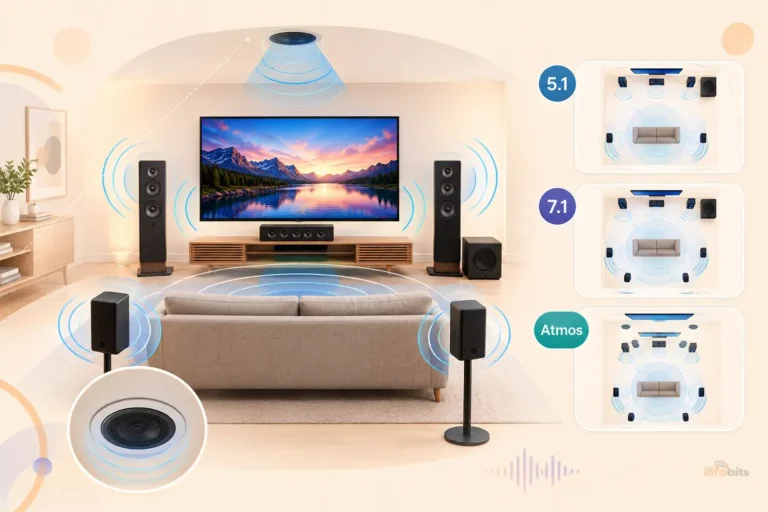
Related: Surround Speaker Setup Guide: 5.1, 7.1 & Atmos Placement
Above or Below the TV?
Both positions work, and the right one depends more on your soundbar’s speaker design and your furniture than personal preference.
Place It Below the TV If:
- Your soundbar has standard front-firing speakers (true for the large majority of models)
- You have a TV stand, console, or shelf with enough clearance beneath the screen
- You want the simplest setup; no drilling, no wall mount, just set it down
- Your seating is at a normal couch height, putting your ears close to the TV’s lower edge
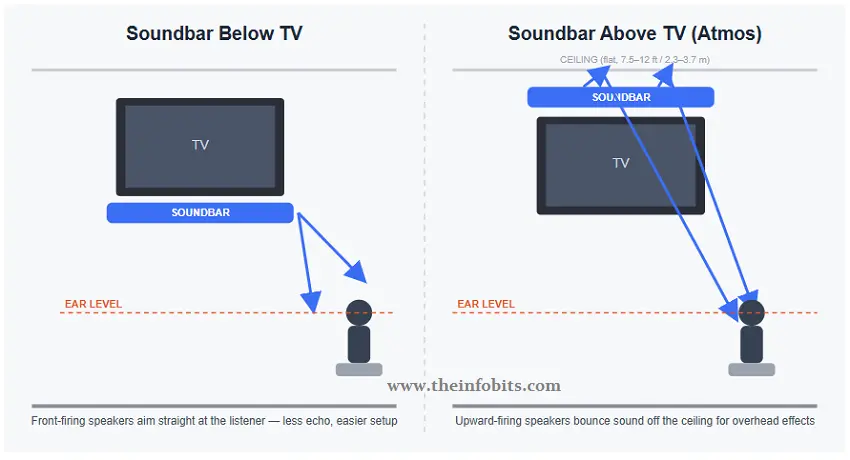
This is the default recommendation for most households, and for good reason: front-firing speakers pointed directly at the listener produce less ceiling and side-wall reflection, which means cleaner, more direct sound with less echo.
Place It Above the TV If:
- Your soundbar has upward-firing speakers (used for Dolby Atmos or DTS:X height effects)
- Your TV stand doesn’t have room underneath for the soundbar without blocking the screen
- You’re using taller seating, like bar stools or a raised sectional, and want the soundbar closer to that higher ear line
- You’ve already wall-mounted the TV and want a similarly clean wall-mounted look
One practical note either way: Don’t let the soundbar’s height, wherever you place it, cover any part of the TV screen or its bottom-bezel sensor. That second part matters more than people expect. See the remote-control section further down.
Related: TV vs Monitor: Can We Use a Monitor as a TV?
Wall-mounting your soundbar? A soundbar wall-mount bracket kit (see the options on Amazon) makes installation easier and helps position the soundbar at the ideal height below your TV. Look for an adjustable bracket that’s compatible with your soundbar model for the best fit and a clean, professional-looking setup.
Placing an Atmos or DTS:X Soundbar
If your soundbar has upward-firing drivers, its placement rules are noticeably stricter, because it depends entirely on bouncing sound cleanly off your ceiling rather than sending it straight at you.
- Ceiling height matters. Dolby’s own guidance puts the ideal ceiling height between roughly 7.5 and 12 feet (2.3–3.7 meters). Much higher than that, and the reflected sound arrives too diffuse and too late to feel convincing.
- The ceiling needs to be flat and reflective. Drywall, plaster, or hardwood-style flat ceilings work well. Textured or acoustic-tile ceilings absorb sound instead of bouncing it, which noticeably weakens or eliminates the overhead effect. Sloped or vaulted ceilings also degrade it.
- Keep it away from the ceiling itself. Counterintuitively, being too close to the ceiling doesn’t help. The reflection angle gets too steep, and the sound doesn’t spread evenly across the listening area.
- Center it on your seating, not just the TV. The upward-firing drivers are aiming at a reflection point roughly above your listening position, so keep the soundbar centered on where you actually sit, not just centered visually under the screen.
If your ceiling doesn’t meet these conditions ( very high ceilings, exposed beams, heavy texture, or an open-plan space with no real ceiling overhead), the Atmos/DTS:X height effect will be weak no matter how well you position the soundbar itself.
In that case, the soundbar will still sound good as a wide stereo/surround system; you just won’t get much benefit from the height channels specifically.
Related: Headphones vs. Speakers: Which Is Better for Listening to Music?
Centering the Soundbar
This gets skipped in a lot of placement advice, but it matters as much as above-vs-below. The soundbar should be centered on your TV screen (or on your seating position for Atmos models), not just placed wherever there’s open space on the stand.
An off-center soundbar can affect the way audio is positioned in the room. Dialogue may seem to come from one side instead of the center. Sound effects can also feel slightly out of place.
The difference may be negligible at first, but it becomes much more noticeable once you’ve experienced proper soundbar placement.
How Far Should the Soundbar Be From the TV?
Leave roughly 10–15 cm (4–6 inches) of clearance between the soundbar and the TV. This isn’t just for looks. It gives you room to route and access cables and controls, and it helps prevent a specific, common problem: the soundbar physically blocking your TV’s remote-control sensor.
Fixing a Blocked Remote Sensor
If your TV remote stops working (or becomes unreliable) after adding a soundbar, the soundbar is very likely sitting in front of your TV’s infrared sensor, which is usually located at the bottom-center or a bottom corner of the screen.
A few ways to fix it, roughly in order of effort:
- Reposition slightly. Even a small shift, lower, or offset to one side can clear the sensor’s line of sight.
- Enable the soundbar’s IR repeater function, if it has one (check the soundbar’s setup menu). This relays your TV remote’s signal through to the TV, letting you keep the soundbar exactly where it is.
- Use an IR extender/repeater kit. These inexpensive kits (view on Amazon) capture the remote’s signal and relay it via a small cable-mounted blaster placed directly at the TV’s sensor. This is very useful when repositioning isn’t an option, and your soundbar has no built-in repeater.
- Fall back to HDMI-CEC if your TV and soundbar both support it, which lets you control basic functions without relying on line-of-sight infrared at all.
Soundbar in a Cabinet
Placing a soundbar on a cabinet shelf can work, but only under the right conditions:
- The shelf must be open. No cabinet doors in front of the soundbar, since doors (even glass ones, in some cases) muffle and distort the sound.
- This only works well for soundbars with purely front-firing speakers.
- Avoid this entirely for Atmos/DTS:X soundbars. Upward-firing drivers need a completely open path to the ceiling; a cabinet top sitting directly above the soundbar blocks that reflection and defeats the height effect entirely.
Related: NanoCell vs OLED: Which TV Technology Is Better?
Where Does the Subwoofer Go?
Bass is largely non-directional, which gives you more flexibility with subwoofer placement than with the soundbar itself. But a few rules consistently produce better results:
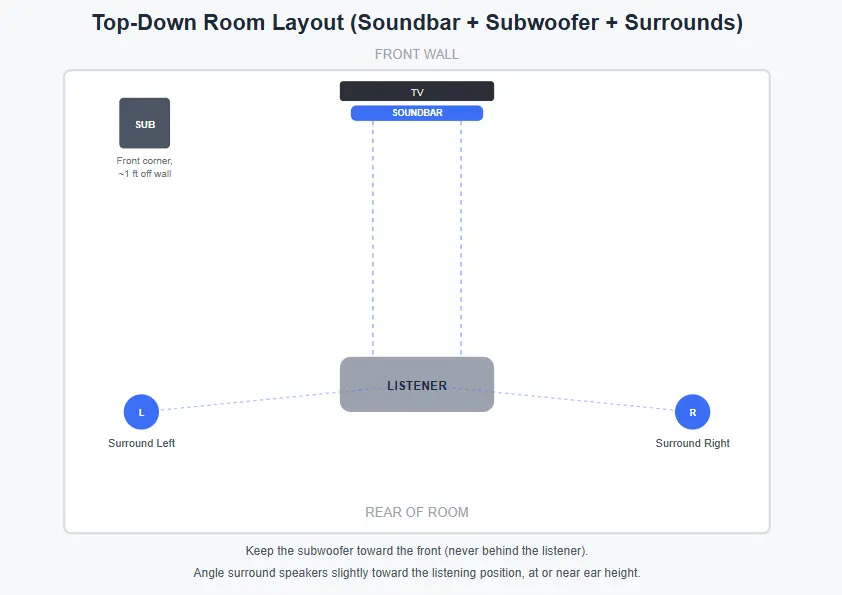
- Keep it toward the front of the room, ideally near the soundbar, and not behind your listening position. If the subwoofer ends up behind you, explosions and bass-heavy effects can start to feel like they’re coming from behind rather than from the screen, which breaks the immersion.
- Front corners often produce stronger, more even bass, since corners naturally reinforce low frequencies. It’s a reasonable starting point if you’re unsure where to place it.
- Leave at least a foot of clearance from any wall where possible, to avoid excessive boominess from sound waves reflecting too close to the driver.
- If it’s wireless, keep it within about 30 feet of the soundbar with as few walls in between as possible, for a reliable connection.
- Test a few spots. Play something bass-heavy, then physically move the subwoofer (or walk around the front half of the room while it’s in one spot) to find where the bass sounds fullest and most even. This is sometimes called the “subwoofer crawl” method, and it genuinely works better than guessing.
Where Do Surround Speakers Go?
If your soundbar system includes separate wireless surround speakers, they serve a different role than the main bar and need different placement:
- Place them to the sides or slightly behind your main seating position, roughly at or near ear height when seated.
- Angle them slightly toward the listening position rather than pointing straight along the wall.
- Keep the path between each surround speaker and your seating area as clear as possible; furniture or heavy curtains directly in front of them will noticeably dull the effect.
- Try to keep left and right surrounds at a roughly equal distance from the listening position, so the surround effect feels balanced rather than lopsided.
Positions to Avoid
A few placements come up often enough in practice that they’re worth calling out directly, even though they might seem convenient:
- Behind the TV. This blocks direct sound entirely and also puts the soundbar out of line-of-sight for any remote control it uses, making it hard to operate.
- Behind the couch. The couch itself acts like a sound barrier, muffling the audio before it even reaches you, and defeats the purpose of a directional soundbar.
- On the floor. Floor placement puts the drivers well below ear level and often causes the floor itself to absorb or distort a chunk of the sound, especially on carpet.
If your soundbar ends up in one of these locations because of limited space, the room layout may need a small adjustment. In many cases, the room isn’t the real problem.
Moving the soundbar just a foot or two to a nearby shelf or TV stand at the proper height can make a noticeable difference. A small change in placement often improves both sound quality and dialogue clarity.
Quick Reference by Soundbar Type
| Soundbar type | Best position | Key rule |
|---|---|---|
| Standard front-firing | Below the TV | Center it, keep it at ear level |
| Dolby Atmos / DTS:X (upward-firing) | Above the TV, or below with a fully open ceiling path | Flat ceiling, 7.5–12 ft height, no cabinet overhead |
| With external subwoofer | Front of room, near the soundbar | Never behind the listener |
| With wireless surrounds | Sides/rear of seating, ear height | Angle toward the listener |
| In a cabinet | Open shelf only, front-firing only | No doors, no Atmos models |
Final Thoughts
The right soundbar placement can make a bigger difference than buying a more expensive model. A few small adjustments can improve dialogue, create a wider soundstage, and give you a more immersive home theater experience. In most cases, placing the soundbar centered below your TV at ear level delivers the best results.
Every room is different, so don’t be afraid to experiment. If your first setup doesn’t sound right, move the soundbar slightly or adjust its height. Even a small change can noticeably improve the audio.
If you’ve checked placement and something still sounds off ( no sound at all, or audio that cuts in and out ), that’s usually a connection or setting issue rather than a placement one; double-check your HDMI ARC/eARC or optical connection and the TV’s audio output settings.
Frequently Asked Questions
Should a soundbar be placed above or below the TV?
Below is the better default for most soundbars with standard front-firing speakers, since it naturally lands close to seated ear level. Above the TV is better specifically for soundbars with upward-firing Dolby Atmos or DTS:X speakers, or when there isn’t enough clearance underneath the screen.
Can you mount a soundbar vertically?
It’s possible, but not recommended. Rotating a soundbar 90 degrees shifts its left and right channels so they effectively fire toward the floor and ceiling instead of left and right, which distorts the stereo image most soundbars are designed to produce.
Should a soundbar be in front of or behind the TV?
In front, always. Placing a soundbar behind the TV blocks its direct sound path and also interferes with the remote control, since most soundbar remotes rely on a clear line of sight to the unit.
How far should a soundbar be from the TV?
How far should a soundbar be from the TV? Around 10–15 cm (4–6 inches) is the general recommendation, which leaves enough clearance for cables and controls while helping avoid blocking the TV’s infrared remote sensor.
Is it better to wall-mount a soundbar?
Wall-mounting works well if your soundbar includes mounting hardware and you want it precisely at ear level regardless of your furniture height. It’s not inherently better than placing it on a stand. It’s simply a way to get exact placement control when your TV console doesn’t offer it.
Does soundbar placement really affect Dolby Atmos performance?
Yes, significantly more than it affects standard stereo sound. Atmos and DTS:X rely on bouncing sound off a flat ceiling within a specific height range, so placement (and ceiling type) has a much bigger impact on the final result than it does with a standard front-firing soundbar.
Where should the subwoofer go relative to the soundbar?
Toward the front of the room, ideally near the soundbar and never behind the listening position. Front corners often produce the strongest, most even bass if you’re unsure where else to start.
Why did my TV remote stop working after I added a soundbar?
The soundbar is very likely blocking your TV’s infrared sensor, which is usually near the bottom of the screen. Repositioning the soundbar slightly, enabling its IR repeater function if it has one, or adding a small IR extender kit will resolve this.
Can I put my soundbar inside a TV cabinet?
Yes, but only if the shelf is open (no doors) and the soundbar has purely front-firing speakers. Atmos or DTS:X soundbars should never go inside a cabinet, since anything directly above them blocks the ceiling reflection the height effect depends on.
Do wireless surround speakers need to be at ear level too?
Ideally, yes, or close to it. Surround speakers placed too high or too low relative to your seated ear level will sound less immersive, even though bass from a subwoofer is far more forgiving about exact placement height.
Why does my soundbar sound worse since I moved it to the floor?
Floor placement puts the speakers well below ear level and, depending on your flooring, can cause sound to be absorbed or distorted before it reaches you. Moving it back up to a shelf, stand, or wall mount at or near seated ear height will restore clarity.
Does the size of my room affect where I should place the soundbar?
The soundbar’s own placement rules (ear level, centered, clear of obstructions) stay the same regardless of room size. Room size mainly affects where you place the subwoofer and any surround speakers, since bass behaves differently across larger spaces and surrounds need enough distance from the listener to create a real sense of separation.
We hope this guide helped you find the best place for your soundbar. If you found it useful, please share it with your friends and family.
Also, follow The Infobits on Facebook and X (formerly Twitter) for more home entertainment tips, TV setup guides, troubleshooting tutorials, honest product reviews, and practical buying advice.
We hope you found this article helpful. Sign up for our free newsletter to receive fresh information right in your inbox and stay technically informed.
Disclosure: If you follow our links to a retailer’s website and make a purchase, we will get an affiliate commission on some, but not all, of the items or services we promote. This will not change the price for you.