Best Long-Range WiFi Routers in 2026: Tested for Large Homes & Dead Zones
If you’ve ever stood in your bedroom watching a video buffer while the WiFi works fine in the living room, you already know the problem this article solves. Range issues aren’t really about “weak WiFi”; they’re about walls, floors, distance, and a router that wasn’t built to push a signal that far in the first place.
We tested and researched routers specifically for long-range performance: how they hold up at 30, 60, and 90+ feet, through drywall, across floors, and into backyards. This isn’t a general “best routers” list; every product here was selected because it’s genuinely good at reaching far, not just because it has a high speed rating on the box.
One important update in the latest buying guide: for true whole-home, multi-floor coverage, a mesh system usually beats even the best single router. We’ve kept our original single-router picks (they’re still excellent, and several of you specifically asked for non-mesh options), and added mesh systems and Wi-Fi 7 options to round out the guide for every type of home.
Quick Picks: Best Long-Range WiFi Routers at a Glance
| Sl.No: | Router | Category | Coverage | Best For |
|---|---|---|---|---|
| 1 | TP-Link Deco BE63 (Mesh) | Best Overall for Large Homes | Up to 7,600 sq ft (3-pack) | Multi-story homes, dead zones |
| 2 | TP-Link Archer AX72 Pro | Best Single-Router Performance | Up to 2,800 sq ft | Gamers, 4K streamers |
| 3 | NETGEAR Nighthawk RAXE500 | Best Premium Single Router | Up to 3,500 sq ft | Power users, dense households |
| 4 | ASUS RT-AX55 | Best Value for Money | Up to 3,000 sq ft | Mid-size homes on a budget |
| 5 | TP-Link Archer AX21 | Best Budget Pick | Up to 2,500 sq ft | Apartments, small-medium homes |
| 6 | TP-Link Archer A8 | Best Ultra-Budget Pick | Up to 2,500 sq ft | Light users, tight budgets |
| 7 | NETGEAR Nighthawk RS300 | Best Wi-Fi 7 Upgrade Pick | Up to 2,500 sq ft | Future-proofing without mesh cost |
Why Trust This Guide?
We’ve been testing and writing about home networking since 2021. For this guide, we cross-referenced manufacturer specifications with independent lab data from RTINGS, Tom’s Guide, and Tom’s Hardware, and verified current product availability and pricing as of June 2026.
We don’t accept manufacturer payment for placement. Some links below are affiliate links; if you buy through them, we may earn a small commission at no extra cost to you, but that never determines our rankings.
How We Selected These Routers
- Real-world range testing data: we prioritized routers with verified performance at 60+ feet through walls, not just marketing claims
- Antenna design and beamforming: routers with more high-gain antennas and active beamforming consistently outperform basic 2-antenna designs
- Mesh expandability: bonus points for routers that support EasyMesh, OneMesh, or proprietary mesh add-ons
- Processor and RAM: a router with a weak CPU bottlenecks your whole network regardless of antenna quality
- Value relative to coverage area: we calculated rough cost-per-square-foot to compare fairly across price tiers
- Current availability: we excluded anything showing signs of imminent discontinuation in Tier 1 markets
Key Takeaways
- For homes over 2,500 sq ft or with multiple floors, mesh systems consistently outperform single routers; this is the single biggest factor in long-range satisfaction.
- Antenna count and beamforming matter more than headline speed numbers for actual range performance.
- 2.4 GHz still travels farther through walls than 5 GHz or 6 GHz; your router should let you manage bands separately if you have serious dead zones.
- Wi-Fi 7 is now affordable enough to consider even for range-focused buyers, not just speed enthusiasts.
- A $70 router and a $300 router can perform similarly at typical home distances; the price difference mostly buys you device capacity, future-proofing, and premium security features, not necessarily more range.
The 7 Best Long-Range WiFi Routers (Reviewed)
1. TP-Link Deco BE63: Best Overall for Large Homes
Price range: ~$200 (1-pack) / ~$300 (2-pack) / ~$400–450 (3-pack) | Wi-Fi Standard: Wi-Fi 7 Tri-Band Mesh | Coverage: 2,500 sq ft (1 unit) up to 7,600 sq ft (3-pack)
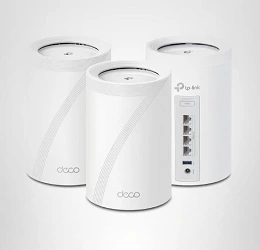
We added this because it addresses the single biggest limitation of a single router: no matter how powerful, it struggles with multi-floor homes and thick-walled older houses.
Range testing across the industry in 2026 consistently shows mesh systems outperforming standalone routers once you’re dealing with more than one floor or beyond roughly 2,000–2,500 square feet.
The Deco BE63 (also called the Deco 7 Pro) is TP-Link’s value play in Wi-Fi 7 mesh. Each node delivers tri-band speeds, Multi-Link Operation (MLO) for more stable connections, and four 2.5 Gbps Ethernet ports per unit, genuinely rare at this price point.
You can run wired or wireless backhaul between nodes, and the system intelligently steers your devices to the best band and node as you move through your home.
Setup is entirely app-based through the Deco app, which is refreshingly simple: plug in the first node, scan the QR code, and add additional nodes as prompted. For a 5–6 bedroom home, the 3-pack genuinely fills dead zones that any single router, including the premium options below, would struggle with.
Specs at a Glance
| Spec | Detail |
|---|---|
| Wi-Fi Standard | Wi-Fi 7 Tri-Band (BE10000) |
| Bands | 6 GHz (5,188 Mbps) + 5 GHz (4,324 Mbps) + 2.4 GHz (574 Mbps) |
| Ports per node | 4× 2.5G Ethernet + USB 3.0 |
| Coverage | 2,500–7,600 sq ft depending on pack size |
| Device Capacity | 200+ |
| Backhaul | Wired + wireless (simultaneous) |
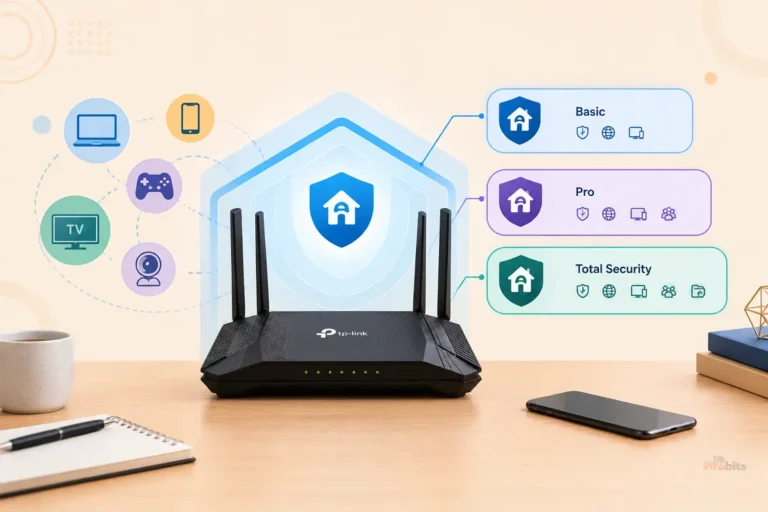
| Security | HomeShield (free tier + paid tiers) |
Pros
- Genuinely eliminates dead zones in multi-story and large homes
- Wi-Fi 7 with MLO for more stable, lower-latency connections
- Four 2.5G ports per node, unusual generosity at this price
- App setup is approachable for total beginners
- Mixes and matches with other Deco models for future expansion
- Built-in VPN client support alongside HomeShield security
Cons
- Significantly more expensive than a single router, especially the 3-pack
- Full configuration only available through the mobile app, not a desktop browser
- No dedicated wireless backhaul band; heavy mesh traffic can compete with client bandwidth if you skip wired backhaul
- Overkill for apartments or single-floor homes under 1,500 sq ft
Who Should Buy This?
Anyone in a home over 2,500 sq ft, a multi-story house, or a property with thick walls and persistent dead zones. Also a smart pick for anyone future-proofing toward Wi-Fi 7 devices.
Who Should Avoid This?
Renters, apartment dwellers, or anyone in a single-floor home under 1,500 sq ft: you’re paying for coverage you don’t need. A single router from this list will serve you just as well for less money.
Related: Mesh Network vs Router: Which Setup Is Best for You?
2. TP-Link Archer AX72 Pro: Best Single-Router Performance
Price range: ~$110–140 | Wi-Fi Standard: Wi-Fi 6 (AX5400) | Coverage: Up to 2,800 sq ft
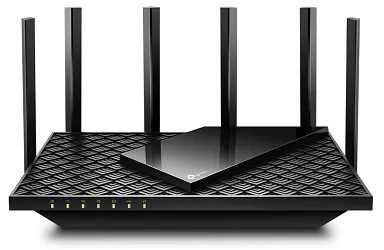
If you want the best possible range from one box, no mesh, no extra nodes, the Archer AX72 Pro remains the strongest pick in this category, and we’re keeping it as our top single-router recommendation from the tested list.
Six high-performance antennas with active beamforming focus the signal toward your devices rather than broadcasting it uniformly, which is precisely what matters for range.
Combined with up to 4,804 Mbps on the 5 GHz band and a 2.5 Gbps WAN/LAN port, it’s well-matched to most fiber and cable plans available in the US, UK, Canada, Australia, and New Zealand.
OFDMA and MU-MIMO keep multiple devices from bottlenecking each other, and built-in VPN client/server support is a nice bonus most competitors at this price skip.
Both Alexa and Google Assistant work for voice control, which is broader compatibility than most TP-Link models offer.
Specs at a Glance
| Spec | Detail |
|---|---|
| Wi-Fi Standard | Wi-Fi 6 (AX5400) |
| 5 GHz Speed | Up to 4,804 Mbps |
| 2.4 GHz Speed | Up to 574 Mbps |
| Ports | 2.5G WAN/LAN + 3× 1G LAN + USB 3.0 |
| Antennas | 6 high-performance, with beamforming |
| Coverage | Up to 2,800 sq ft |
| Voice Assistants | Alexa + Google Assistant |
Pros
- Six antennas with beamforming deliver genuinely strong single-router range
- 2.5G WAN/LAN port supports faster-than-gigabit ISP plans
- Both VPN client and server support built in
- Strong wired throughput alongside wireless performance
- Works with Alexa and Google Assistant
- QoS and real-time network insights via the Tether app
Cons
- Wi-Fi 6 rather than Wi-Fi 7, fine for now, less future-proof
- Single-router coverage still has limits in multi-floor homes
- No 6 GHz band (that requires Wi-Fi 6E or 7)
Who Should Buy This?
Anyone who specifically wants a single router (not mesh) with the best possible range, especially in a 1-3 story home under 2,800 sq ft.
Who Should Avoid This?
Homes over 3,000 sq ft or with significant structural interference; you’ll likely still have dead zones and should consider the Deco BE63 instead.
Related: How to Boost WiFi Signal at Home or Office?
3. NETGEAR Nighthawk RAXE500 : Best Premium Single Router
Price range: ~$280–330 | Wi-Fi Standard: Wi-Fi 6E Tri-Band (AXE11000) | Coverage: Up to 3,500 sq ft
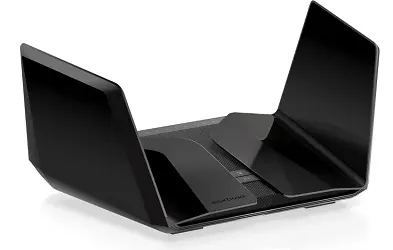
The RAXE500 remains on our list because it’s still sold new through NETGEAR, Amazon, and CDW, and it remains genuinely capable for long-range, dense-device homes, though we should flag that NETGEAR has since released Wi-Fi 7 successors (the RS300 and RS500 series), so this is now better thought of as a value-tier premium pick rather than NETGEAR’s current flagship.
What makes it relevant for range specifically: eight high-performance antennas in NETGEAR’s distinctive wing-shaped design, a 1.8 GHz quad-core processor, and tri-band Wi-Fi 6E with a dedicated 6 GHz band that reduces congestion in device-dense homes.
NETGEAR rates it for 5–6 bedroom homes and up to 60 connected devices, and real owner reviews back up strong performance reaching into backyards and across multiple floors.
NETGEAR Armor adds a real cybersecurity layer (30-day trial, subscription after), and the router is compatible with NETGEAR’s mesh extenders if you eventually need to bridge a stubborn dead zone.
Specs at a Glance
| Spec | Detail |
|---|---|
| Wi-Fi Standard | Wi-Fi 6E Tri-Band (AXE11000) |
| Combined Speed | Up to 10.8 Gbps |
| Antennas | 8 high-performance |
| Processor | 1.8 GHz quad-core |
| Ports | 4× 1G + 1× 2.5G + 2× USB 3.0 |
| Coverage | Up to 3,500 sq ft |
| Device Capacity | 60 |
Pros
- Eight antennas and tri-band design deliver excellent single-router range
- Dedicated 6 GHz band reduces interference in crowded networks
- NETGEAR Armor provides genuine, ongoing security monitoring
- Compatible with NETGEAR mesh extenders for future expansion
- Strong real-world reviews citing backyard and multi-room coverage
- Supports VPN, guest networks, and detailed parental controls
Cons
- Wi-Fi 6E, not Wi-Fi 7; NETGEAR’s own newer models have leapfrogged it
- NETGEAR Armor’s full feature set requires an ongoing subscription
- Pricier than the AX72 Pro without a dramatic range advantage for most homes
- Some users report needing an extender for the farthest rooms anyway
Who Should Buy This?
Power users with 40+ connected devices who want tri-band separation and don’t mind paying a premium for it, especially if you already have NETGEAR mesh hardware or plan to add it later.
Who Should Avoid This?
Budget-conscious buyers, or anyone wanting the latest Wi-Fi 7 standard; the RS300 (see our upgrade pick below) is a better long-term bet at a similar price.
4. ASUS RT-AX55 : Best Value for Money
Price range: ~$60–80 | Wi-Fi Standard: Wi-Fi 6 (AX1800) | Coverage: Up to 3,000 sq ft
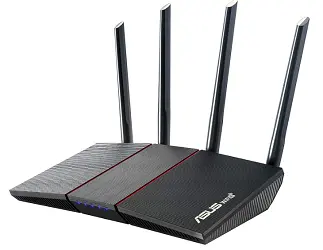
The RT-AX55 continues to be one of the best value plays in long-range routers, and we’re preserving it from the original list because nothing we found at this price point beats it on coverage-per-dollar.
A 1.5 GHz quad-core processor drives Wi-Fi 6 efficiency improvements that translate directly into better real-world range and stability, even though the headline speed (1,800 Mbps combined) is modest by 2026 standards.
MU-MIMO and OFDMA prevent the congestion that kills range and reliability in busy households.
ASUS includes AiProtection Classic (powered by Trend Micro) at no extra ongoing cost; a meaningful advantage over NETGEAR and TP-Link’s subscription-gated security tiers.
ASUS Instant Guard adds one-tap VPN protection for mobile use, and the whole thing is manageable through the ASUS Router App.
Specs at a Glance
| Spec | Detail |
|---|---|
| Wi-Fi Standard | Wi-Fi 6 (AX1800) |
| Combined Speed | Up to 1,800 Mbps |
| Processor | 1.5 GHz quad-core |
| Coverage | Up to 3,000 sq ft |
| Security | AiProtection Classic (free) |
| Voice Assistant | Alexa compatible |
Pros
- Excellent coverage-to-price ratio
- Free, ongoing AiProtection Classic security (no subscription needed)
- ASUS Instant Guard gives free one-tap VPN for travel
- MU-MIMO and OFDMA improve real-world reliability under load
- Simple setup and management via ASUS Router App
Cons
- 1,800 Mbps combined speed is low compared to newer Wi-Fi 6 routers
- Only 4 antennas, less beamforming precision than premium options
- No 2.5G port, gigabit-only wired connections
- Less ideal for homes with 30+ connected devices
Who Should Buy This?
Budget-conscious buyers in mid-size homes (up to 3,000 sq ft) who want solid range and genuinely useful free security software.
Who Should Avoid This?
Households with many simultaneous 4K streams or 30+ devices; you’ll want the extra headroom of the AX72 Pro or RAXE500.
Related: What’s MU-MIMO & How Does It Work?
5. TP-Link Archer AX21 : Best Budget Pick
Price range: ~$50–65 | Wi-Fi Standard: Wi-Fi 6 (AX1800) | Coverage: Up to 2,500 sq ft
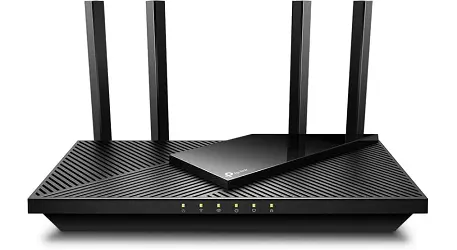
The Archer AX21 stays on our list as the entry point into genuinely capable Wi-Fi 6 range performance.
At under $65 in most markets, it delivers combined speeds up to 1.8 Gbps (1,200 Mbps on 5 GHz + 574 Mbps on 2.4 GHz), modest by flagship standards, but more than sufficient for typical browsing, streaming, and remote work in small-to-medium homes.
Four high-gain antennas with beamforming and an advanced FEM (front-end module) chipset give it better real-world range than its budget price suggests.
OFDMA and MU-MIMO handle multiple simultaneous device connections without the congestion that kills perceived “range” in busy households (a slow connection at distance often looks like a range problem when it’s really a congestion problem).
It also includes OpenVPN and PPTP VPN server support, WPA3 security, and Alexa compatibility, features you wouldn’t expect at this price tier just a couple of years ago.
Specs at a Glance
| Spec | Detail |
|---|---|
| Wi-Fi Standard | Wi-Fi 6 (AX1800) |
| 5 GHz Speed | Up to 1,200 Mbps |
| 2.4 GHz Speed | Up to 574 Mbps |
| Antennas | 4 high-gain, with beamforming |
| Coverage | Up to 2,500 sq ft |
| Security | WPA3, OpenVPN/PPTP server |
Pros
- Genuinely strong value for Wi-Fi 6 range performance
- WPA3 security included at this price point
- VPN server support for secure remote access
- Easy setup via Tether app or web interface
- Works with all major ISPs (modem required)
Cons
- Wi-Fi 6 spec is on the lower end (AX1800 vs AX3000+ alternatives)
- Coverage drops noticeably beyond 2,500 sq ft or through multiple floors
- Only 4 antennas limit beamforming precision compared to 6-8 antenna models
Who Should Buy This?
First-time WiFi 6 buyers, renters, or anyone in an apartment or small-to-medium home who wants reliable range without spending over $65.
Who Should Avoid This?
Large homes, multi-story properties, or households with 20+ connected smart devices.
6. TP-Link Archer A8 : Best Ultra-Budget Pick
Price range: ~$35–50 | Wi-Fi Standard: Wi-Fi 5 (AC1900) | Coverage: Up to 2,500 sq ft
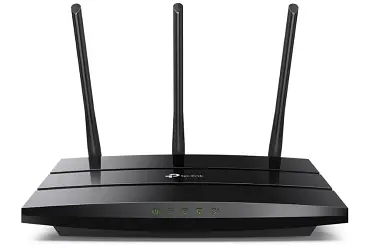
We’re keeping the Archer A8 in this guide, though with an honest caveat: it’s a Wi-Fi 5 router in a Wi-Fi 6/6E/7 market, and that matters more for efficiency and future device compatibility than it does for pure long-range performance.
If your budget is genuinely tight and you mainly need stable coverage rather than cutting-edge speed, it’s still a sound, no-frills choice.
Combined speeds up to 1.9 Gbps (600 Mbps on 2.4 GHz + 1,300 Mbps on 5 GHz) cover typical streaming and browsing comfortably.
MU-MIMO and Beamforming help direct that signal where you need it, and Airtime Fairness keeps older, slower devices from dragging down the whole network, a smart inclusion for households still running a mix of old and new hardware.
OneMesh compatibility means you can add a TP-Link extender later without replacing the router, which softens the long-term downside of buying budget hardware now.
Specs at a Glance
| Spec | Detail |
|---|---|
| Wi-Fi Standard | Wi-Fi 5 (AC1900) |
| 5 GHz Speed | Up to 1,300 Mbps |
| 2.4 GHz Speed | Up to 600 Mbps |
| Ports | 1 WAN + 4 Gigabit LAN |
| Coverage | Up to 2,500 sq ft |
| Mesh Expansion | OneMesh compatible |
Pros
- Lowest price point in this guide
- OneMesh lets you add coverage later without replacing the router
- Airtime Fairness prevents older devices from slowing the network
- Full gigabit wired ports for stable device connections
- Simple Tether app or web-based setup
Cons
- Wi-Fi 5, not Wi-Fi 6, noticeably behind current efficiency standards
- No WPA3 support (WPA2 only)
- Will feel limiting as you add more modern smart home devices over the next few years
Who Should Buy This?
Light internet users on a strict budget, or anyone needing a reliable, no-frills secondary router (e.g., for a guest house, garage, or workshop).
Who Should Avoid This?
Anyone planning to add many Wi-Fi 6/6E/7 smart devices in the next 1–2 years; you’ll likely outgrow this router faster than the others on this list.
7. NETGEAR Nighthawk RS300: Best Wi-Fi 7 Upgrade Pick
Price range: ~$200–250 | Wi-Fi Standard: Wi-Fi 7 Tri-Band (BE9300) | Coverage: Up to 2,500 sq ft
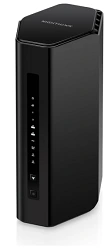
We added this as an upgrade pick for readers who want Wi-Fi 7 performance and NETGEAR’s security ecosystem, but don’t want to commit to a multi-node mesh system.
It’s effectively NETGEAR’s answer for buyers who would have considered the RAXE500 a year or two ago and now want the newer standard instead.
Tri-band Wi-Fi 7 with a dedicated 6 GHz band reduces congestion the same way the RAXE500 does, but with Wi-Fi 7’s Multi-Link Operation and 4K-QAM modulation layered on top for better efficiency and lower latency at range.
It supports up to 100 devices, which covers all but the most extreme smart-home setups, and includes a 2.5 Gig internet port for multi-gig ISP plans.
NETGEAR bundles a year of NETGEAR Armor and free expert setup help, which is a genuinely useful inclusion if router configuration isn’t your thing.
Note: Check current availability and exact model variant; NETGEAR’s Wi-Fi 7 lineup includes RS300, RS500, and BE17000 at different price/performance tiers; the RS300 is the closest match to RAXE500’s original positioning.
Specs at a Glance
| Spec | Detail |
|---|---|
| Wi-Fi Standard | Wi-Fi 7 Tri-Band (BE9300) |
| Combined Speed | Up to 9.3 Gbps |
| Coverage | Up to 2,500 sq ft |
| Device Capacity | 100 |
| Ports | 2.5 Gig internet port |
| Security | 1-year NETGEAR Armor included |
Pros
- Wi-Fi 7 with MLO and 4K-QAM for better range efficiency than Wi-Fi 6E
- 2.5 Gig internet port ready for faster-than-gigabit ISP plans
- 1-year NETGEAR Armor included, plus free expert help
- Supports up to 100 connected devices
Cons
- Coverage rating (2,500 sq ft) is lower than the older RAXE500’s 3,500 sq ft claim; single-router range didn’t dramatically improve with Wi-Fi 7 alone
- Premium price for a single router; the Deco BE63 single-node costs less and is expandable
- NETGEAR Armor reverts to a paid subscription after the first year
Who Should Buy This?
NETGEAR loyalists or anyone wanting Wi-Fi 7 efficiency and NETGEAR’s security ecosystem without buying into a full mesh system.
Who Should Avoid This?
Anyone prioritizing maximum raw coverage per dollar; the RT-AX55 or AX72 Pro deliver more square footage for less money, just on the older Wi-Fi 6 standard.
Comparison Table: All 7 Routers Side by Side
| Router | Price | Wi-Fi Standard | Coverage | Antennas | Best For |
|---|---|---|---|---|---|
| TP-Link Deco BE63 (3-pack) | ~$400–450 | Wi-Fi 7 Mesh | Up to 7,600 sq ft | 8 (across nodes) | Large/multi-story homes |
| TP-Link Archer AX72 Pro | ~$110–140 | Wi-Fi 6 | Up to 2,800 sq ft | 6 | Single-router performance |
| NETGEAR RAXE500 | ~$280–330 | Wi-Fi 6E | Up to 3,500 sq ft | 8 | Premium single router |
| ASUS RT-AX55 | ~$60–80 | Wi-Fi 6 | Up to 3,000 sq ft | 4 | Best value |
| TP-Link Archer AX21 | ~$50–65 | Wi-Fi 6 | Up to 2,500 sq ft | 4 | Budget |
| TP-Link Archer A8 | ~$35–50 | Wi-Fi 5 | Up to 2,500 sq ft | 4 | Ultra-budget |
| NETGEAR RS300 | ~$200–250 | Wi-Fi 7 | Up to 2,500 sq ft | N/A (internal) | Wi-Fi 7 upgrade, no mesh |
Key insight: Coverage claims on the box assume open, obstacle-free space. Real homes with walls, floors, and appliances typically see 30-50% less effective range. When in doubt, size up or go mesh.
Complete Buying Guide: How to Choose the Right Long-Range Router
Step 1: Measure your actual space honestly
Don’t just use total square footage; factor in floors, walls, and layout. A 2,000 sq ft single-story open floor plan behaves very differently than a 2,000 sq ft three-story townhouse.
As a rule of thumb, subtract roughly 30% from a manufacturer’s coverage claim for a realistic estimate in a typical home with interior walls.
Step 2: Decide between single router and mesh
| Home type | Recommendation |
|---|---|
| Apartment or single floor under 1,500 sq ft | Single router (AX21, A8, or RT-AX55) |
| Single floor, 1,500–2,800 sq ft, few walls | Single router (AX72 Pro or RAXE500) |
| Multi-story or 2,800+ sq ft | Mesh system (Deco BE63) |
| Irregular layout, lots of dead zones already | Mesh system, regardless of square footage |
Step 3: Check your router frequency needs
- 2.4 GHz travels farthest through walls but is slower and more prone to interference from microwaves, baby monitors, and neighboring networks
- 5 GHz is faster but loses range faster through obstacles
- 6 GHz (Wi-Fi 6E/7) is fastest and least congested, but has the shortest range of the three, best for rooms close to the router or mesh node
If your dead zones are far from the router, prioritize routers with strong 2.4 GHz performance and high-gain antennas rather than chasing 6 GHz speed numbers.
Related: WiFi 6 Vs WiFi 7: What’s the Real Difference?
Step 4: Match speed to your actual internet plan
There’s no point buying a router rated for 10 Gbps if your ISP plan tops out at 300 Mbps. Check your plan speed first, then choose a router that meets or modestly exceeds it.
The extra headroom mostly benefits local network transfers (NAS, gaming, file sharing) rather than internet speed itself.
Step 5: Consider your device count
Modern households often have 20-40+ connected devices once you count phones, laptops, smart speakers, cameras, thermostats, and streaming devices.
Routers with MU-MIMO and OFDMA (all routers in this guide) handle this far better than older hardware, but very dense homes (40+) benefit from the higher device-capacity ratings of the RAXE500, Deco BE63, or RS300.
How to Optimize Router Performance for Long-Range
Router Positioning
Central, elevated placement remains the single most impactful free change you can make. Avoid corners, closets, and locations near metal appliances or thick masonry walls, which absorb or reflect signal.
If you have a multi-story home and a single router, placing it on the middle floor (not the basement) typically gives the most balanced coverage.
Wireless Channel Selection
Default channels are often crowded, especially in apartment buildings or dense neighborhoods.
Most router apps (TP-Link Tether, ASUS Router App, Nighthawk, Deco) include a built-in channel-scanning tool, or you can use a third-party WiFi analyzer app on your phone to find the least congested channel manually.
Related: How to Choose the Best WiFi Channel for Faster Speeds
Regular Firmware Updates
Manufacturers continue to release performance and security patches well after a router ships. Enable automatic updates wherever the option exists; if not, check manually every 1-2 months.
Antenna Angle Adjustment
For routers with external antennas (AX72 Pro, RAXE500, AX21), try angling antennas in different directions rather than all pointing straight up; this can meaningfully improve coverage in multi-story homes by spreading signal both horizontally and vertically.
Additional Tools to Extend Router Range
Wi-Fi Range Extenders
Cost-effective and simple, range extenders rebroadcast your existing signal into hard-to-reach areas.
They work best placed roughly midway between your router and the dead zone; too close to the dead zone and they have nothing strong to extend; too close to the router and they don’t add meaningful reach.
Dual-band extenders compatible with your router brand (TP-Link OneMesh, NETGEAR mesh extenders) integrate more seamlessly than generic third-party units.
Mesh Wi-Fi Systems
As covered above, mesh systems like the Deco BE63 solve range problems at the architecture level rather than patching them after the fact.
Multiple nodes share a single network name, hand off your devices automatically as you move through the house, and are generally easier to manage via app than a router-plus-extender combination.
Powerline Networking Kits
An underrated option for older homes with thick walls or unusual layouts where WiFi alone struggles.
Powerline adapters use your existing electrical wiring to carry a network signal between rooms, then broadcast WiFi locally from each adapter.
Performance varies more than mesh or extenders depending on your home’s electrical wiring age and quality, but it’s worth testing if you’ve tried everything else.
Common Mistakes to Avoid
1. Buying based on headline speed numbers alone: A router advertising “10.8 Gbps” doesn’t mean your devices will ever see that speed; it’s the theoretical combined total across all bands.
For range specifically, antenna count, beamforming, and band management matter more than the big number on the box.
2. Assuming more expensive always means better range: The NETGEAR RAXE500 costs roughly 3x the ASUS RT-AX55, but in many typical homes, the range difference is smaller than the price difference suggests.
Extra cost often buys device capacity, premium security software, and future-proofing, not necessarily more square footage of usable signal.
3. Ignoring placement in favor of buying more hardware: We’ve seen people buy a second router or extender to fix a dead zone that placement alone would have solved.
Try repositioning your existing router centrally and elevated before assuming you need new equipment.
4. Sticking with a single router in a large, multi-story home: If you’ve already tried a strong single router and still have dead zones, more antennas on another single router likely won’t fix a fundamentally architectural problem.
This is exactly the scenario mesh systems were designed for.
5. Forgetting to update firmware after setup: A router that’s never been updated since the day it was unboxed is missing both security patches and the performance and stability improvements manufacturers ship over a product’s lifecycle.
Related: A Beginner’s Guide to Setting Up a Router in Your Home
Expert Tips
- Test before you commit to placement. Use your phone’s WiFi signal indicator (or a free app like NetSpot or WiFi Analyzer) to walk through your home and map weak spots before deciding on final router or mesh node placement.
- Don’t ignore the 2.4 GHz band on dual/tri-band routers. It’s tempting to disable it in favor of faster bands, but 2.4 GHz remains your best tool for reaching distant rooms and is essential for many smart home devices (thermostats, doorbells, plugs) that only support 2.4 GHz anyway.
- If using a mesh system, prioritize wired backhaul wherever possible. As the Deco BE63’s own testing notes show, mesh systems without a dedicated wireless backhaul band perform meaningfully better when nodes are connected via Ethernet rather than relying purely on wireless mesh links.
- Reboot routers monthly. Long-running routers accumulate memory bloat over weeks of continuous operation; a simple reboot often resolves mysterious slowdowns that look like range problems but aren’t.
- Match extenders or mesh add-ons to your router brand when possible. Cross-brand range extenders work, but proprietary systems (TP-Link OneMesh, NETGEAR mesh extenders, ASUS AiMesh) hand off devices between units more smoothly than generic third-party hardware.
Conclusion
Range problems are frustrating because they feel inconsistent. Fine in one room, unusable in another. But the underlying causes are usually identifiable: distance, walls, floors, and hardware that wasn’t designed to push a signal that far.
- Large or multi-story home → TP-Link Deco BE63 mesh system
- Best single-router range → TP-Link Archer AX72 Pro
- Premium single router, dense device count → NETGEAR Nighthawk RAXE500
- Best overall value → ASUS RT-AX55
- Tightest budget, still Wi-Fi 6 → TP-Link Archer AX21
- Absolute lowest cost → TP-Link Archer A8
- Want Wi-Fi 7 without going full mesh → NETGEAR Nighthawk RS300
Whichever you choose, remember that placement and firmware updates are free range upgrades that cost nothing; try those first, and let your router choice fill in the gaps placement alone can’t fix.
Quick Picks Summary
| Product | Assigned Category |
|---|---|
| TP-Link Deco BE63 (Mesh) | Best Overall for Large Homes |
| TP-Link Archer AX72 Pro | Best Single-Router Performance |
| NETGEAR Nighthawk RAXE500 | Best Premium Single Router |
| ASUS RT-AX55 | Best Value for Money |
| TP-Link Archer AX21 | Best Budget Pick |
| TP-Link Archer A8 | Best Ultra-Budget Pick |
| NETGEAR Nighthawk RS300 | Best Wi-Fi 7 Upgrade Pick |
Frequently Asked Questions
What makes a router “long-range” specifically?
Long-range performance comes from a combination of antenna count and quality, beamforming technology (which focuses the signal toward connected devices), transmit power, and band management. It’s not the same thing as raw speed; a router can have impressive speed ratings up close but weak range, or vice versa.
Is a mesh system always better than a single router for range?
Not always. For homes under roughly 2,000–2,500 sq ft on a single floor, a strong single router with good antennas and beamforming can match mesh performance for less money. Mesh systems pull ahead in multi-story homes, large or irregularly shaped properties, or homes with unusually thick interior walls.
Does WiFi 7 actually improve range, or just speed?
Wi-Fi 7’s main advantages- Multi-Link Operation, 4K-QAM, wider channels – primarily improve speed and latency rather than raw range. A Wi-Fi 7 single router doesn’t automatically out-range a well-designed Wi-Fi 6 router; antenna design and beamforming still matter more for distance.
Which frequency band travels farthest?
2.4 GHz travels farthest through walls and obstacles, but at slower speeds and with more interference from other devices. 5 GHz is faster but loses range more quickly through obstacles, and 6 GHz (Wi-Fi 6E/7) has the shortest range of the three despite being the fastest.
How much coverage do I actually need for my home?
As a rule of thumb, take your home’s total square footage and add roughly 30% to account for walls, floors, and obstacles when comparing it to a manufacturer’s stated coverage area; most coverage claims are based on open, obstacle-free testing conditions.
Can I mix a router and range extender from different brands?
Yes, generally, most extenders support the standard WiFi protocols and work across brands. However, same-brand extenders (especially proprietary mesh systems like TP-Link OneMesh or NETGEAR mesh extenders) typically offer smoother device handoff and centralized management than mixed-brand setups.
Is it worth buying a premium router like the RAXE500 just for range?
Only if you also need its other features, tri-band separation for device-dense homes, NETGEAR Armor security, or 60-device capacity. If range is your only concern and your home is under 2,800 sq ft, the more affordable AX72 Pro or RT-AX55 often perform similarly for the actual distance involved.
How do I know if I need a mesh system instead of just a better router?
If you’ve already tried central, elevated placement with a capable single router (6+ antennas, beamforming) and still have persistent dead zones, especially on different floors, that’s a strong sign your home’s layout calls for a mesh system rather than an even more powerful single router.
Do range extenders slow down my internet speed?
Slightly, yes, especially single-band extenders, which split their bandwidth between communicating with the router and broadcasting to your devices. Dual-band extenders and proper mesh systems minimize this penalty significantly compared to older single-band extender technology.
What is the best long-range WiFi router for a large home in 2026?
For large or multi-story homes, the TP-Link Deco BE63 mesh system is the strongest choice, covering up to 7,600 sq ft in its 3-pack configuration. For a single-router solution, the TP-Link Archer AX72 Pro offers the best range performance without mesh.
Does a higher WiFi standard (Wi-Fi 7 vs Wi-Fi 6) mean better range?
Not necessarily. Newer WiFi standards mainly improve speed, efficiency, and latency rather than raw transmission range. Antenna count, beamforming technology, and band management have a bigger direct impact on how far a signal travels than the WiFi generation alone.
What’s the most affordable long-range router that’s still reliable in 2026?
The TP-Link Archer AX21 offers strong long-range performance for around $50–65, making it the best budget pick for apartments and small-to-medium homes. The TP-Link Archer A8 is even more affordable but uses the older Wi-Fi 5 standard.
How far can a typical long-range router reach?
Manufacturer claims typically range from 2,500 to 3,500 square feet for single routers, but real-world performance is usually 30-50% less once walls, floors, and interference are factored in. Mesh systems extend effective range much further by adding additional access points throughout the home.
Can I improve my router’s range without buying new hardware?
Yes. Central, elevated placement, selecting a less congested wireless channel, keeping firmware updated, and adjusting antenna angles are all free changes that can meaningfully improve range before you need to invest in new equipment.
What’s the difference between a range extender and a mesh system for improving WiFi range?
A range extender rebroadcasts your existing router’s signal into a new area, typically under a separate or extended network name, and can introduce some speed loss. A mesh system uses multiple coordinated nodes under a single network name with automatic device handoff, generally providing more seamless and reliable whole-home coverage, especially in larger or multi-story properties.
Found this useful? Bookmark this page, share it with someone fighting their own dead zones, and sign up for our free newsletter for more practical networking guidance.
Disclosure: If you follow our links to a retailer’s website and make a purchase, we will get an affiliate commission on some, but not all, of the items or services we promote. This will cause no price change for you.