Mini-LED TV: How It Works, RGB Mini-LED, and Whether It’s Worth Buying
Quick answer: Mini-LED is a backlight technology for LCD TVs, monitors, laptops and tablets. Instead of a few dozen ordinary LEDs, the screen uses thousands of tiny LEDs grouped into “dimming zones” that can brighten or darken independently. The result is a brighter picture, better contrast and deeper blacks than a regular LED TV. Mini-LED is still an LCD, so it can’t switch off individual pixels the way OLED can, and you may notice a faint glow (blooming) around bright objects on dark backgrounds.
If you’ve shopped for a TV recently, you’ve probably hit a wall of labels like Mini-LED, QLED, Neo QLED, QNED, ULED, and now RGB Mini-LED and Micro RGB. It’s confusing, and some of it is marketing.
This guide strips it back. You’ll learn what mini-LED actually is, how it works, where it beats OLED, where it doesn’t, and how to tell whether a “mini-LED” TV in a store is the real deal.
What Is Mini-LED?
Mini-LED is a backlight upgrade for LCDs. It is not a new kind of screen.
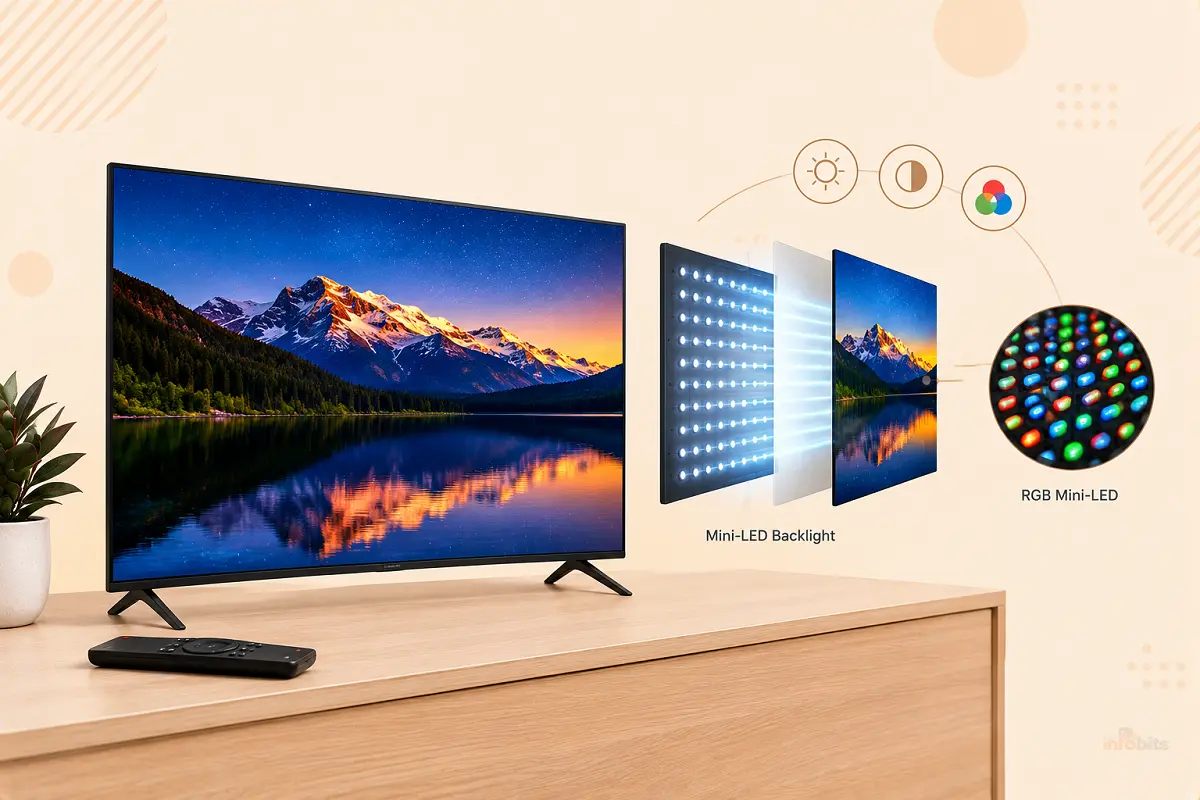
A normal LED TV has an LCD panel at the front and a backlight behind it. The LCD acts like a shutter, letting light through or blocking it to form the picture. In a mini-LED set, that backlight is made of thousands of very small LEDs, each a fraction of a millimetre across, instead of dozens of regular-sized ones.
The word “mini” refers to the LEDs, not the TV. A mini-LED TV can be 43 inches or 98 inches.
Because the LEDs are so small, manufacturers can fit thousands of them behind the panel and group them into local dimming zones. Each zone can be turned up, dimmed, or switched off on its own.
How Does Mini-LED Work?
Here’s the process, step by step:
- The TV analyzes each frame. The processor works out which parts of the picture are bright and which are dark.
- It assigns brightness to each zone. A zone behind a bright sun gets full power. A zone behind a black night sky dims or switches off.
- The LCD layer shapes the picture. The liquid-crystal panel in front blocks or passes light pixel by pixel to produce the final image.
- Color layers do their work. Most mini-LED TVs use a blue backlight and a quantum dot layer to produce red and green. Samsung sells this as Neo QLED. Others label it QD-Mini LED.
More zones mean more precise control. That’s why zone count is the first spec people compare, though it isn’t the only one that matters, as you’ll see below.
Local Dimming Zones and Blooming
Dimming happens by zone, not by pixel. A zone covers a patch of the screen containing thousands of pixels. When a small bright object (a subtitle, a star, a mouse cursor) sits on a dark background, the whole zone behind it lights up. That leaks light into the surrounding dark area, creating a soft halo. This is blooming, also called the halo effect.
Research on mini-LED LCDs confirms the limitation. Smaller zones shrink the halo, but zone dimming is never pixel-level, so haloing never disappears completely.
How many zones do you need?
There’s no magic number, but here’s a practical rule of thumb:
| Zone count | What to expect |
|---|---|
| Under ~500 | Blooming is easy to spot in dark scenes |
| ~500 to 1,000 | Better, but subtitles and bright objects still glow |
| 1,000+ | Blooming becomes much less distracting for most people |
| Thousands (premium sets) | Very controlled, especially with a good processor |
Treat these as guidelines. A TV with fewer well-tuned zones can beat one with more zones and a lazy dimming algorithm. The processor, the lens and diffuser design, and the firmware all affect what you actually see.
Tip: Judge blooming at your normal brightness, in a room that looks like yours. Showroom “vivid” mode hides problems and exaggerates strengths.
Mini-LED vs Regular LED, Full-Array and Edge-Lit
| Feature | Edge-lit LED | Full-array LED | Mini-LED |
|---|---|---|---|
| LED position | Along the edges | Behind the screen | Behind the screen |
| LED size | Standard | Standard | Very small |
| Dimming zones | Few, or none | Dozens to hundreds | Hundreds to thousands |
| Contrast | Basic | Good | Very good |
| Blooming | Often noticeable | Noticeable | Reduced |
| Typical price | Lowest | Mid | Mid to high, now often affordable |
In short, mini-LED is an advanced form of full-array local dimming. The big change is how many zones the TV can control.
Decoding the Marketing Names
Brands love their own labels. Here’s what they usually mean:
- Neo QLED (Samsung): Mini-LED backlight plus quantum dots.
- QNED (LG): Mini-LED backlight plus LG’s NanoCell color layer.
- QD-Mini LED / SQD-Mini LED (TCL): Mini-LED backlight plus quantum dots. SQD is TCL’s newer version with a refined color filter.
- ULED / Mini-LED ULED (Hisense): Hisense’s name for its mini-LED sets.
- RGB Mini-LED, Micro RGB, True RGB: Newer designs with red, green, and blue LEDs in the backlight (more below).
Not every product labeled “mini-LED” performs the same. Independent reviewers have flagged cases where a 2026 model’s marketing and its real hardware didn’t match up well. Always read independent reviews rather than relying on the box.
If the whole QLED/NanoCell alphabet soup is new to you, our guide on NanoCell vs OLED covers how those color layers compare.
Mini-LED vs OLED: Which Is Better?
It depends on your room and your habits. Neither wins everywhere.
| Mini-LED | OLED | |
|---|---|---|
| How light is made | LCD with an LED backlight | Each pixel makes its own light |
| Black levels | Very good, with some blooming | Perfect, pixels turn fully off |
| Peak brightness | Very high | High on 2026 flagships, but lower for large bright areas |
| Bright rooms | Excellent | Good, but can struggle in direct sun |
| Viewing angles | Depends on panel type (VA or IPS) | Excellent |
| Burn-in risk | Not an OLED-style risk | Possible with static images over time |
| Giant screens (85″+) | Widely available, better value | Rare and expensive |
| Price per inch | Usually lower | Usually higher |
Choose mini-LED if:
- Your TV sits in a bright, sunny living room.
- You watch lots of sports, news, or gaming with static logos and score bars.
- You want 75 inches or bigger without a flagship-sized price tag.
Choose OLED if:
- You watch mostly in a dim or dark room.
- You care most about perfect blacks and wide viewing angles.
- You’re sensitive to halos around bright objects.
Worried about screen retention on OLED? Our explainer on OLED burn-in covers what’s real and what’s hype. Not sure about panel types? See IPS vs VA panels for how viewing angles and contrast differ.
RGB Mini-LED, Micro RGB and True RGB: What’s New in 2026
This is the biggest shift in mini-LED since it launched, and the labels are confusing.
Standard mini-LED uses a blue (or white) backlight and a color-conversion layer to make red and green.
RGB Mini-LED skips that step. The backlight itself contains separate red, green, and blue LEDs, each controlled independently. The result is purer color and a wider color range, with less color bleed.
You’ll also see:
- Micro RGB (Samsung’s branding) and Mini RGB evo (LG’s branding)
- True RGB (Sony’s branding)
- TriChroma (earlier Hisense branding)
These share the same core idea. Means red, green, and blue light sources behind an LCD, but execution and zone counts differ by brand.
Analysts reported that RGB Mini-LED TVs only began reaching store shelves in early 2026. Prices are high, and some entry-level models may not use true red, green, and blue emitters at all, so check the specs.
One honest note: an RGB backlight uses three LEDs per spot, so for the same processor, the number of independently controlled zones can be lower than with a white or blue backlight. Early tests show RGB sets win on brightness and color but can still show some halo.
Mini-LED vs Micro LED: not the same thing
This trips up a lot of shoppers. Mini-LED is a backlight behind an LCD. Micro LED is a true self-emissive display, where each tiny LED is a pixel, like OLED but using inorganic materials. Micro LED TVs exist but cost far more than mainstream sets.
To make things murkier, some brands now put “micro” in the name of RGB backlight products that are still LCDs. If a TV has a backlight and an LCD layer, it isn’t true self-emissive Micro LED.
The Real Benefits of Mini-LED
- Higher brightness for HDR highlights and bright rooms
- Better contrast than regular LED TVs thanks to many zones
- No OLED-style burn-in, which is useful for gamers and news-heavy households
- Slimmer designs than older full-array sets
- Big sizes at friendlier prices, from budget 50-inch models up to 98-inch giants
- Strong gaming specs on many models, including 4K 144Hz and HDMI 2.1
Planning to game? Read our guide to HDMI 2.1, so you know which port to use.
The Downsides and Limits
- Blooming remains, especially with subtitles or bright objects on black
- Viewing angles can be weaker on VA-based panels, with contrast fading from the side
- Backlight tuning varies wildly between models and firmware versions
- Not a perfect black, because the backlight is still behind the LCD
- Marketing noise: “mini-LED” can describe anything from a budget set with a few hundred zones to a flagship with thousands
Myth vs Fact
| Myth | Fact |
|---|---|
| Mini-LED is the same as Micro LED | No. Mini-LED is an LCD backlight. Micro LED is self-emissive. |
| More zones always means a better picture | Not necessarily. Processing and tuning matter just as much. |
| Mini-LED has OLED-level blacks | It gets close in many scenes, but blooming remains. |
| Mini-LED TVs burn in like OLEDs | LCD backlights don’t suffer the same permanent pixel burn-in. |
| Mini-LED is always expensive | Entry-level models can be surprisingly affordable, especially during sales. |
| “Mini-LED” on the box guarantees great quality | Quality depends on zone count, tuning, panel type, and processing. |
Mini-LED in Monitors, Laptops and Tablets
Mini-LED isn’t only for TVs. Premium tablets, laptops, and gaming or creator monitors use it too, and the same compromises apply on a smaller scale.
On a monitor, blooming shows up around white text, cursors, and taskbars on dark backgrounds. Dark-mode apps expose it most. Many monitors let you adjust local dimming strength in the menu, and a medium setting often looks cleaner than “high.”
For desktop use, check these before buying:
- Zone count and how the monitor handles dark mode
- Whether local dimming can be turned off or reduced
- Whether the backlight dimming is flicker-free if you’re sensitive to flicker
If you’re deciding between a monitor and a TV for your desk, our guide on the difference between a monitor and a TV explains what you give up either way.
How to Choose a Mini-LED TV: A Practical Checklist
Use this list before you spend money.
- Match the TV to your room. Bright room: prioritize peak and full-screen brightness plus a good anti-glare screen. Dark room: prioritize black levels and consider OLED.
- Check independent reviews, not just spec sheets. Look for blooming tests, uniformity, and HDR performance.
- Look at the panel type. VA gives better contrast; IPS gives better viewing angles. Sit where you’d sit at home.
- Test with dark content. Use a film with dark scenes and white subtitles, and watch for halos.
- Check gaming features. Look for 4K at 120 or 144Hz, VRR, and HDMI 2.1 on more than one port.
- Check the smart platform. Google TV, Tizen, and webOS feel very different day to day. See webOS vs Tizen and Tizen vs Google TV.
- Know your size and distance. Bigger isn’t always better in a small room.
- Compare prices over time. Mini-LED prices drop fast during sales, and last year’s flagship is often a bargain.
Common Mistakes Buyers Make
- Buying on zone count alone
- Judging a TV in a bright showroom on “vivid” mode
- Assuming every “mini-LED” label means the same hardware
- Ignoring viewing angles when seating is off to the side
- Forgetting soundbars, because ultra-thin TVs have tiny speakers
- Using a cheap HDMI cable that can’t carry 4K 120Hz
Settings and Setup Tips That Make Mini-LED Look Better
- Pick Filmmaker, Cinema, or Movie mode instead of Vivid. It’s more accurate and usually reduces eye-catching halos.
- Lower local dimming strength if blooming bothers you, or raise it if black levels look washed out. Try both.
- Add soft bias lighting. A dim light behind the TV lowers the contrast between the screen and the wall, which makes halos less noticeable and reduces eye strain. A simple USB LED strip ( see the options on Amazon) on the back of the TV does the job.
- Use the right cable for gaming. For 4K at 120Hz, use a certified Ultra High Speed HDMI cable Highwings 8K 10K 4K HDMI Cable available on Amazon and plug it into the correct HDMI 2.1 port.
- Fix the sound. Many slim mini-LED TVs have modest speakers. A soundbar is the easiest upgrade, and our guide to soundbar placement shows where to put it. If your TV and soundbar use ARC, see the HDMI ARC vs eARC article for more information.
- Protect the set. A good surge protector is cheap insurance for a TV that costs hundreds or thousands. See our surge protector guide.
- Keep the screen clean. Wipe it with a dry microfiber cloth like Amazon Basics Microfiber Cleaning Cloths and avoid spray cleaners that can seep into edges.
Troubleshooting Common Mini-LED Problems
| Problem | Likely cause | What to try |
|---|---|---|
| Halo around subtitles or logos | Local dimming zones | Lower local dimming strength, turn off Vivid mode, lower backlight |
| Washed-out blacks | Dimming set too low or room too bright | Raise local dimming, dim the room, check HDR settings |
| Dark corners look uneven or cloudy | Panel uniformity | Check from your normal seat; try a different picture mode |
| Colors look off from the side | VA viewing angles | Reposition seating, or choose an IPS or wide-angle panel next time |
| Flicker or eye strain | Backlight dimming method or very bright settings | Lower brightness, change picture mode, check the monitor’s flicker-free spec |
| No 4K120 or HDR | Wrong HDMI port or cable | Use the HDMI 2.1 port and an Ultra High Speed cable; check the TV’s input settings |
If problems look like hardware faults (stripes, large dark patches, flashing zones), contact the manufacturer or retailer and ask about the warranty.
Mini-LED Decision Guide
- Bright living room, sports and kids’ TV: Mini-LED or RGB Mini-LED.
- Dedicated dark home theater: OLED, or a high-end mini-LED with many zones.
- 85 inches or bigger: Mini-LED, because OLED options are limited.
- Heavy gaming with static HUDs: Mini-LED.
- Budget-conscious shopper: An entry-level or last-year’s mini-LED model on sale.
- Color-obsessed, money no object: Premium RGB Mini-LED or Micro RGB, but read reviews first.
For more on resolution and bitrate, which also affect picture quality, see bitrate vs resolution.
Final Verdict
Mini-LED is a real upgrade, not just a sticker. It gives you brighter, punchier, higher-contrast pictures than a regular LED TV, with no OLED-style burn-in worries, and it scales to huge screens at sensible prices.
It isn’t perfect like any other technology. Blooming exists, and quality varies a lot from model to model.
The simplest way to choose is that if your room is bright or your screen is big, mini-LED (and increasingly RGB Mini-LED) is hard to beat. If you mostly watch in the dark and want perfect blacks, OLED still holds the crown. Whichever you pick, trust independent reviews over the label on the box.
Frequently Asked Questions
What is a mini-LED TV in simple terms?
It’s an LCD TV with a backlight made of thousands of tiny LEDs. They’re grouped into zones that dim or brighten separately, which improves contrast and brightness compared with a regular LED TV.
Is mini-LED better than OLED?
Neither is better in every case. Mini-LED is brighter, bigger, and usually cheaper, and it avoids burn-in concerns. OLED has perfect blacks, wider viewing angles, and no blooming.
Is mini-LED the same as QLED?
No. QLED refers to a quantum dot color layer. Many mini-LED TVs combine both, such as Samsung’s Neo QLED and TCL’s QD-Mini LED.
Is mini-LED the same as Micro LED?
No. Mini-LED is a backlight for an LCD. Micro LED is a self-emissive display where each tiny LED is a pixel, and it costs far more.
What is RGB Mini-LED?
It’s a mini-LED design with red, green, and blue LEDs in the backlight instead of a blue backlight with a color-conversion layer. The goal is purer color and higher brightness.
What is blooming on a mini-LED TV?
Blooming is a glow around bright objects on dark backgrounds. It happens because dimming zones are bigger than individual pixels.
Does mini-LED have burn-in?
Not in the OLED sense. LCD-based mini-LED TVs don’t suffer the same permanent pixel burn-in from static images like logos or score bars.
How many dimming zones should a mini-LED TV have?
More is generally better, and about 1,000 or more is a good rough target for reduced blooming. Processing and tuning matter just as much as the number.
Are mini-LED TVs good for gaming?
Yes, many are. Look for 4K at 120 or 144Hz, VRR, low input lag, and several HDMI 2.1 ports.
Are mini-LED TVs good in bright rooms?
Yes. High brightness and anti-glare screens make them one of the best choices for sunny living rooms.
Do mini-LED TVs have bad viewing angles?
Some do. VA panels lose contrast from the side, while IPS panels have better angles but more “IPS glow” in dark rooms. Check reviews for the specific model.
How long do mini-LED TVs last?
LED backlights are generally durable and don’t wear like organic OLED pixels. Real lifespan depends on build quality, heat, and how hard you run the brightness.
Is mini-LED worth the extra money over a regular LED TV?
Usually, yes, if you care about contrast and HDR. With frequent sales, the price gap has narrowed a lot.
Are all mini-LED TVs the same?
No. Zone count, panel type, processing, brightness, and tuning vary widely, so a budget and a flagship mini-LED look very different.
How do I reduce blooming?
Use Movie or Filmmaker mode, lower the local dimming strength or backlight, dim the room lights, and add soft bias lighting behind the TV.
Should I wait for RGB Mini-LED before buying?
Only if you want the best color and have the budget. RGB models are new and pricey. Standard mini-LED is mature, widely reviewed, and much cheaper.
Sources consulted for fact-checking: RTINGS, TechRadar, Trusted Reviews, Coolblue, Digit, IEEE Photonics Journal, and 2026 TV-technology comparisons from retailers and review sites. Always check current prices and specs before you buy.
Found this guide useful? Share it with someone interested in tech-related tips, tricks, solutions, and news. Follow us on Facebook and Twitter for more tips, tricks, and guides.
We also ask that you bookmark this page for future reference, as we are constantly updating our articles with new information.
Sign up for our free newsletter as well to receive fresh information immediately in your inbox and keep technically up to date.
Disclosure: If you follow our links to a retailer’s website and make a purchase, we will get an affiliate commission on some, but not all, of the items or services we promote. This will cause no price change for you.
You May Be Interested in Reading:
- Malwarebytes vs Bitdefender: Which Antivirus Should You Buy?
- How to Test If Your Graphics Card Is Dead (Without Buying a New One)
- SSD vs. HDD for Gaming, Editing, and Everyday Use: The Real Differences
- Cord Cutting Guide: How to Replace Cable With Streaming Services and Apps
- What Is Cloud TV? How It Works and How It Differs from OTT