What Is a TF Card and How Is It Different from a MicroSD Card?
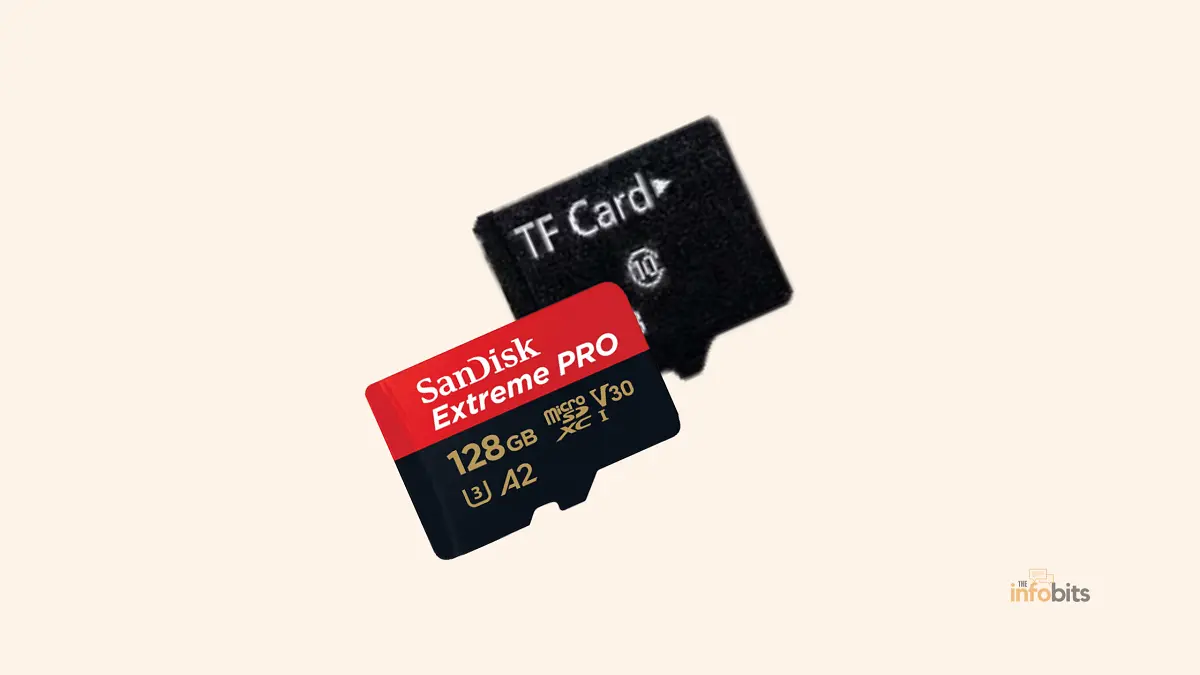
Quick Answer: Yes, here’s the short answer, because it’s more useful than any comparison table: a TF card and a microSD card are the same product. Same dimensions, same connector, same technology, same speed classes, same capacities. “TF card” isn’t a smaller, cheaper, slower alternative to microSD. It’s an older name for the same format.
If you’ve seen articles claiming TF cards have lower capacities, different speeds, or use different memory technology than microSD cards, that’s simply incorrect.
This guide explains where the confusion comes from, what actually determines a card’s performance, and, more usefully, what to actually check before buying one.
Where “TF Card” Actually Came From
In 2004, SanDisk (working with Motorola) introduced a new memory card format under the name TransFlash, or “TF” for short. It was designed to be smaller than anything on the market at the time, aimed at the earliest generation of compact mobile phones and MP3 players.
In 2005, the SD Association, the industry body that governs SD card standards, adopted TransFlash into its official lineup and renamed it microSD.
From that point on, every new card manufactured to the standard has technically been “microSD.”
The name “TF card” stuck around anyway, especially in China and other parts of Asia, where it’s still commonly used in product listings, packaging, and manuals, even for cards that are functionally identical to what everyone else calls microSD.
So when you see a product labeled “TF card,” you’re not looking at a different or older technology. You’re looking at a microSD card with a legacy name attached.
So Why Do Some Articles Say They’re Different?
This is worth addressing directly, because it’s a common source of bad information online. Some comparisons claim TF cards have lower maximum capacities, slower speed classes, or lower prices than microSD cards.
None of that reflects an actual technical difference between the formats, because there isn’t one.
What those comparisons are usually picking up on is one of two real, but unrelated, things:
- Cheap or uncertified products marketed as “TF cards.” The term TF card is still used loosely in some markets. It often appears on budget or uncertified memory cards. These cards may deliver slower speeds or unreliable performance. However, the problem isn’t the TF card name itself. The real issue is poor-quality microSD cards that use the older term to sound more generic or avoid official certification requirements.
- Comparisons that are actually describing full-size SD cards, not TF/microSD. A full-size SD card (32mm x 24mm x 2.1mm) is genuinely larger, can reach higher maximum capacities in the newer SDUC standard, and often includes a physical write-protect switch that microSD/TF cards lack. If an article’s “differences” sound like they involve card size or a lock switch, it’s likely comparing microSD to full-size SD, not to a separate “TF” format.
The safe rule of thumb: judge any card by its actual printed capacity, speed class, and SD Association certification, never by whether the packaging says “TF” or “microSD.” The name tells you nothing about performance.
Physical Specs: Identical, Not Similar
Both are exactly 15mm x 11mm x 1mm, weighing about a quarter of a gram. Both use the same connector pins and communicate over the same interfaces.
Both fit the same microSD card slots, camera slots (with an adapter), and card readers. There’s no adapter or converter needed to go from “TF” to “microSD,” because there’s nothing to convert; it’s the same object.
Note on write protection: unlike full-size SD cards, neither TF nor microSD cards include a physical write-protect lock switch. If you need that feature, you’d need a full-size SD card or a microSD-to-SD adapter that includes a switch (some do).
Capacity Standards: What Actually Determines Storage Size
Storage capacity isn’t determined by whether a card is called TF or microSD. It’s determined by which capacity standard the card is built to:
| Standard | Capacity Range | Typical File System |
|---|---|---|
| microSD (original) | Up to 2GB | FAT16/FAT32 |
| microSDHC (High Capacity) | 4GB – 32GB | FAT32 |
| microSDXC (Extended Capacity) | 64GB – 2TB | exFAT |
| microSDUC (Ultra Capacity) | Up to 128TB (spec allows; consumer cards currently top out well below this) | exFAT |
A card sold as a “1TB TF card” and a “1TB microSD card” are both microSDXC-standard cards. They are in the same capacity tier, same underlying technology, regardless of which name is on the packaging.
Practical tip: always check that your device supports the capacity standard your card uses. Older devices built before SDXC became common may only read microSD and microSDHC cards, capping out around 32GB regardless of what higher-capacity card you insert.
Related: How Many Bytes In A Gigabyte?
Speed Classes: Also Identical Across Both Names
Speed ratings work the same way whether the card is labeled TF or microSD:
- Speed Class (2, 4, 6, 10): minimum sustained write speed in MB/s.
- UHS Speed Class (U1, U3): minimum 10MB/s and 30MB/s, respectively, for Ultra High Speed bus cards.
- Video Speed Class (V6 – V90): geared toward 4K/8K video recording, with V90 guaranteeing 90MB/s sustained writes.
- Application Performance Class (A1, A2): measures random read/write performance, which affects how well a card runs apps directly from it. It is relevant mostly for Android devices and the Nintendo Switch.
None of these ratings is exclusive to “microSD” branding or unavailable to “TF” branding. A high-endurance dash cam card and a fast A2-rated card for running mobile games can each be labeled either way; the rating printed on the card is what matters, not the name.
File Systems: FAT32 vs exFAT
This is a genuinely useful practical difference to understand, and it applies equally to any card regardless of naming:
- FAT32 is used on cards up to 32GB and has broad compatibility, but it caps individual file sizes at 4GB. It means that a single continuous 4K video recording will get cut off around 4GB (roughly 10–15 minutes, depending on bitrate) unless your device automatically splits files.
- exFAT is required for SDXC cards (64GB and up) and removes that 4GB file size limit, making it necessary for longer 4K or 8K video recordings. Most modern cameras, phones, and consoles support exFAT without issue, but very old devices sometimes don’t.
Related: MBR or GPT for SSD, Which Is Better and How to Choose?
Common Devices That Use TF/MicroSD Cards
Since they’re the same format, the device list is identical regardless of which name you’re shopping under:
- Smartphones and tablets with expandable storage (mostly Android; note that many recent flagship phones have dropped card slots entirely)
- Action cameras and drones, where small size and light weight matter
- Dash cams, which specifically benefit from “High Endurance” or “Max Endurance” rated cards designed for continuous loop recording and rewriting
- Nintendo Switch and Switch 2, which use standard microSD/microSDXC cards for game storage
- Security cameras and doorbell cameras for local video storage
- Handheld GPS units, MP3 players, and other compact electronics
Common Mistakes to Avoid When Buying
- Assuming “TF card” means a cheaper, lower-quality product. It doesn’t inherently. The name says nothing about quality on its own.
- Buying based on capacity alone without checking the speed class, especially for 4K video recording or dash cam use, where sustained write speed matters more than total storage.
- Ignoring SD Association certification. Since “TF card” is sometimes used loosely by budget manufacturers, it’s worth checking for genuine certification, particularly with unusually cheap listings claiming very high capacities (1TB+ cards at suspiciously low prices are a common counterfeit pattern).
- Confusing microSD/TF with full-size SD cards. They are not interchangeable without an adapter, and full-size SD cards do have some genuine differences (larger max capacities under SDUC, write-protect switch) that don’t apply to the TF/microSD comparison at all.
- Assuming any adapter works for any use case. A basic SD adapter lets a microSD/TF card physically fit an SD slot, but it doesn’t add features the card itself lacks, like a write-protect switch with real functionality on every adapter model.
Myth vs. Fact
Myth: TF cards have lower maximum storage capacity than microSD cards. Fact: Capacity is determined by the standard (microSD, microSDHC, microSDXC, microSDUC), not by whether the packaging says “TF” or “microSD.” Both names can apply to cards at any capacity tier.
Myth: microSD cards are faster than TF cards. Fact: Speed is determined by the card’s speed class rating, printed on the card itself, and applies identically regardless of naming convention.
Myth: You need an adapter to use a TF card in a device that supports microSD, or vice versa. Fact: No adapter is needed between TF and microSD, since they’re the same physical format. An adapter is only needed to fit a microSD/TF card into a full-size SD card slot.
Related: M.2 vs U.2: A Detailed Comparison
Final Thoughts
The most useful thing to take away here is simple: stop treating “TF card” and “microSD card” as two products to compare, because they’re one product with two names.
When you’re actually shopping, ignore the naming on the package entirely and look at three things instead: the capacity standard, the speed class, and whether it’s genuinely SD Association certified.
Get those three right, and it won’t matter whether the card in front of you says “TF” or “microSD.”
Frequently Asked Questions
Is a TF card the same as a microSD card?
Yes. TF (TransFlash) was the original name SanDisk gave the format in 2004. When the SD Association standardized it in 2005, it became officially known as microSD. They are the same physical card, and the two names are used interchangeably today, especially “TF card” in parts of Asia.
Can I use a TF card in a device that requires a microSD card?
Yes, without any adapter or conversion. Since they’re the same format, any device with a microSD slot will accept a card labeled as a TF card, and vice versa.
Why do some websites say TF cards have different specs than microSD cards?
This is usually a mix-up. Either the comparison is describing full-size SD cards (which genuinely do differ in size and some features), or it’s picking up on differences in individual cheap or uncertified products that happen to be labeled “TF card,” not an actual difference between the two naming conventions.
Is a TF card cheaper than a microSD card?
Not inherently. Price depends on the card’s actual capacity, speed class, and brand, not on which name appears on the packaging. You can find cheap and expensive cards under either label.
What does TF stand for?
TF stands for TransFlash, the original name SanDisk used when introducing the format in 2004, before it was standardized as microSD by the SD Association in 2005.
Do TF cards and microSD cards use different memory technology?
No. Both use standard NAND flash memory as defined by the SD Association’s specifications. There’s no separate “TF technology” distinct from microSD.
What’s the difference between a TF card and a full-size SD card?
This is where real differences exist. Full-size SD cards are larger (32mm x 24mm x 2.1mm vs. 15mm x 11mm x 1mm), often include a physical write-protect switch, and under the newer SDUC standard can support significantly higher maximum capacities than typical consumer microSD/TF cards.
Do I need an adapter to use a TF card in an SD card slot?
Yes, but that’s true of any microSD-format card, not something specific to the “TF” name. A simple microSD-to-SD adapter lets any microSD/TF card physically fit a full-size SD slot.
Which is better for a dash cam, a TF card or a microSD card?
Since they’re the same format, the real question is whether the card is rated for “High Endurance” or continuous loop recording. a feature you should look for regardless of whether the listing says TF or microSD.
How do I know if a “TF card” listing is legitimate?
Check for a clearly printed capacity, speed class, and ideally an SD Association logo or certification. Be cautious of very high capacities (1TB+) at unusually low prices, which is a common pattern for counterfeit or mislabeled cards, regardless of naming.
Can a TF card run apps and games directly, like on a Nintendo Switch?
Yes, as long as it has an appropriate Application Performance Class rating (A1 or A2) and meets the capacity and speed requirements of the device. This depends on the card’s actual rating, not its TF or microSD label.
We hope this TF Card vs. MicroSD Card: What’s the Real Difference guide cleared up the confusion. While the two names are often used interchangeably today, knowing their history and the subtle differences can help you choose the right memory card with confidence.
If you found this guide helpful, please share it with your friends and family. Also, follow us on Facebook and X (formerly Twitter) for more easy-to-understand tech guides, troubleshooting tips, product comparisons, and honest buying advice from TheInfobits.
We also ask that you bookmark this page for future reference, as we are constantly updating our articles with new information.
Sign up for our free newsletter as well to receive fresh information immediately in your inbox and keep technically up to date.
Disclosure: If you follow our links to a retailer’s website and make a purchase, we will get an affiliate commission on some, but not all, of the items or services we promote. This will cause no price change for you.