
What Is a GaN Charger, and Do You Actually Need It? (A Simple Guide)
Open any charger listing on Amazon, and you’ll see “GaN” in big letters, usually next to a price that makes you wonder if it’s worth it.
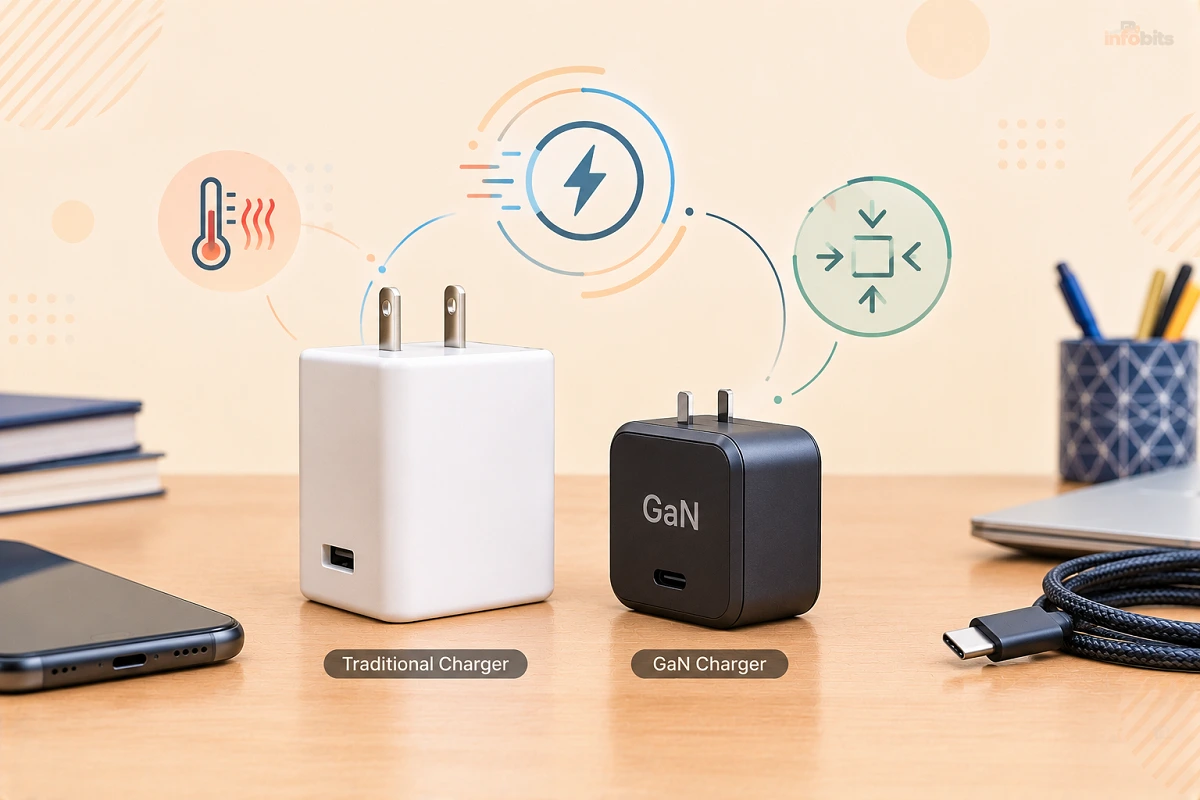
GaN is a better material for the electronics inside a charger. It lets a charger be much smaller, run cooler, and waste less power. It does not make your phone charge faster, and if you already own a good charger that does the job, you probably don’t need to replace it.
This guide explains what GaN is, where it helps, where it’s just marketing, and how to decide in about two minutes.
Quick Answer: GaN (gallium nitride) is a semiconductor used inside modern chargers in place of older silicon parts. A GaN charger is typically smaller, cooler and a bit more efficient than a silicon charger of the same wattage, but it charges at the same speed. You need one if you want to carry a single compact charger for a laptop and phone, or if your current charger is bulky or runs hot. If you only charge one phone and your current charger works, you can skip it.
What Is GaN?
GaN stands for gallium nitride. It’s a semiconductor material, like silicon, which has powered nearly all electronics for decades.
Inside every charger is a set of tiny electronic switches (transistors). They turn the high-voltage electricity from your wall into the low, steady voltage your phone or laptop wants. The faster and more cleanly those switches work, the less energy is lost as heat.
Silicon works fine, but it has limits. GaN is a “wide-bandgap” material, which means that it can handle higher voltages and temperatures and switch on and off much faster with less energy wasted. Think of silicon as a reliable diesel van and GaN as a newer, more efficient engine that does the same job with less fuel and a smaller engine bay.
GaN isn’t new science. It has been used for years in LEDs and radio equipment. It became affordable enough for everyday chargers around 2019 to 2020, and today you’ll find it in most reputable laptop and multi-port chargers.
How Does a GaN Charger Work?
A GaN charger does the same job as any other charger, in the same steps:
- Takes AC power from your wall socket.
- Converts it to DC and steps the voltage down.
- Negotiates with your device (usually through USB Power Delivery) to agree on a safe voltage and current.
- Delivers that power through the cable.
The difference is inside step 2. Because GaN switches so quickly, the charger can use smaller transformers, capacitors, and heat-management parts. Less bulk, less wasted heat, and a brick that can shrink noticeably without losing power.
That’s the whole trick. GaN improves the brick. It doesn’t change what happens at the device.
GaN vs Silicon Chargers: What Actually Changes
| Feature | GaN charger | Traditional silicon charger |
|---|---|---|
| Size and weight | Noticeably smaller at higher wattages | Larger and heavier for the same wattage |
| Heat in the brick | Usually runs cooler | Usually runs warmer |
| Efficiency | Roughly 90–95% in good designs | Roughly 85–90% |
| Charging speed | Same at the same wattage | Same at the same wattage |
| Price | Slightly higher, but the gap has narrowed a lot | Cheaper, especially at low wattages |
| Best for | Laptops, multi-device charging, travel | Single-phone charging at home |
The efficiency difference is real but modest. If you’re charging one phone overnight, the energy you’d save over a year is small enough that it shouldn’t drive your decision. Size, heat, and convenience are the better reasons to buy.
Does GaN Charge Faster?
No, and This Is the Biggest Myth.
A 65W GaN charger and a 65W silicon charger deliver the same power. If your laptop pulls 65W, both charge it at the same speed.
What decides how fast your device charges:
- The device’s own limit. Your phone only accepts what its charging circuit allows.
- The charger’s wattage. A 20W charger can’t push 45W, GaN or not.
- The charging standard. USB Power Delivery (PD), Programmable Power Supply (PPS), and others must match what the device supports.
- The cable. A low-quality or low-rated cable can cap the speed.
A real example: Apple says the iPhone 17 series (excluding the iPhone Air) can reach about 50% in roughly 20 minutes with a 40W or higher adapter. The iPhone Air is capped at 20W wired.
A bigger charger won’t push a phone past its limit, and in hands-on testing, the iPhone 17 charged at about the same rate with Apple’s 40W-with-60W-max adapter and several older chargers.
So if someone tells you GaN will “double your charging speed,” what they probably mean is that the wattage went up, not the technology.
Related: Is Fast Charging Bad for Your Battery? The Real Science
Do You Need a GaN Charger? A Quick Decision Guide
Find your situation below.
| If you… | Do you need GaN? | Why |
|---|---|---|
| Charge one phone at home with a charger that works | No | A 20–30W charger of any type is fine |
| Carry a laptop and phone in a backpack | Yes, it’s a big upgrade | One small brick replaces two |
| Travel often and hate packing chargers | Yes | Smaller and lighter, and many are dual-voltage |
| Have a phone, tablet, earbuds, and watch to charge at your desk | Yes | A multi-port GaN charger tidies everything |
| Own a gaming laptop that needs 180W+ | Usually no | Keep the original brick; GaN options are limited at that power |
| Have an old, bulky charger that gets very hot | Probably | Safer and more comfortable day-to-day |
| Are on a tight budget | Not necessarily | A certified silicon charger is a perfectly good purchase |
When you can skip GaN
- Your current charger is certified, undamaged, and gives you the speed your device supports.
- You charge one low-power device and never travel with it.
- The GaN charger you’re considering costs much more than a certified silicon one, and you only want it for the label.
When GaN is worth it
- You charge a laptop (30W to 140W) and want a charger that doesn’t feel like a brick.
- You want one charger for phone, tablet, laptop, and earbuds.
- You’re replacing a lost or worn-out charger anyway, since modern GaN models often cost about the same.
If you’re buying a charger mostly for a work laptop and a phone, a compact three-port 65W model, such as one from Anker’s Nano series, covers both with room to spare, and it’s easy to find a certified option on Amazon.
How Much Power Do You Actually Need?
Match the charger to your most demanding device, then add headroom if you’ll plug in more than one thing.
| Device | Typical charger size |
|---|---|
| Earbuds, smartwatch | 5–20W |
| Most phones | 20–45W (iPhone 17 models, 40W; Samsung’s top models, up to 45W) |
| Tablets | 20–45W |
| Handheld gaming PCs (e.g., Steam Deck) | 45–65W |
| Ultrabooks and MacBook Air | 30–70W, depending on model |
| MacBook Pro 14″ / 16″ and larger work laptops | 70W–140W |
| Gaming laptops | 180W and up (check the original adapter) |
Simple rule: if you’re unsure, check the wattage printed on your laptop’s original charger and match or slightly exceed it. A higher-wattage charger won’t harm your device, because the device only draws what it needs.
If you want to see exactly how much power your devices are drawing, a small USB-C power meter, like the POWER-Z KM003C available on Amazon, plugs between the charger and the device and shows live wattage, a handy tool for settling charger-versus-cable arguments.
GaN Myths vs Facts
| Myth | Fact |
|---|---|
| “GaN charges faster.” | Not by itself. Speed depends on wattage, device limits, and the cable. |
| “A higher-watt charger will fry my phone.” | The device negotiates and only draws what it can handle. |
| “GaN is only for expensive laptops.” | You’ll find GaN in small phone chargers too, and prices have come down. |
| “GaN chargers are unsafe or explode.” | Properly certified ones are safe. Cheap, uncertified chargers (GaN or not) are the real risk. |
| “All chargers labelled GaN are the same.” | Quality varies a lot. Certifications, protection circuits and build matter more than the label. |
| “GaN will ruin my battery.” | The charger doesn’t change how the phone manages its battery. Heat and bad habits do. |
How to Choose a Good GaN Charger: A Buyer’s Checklist
Here’s what to look at, in rough order of importance:
- Safety certification. Look for marks that apply to your region: UL or ETL (US), cUL or CSA (Canada), UKCA or CE (UK), and RCM (Australia and New Zealand). If you can’t find any, don’t buy it.
- Enough wattage for your biggest device, with a little headroom.
- USB Power Delivery (PD) support. Add PPS if you have a recent Samsung or similar phone.
- Port layout and power sharing. On multi-port chargers, the total wattage is shared. A “100W” charger might give 100W from one port but only 45W + 45W (or less) when two are in use. Check the per-port breakdown on the label or product page.
- Plug type. Make sure it fits your wall sockets (US Type A/B, UK Type G, Australia/NZ Type I). Foldable prongs are great for bags.
- Voltage range. Most are 100–240V, so they work worldwide with only a plug adapter. Confirm on the label.
- Brand and warranty. Established brands (Anker, UGREEN, Belkin, Apple, Baseus, and similar) tend to have proper protection circuitry and real warranty support.
- Reasonable price. A suspiciously cheap “100W GaN” charger is a warning sign.
If you work from a desk and want to charge a laptop, phone, and earbuds from one spot, a 3- or 4-port 100W-class GaN charger, such as a UGREEN Nexode model, is usually tidier than juggling separate bricks, which is easily available on Amazon.
Don’t Forget the Cable
Your charger is only half of the story. A mismatched cable is the most common reason people think their new charger is “slow.”
- Phone-sized power (up to 60W) works with standard USB-C cables.
- Above 60W, you need a cable rated for 100W (5A, with an e-marker chip).
- USB PD 3.1 can go up to 240W, but it requires a cable rated for 240W.
- Cheap or old cables, especially USB-A to USB-C ones, can limit speed.
If you’re pairing a 100W charger with a laptop, pick a USB-C cable that’s clearly labelled for 100W or 240W charging (see the best options on Amazon), rather than reusing a thin cable from an old phone.
Related: USB-A vs USB-C: What’s the Difference?
How to Spot a Fake or Poor-Quality GaN Charger
The popularity of GaN has brought a flood of copycats. A dodgy charger can overheat, fail early, or damage your device.
Warning signs:
- No visible safety marks, or marks that look misprinted or blurry
- A price far below comparable name-brand models
- Feels unusually light for its stated wattage
- Gets very hot within minutes (warm is normal, uncomfortable to hold is not)
- Smells of plastic or burning, or has a loose-fitting plug
- Vague listing: no brand, no model number, no specs, no USB-PD mention
- Reviews that mention buzzing, sparking, or shutting off
If you see any of these, stop using the charger. For why cheap electronics can turn dangerous, see our guides on bad phone battery symptoms and why cell phones overheat or blow up.
Common Mistakes People Make With GaN Chargers
- Buying by the “GaN” label alone. Certification and brand reputation matter more.
- Ignoring the cable. A weak cable can undo a great charger.
- Assuming multi-port means full power on every port. Power is shared.
- Overbuying wattage “just in case.” A 140W charger is overkill for earbuds and a phone.
- Throwing away a perfectly good charger because a listing made you feel behind.
- Using a charger in a place with poor power quality without a surge protector. See our surge protector guide.
Expert Tips
- Keep one good charger in your bag and one at your desk instead of pairing a charger with every device.
- Use your original laptop cable with a new third-party charger when you can, since it’s matched to the laptop’s needs.
- Check the label, not the product title. The label shows the voltage and current combinations the charger can actually deliver.
- A little warmth is normal. A GaN brick running warm during a laptop charge isn’t a fault. If it’s too hot to hold, unplug it.
- Protect your battery health too. Charger choice matters less than temperature and habits. I think for more understanding, you can go through the article Is it OK to leave your laptop plugged in all the time?
Troubleshooting: GaN Charger Problems and Fixes
My laptop says “slow charger” or charges very slowly.
The charger’s wattage is likely lower than your laptop needs, or the cable isn’t rated high enough. Try a higher-rated cable, then a higher-watt charger. See Charge Your Laptop Without the Original Charger.
My phone charges slower on the new charger than the old one.
Your phone may need a specific standard like PPS, or the charger splits power across ports. Unplug the other devices and test again.
The charger gets very hot.
Move it somewhere with airflow, away from blankets and bags. If it still burns to the touch, stop using it.
The charger buzzes or whines.
A faint high-pitched sound can be coil whine, which is common and harmless at low levels. Loud buzzing, crackling, or smells aren’t normal. Stop using it.
The charger disconnects devices at random.
Try another cable, another socket, and a single device. If it keeps happening, the charger is probably faulty. Use the warranty.
It doesn’t work with my device at all.
Check that the charger supports USB-C PD and that your device accepts it. Some very old devices expect specific proprietary chargers.
Where Else Is GaN Used?
GaN is bigger than chargers. You’ll also find it in:
- Data-centre and server power supplies, where efficiency saves real money
- Electric vehicle onboard chargers and power electronics
- 5G base stations and radar, where GaN’s high-frequency performance matters
- LED lighting and lasers
- Solar inverters
That’s one reason GaN prices have fallen. Demand from many industries has pushed manufacturing forward, which makes chargers cheaper for everyone.
What About Silicon Carbide (SiC)?
You may see “SiC” mentioned in power-electronics articles. Silicon carbide is another wide-bandgap material, but it’s mostly used in higher-power equipment, such as EV traction inverters and industrial gear. For phone and laptop chargers, GaN is the practical choice today.
The Bottom Line: Do You Need GaN?
If you charge one phone from one wall socket and your charger works, no, you don’t need to upgrade. Keep what you have.
If you carry a laptop, juggle several devices, or want a smaller bag and a tidier desk, GaN is one of the more genuinely useful small upgrades in tech. Just buy a certified model, match the wattage to your biggest device, and use a proper cable.
Frequently Asked Questions
What is GaN in simple terms?
GaN stands for gallium nitride, a semiconductor material used inside modern chargers instead of older silicon. It lets chargers switch power more efficiently, so they can be smaller and run cooler.
What is a GaN charger?
A GaN charger is a power adapter that uses gallium nitride transistors instead of silicon ones. It charges your devices at the same speed as a silicon charger of the same wattage but is usually smaller, cooler, and a bit more efficient.
Do I need a GaN charger?
Not necessarily. If you charge one phone and your current charger works, you can skip it. GaN is worth it if you travel, charge a laptop, or want one compact charger for several devices.
Does a GaN charger charge faster than a normal charger?
No, not at the same wattage. A 65W GaN and a 65W silicon charger deliver the same power. Charging speed is set by the charger’s wattage, your device’s limit, and the cable.
Are GaN chargers better than silicon chargers?
In size, heat, and efficiency, yes. In raw charging speed, they’re equal. Silicon chargers from reputable brands are still perfectly safe and often cheaper.
Are GaN chargers safe?
Yes, when they’re certified and from a reputable brand. Look for safety marks like UL, ETL, CE, UKCA, or RCM. The real risk is uncertified, low-quality chargers, whether they’re GaN or not.
Do GaN chargers run cooler?
Usually, yes. They lose less energy as heat, so the brick is often cooler than a silicon charger of the same power. A warm charger is still normal during high-power use.
Will a GaN charger damage my phone’s battery?
No. Your phone controls how much power it accepts. The charger doesn’t override that. Heat, full-charge habits, and cheap chargers are bigger battery risks.
Can I use a higher-wattage GaN charger on my phone?
Yes. Your phone only draws the power it can handle. A 100W charger will safely charge a phone that supports 25W, but it won’t make the phone charge any faster.
Can a GaN charger charge a laptop?
Yes, if its wattage and USB-C Power Delivery profile match your laptop’s needs. Many ultrabooks need 45–65W, and larger laptops need 100–140W.
What wattage GaN charger should I buy?
Match your most demanding device. Around 30–45W suits most phones and tablets, 65W suits most thin laptops, and 100–140W suits larger laptops. Add headroom if you’ll charge multiple devices at once.
Which charger does the iPhone 17 need?
Apple says iPhone 17 models (except iPhone Air) reach their fastest charging with a 40W or higher adapter. The iPhone Air charges at up to 20W. Any good USB-C PD charger that meets those numbers will work.
Do GaN chargers work with Android phones?
Yes. Any GaN charger with USB-C Power Delivery works with Android phones. For the fastest speeds on newer Samsung models, look for PPS support too.
Why do multi-port GaN chargers get slower when I plug in two devices?
The charger’s total wattage is shared between ports. A 100W charger might give 100W to one device but split into smaller amounts when two or more are connected. Check the per-port breakdown.
How can I tell if a GaN charger is fake?
Warning signs include no visible safety marks, a price far below similar brands, unusual lightness, a vague listing with no brand, and getting very hot quickly. Buy from known brands or reputable sellers.
Do GaN chargers last longer?
They can, because they run cooler and cooler parts tend to last longer. Build quality matters more than the GaN label, so a well-made charger from a reputable brand is the best bet.
Can I use a GaN charger when travelling abroad?
Most GaN chargers support 100–240V, so they work worldwide. You’ll only need a plug adapter for the local socket. Confirm the voltage range on the label first.
Is GaN worth the extra money?
For laptop users and frequent travellers, usually yes, and prices have narrowed. For someone charging a single phone at home, a certified silicon charger is just as good.
Do I need a special cable for a GaN charger?
Not for phones. For laptops above 60W, you need a cable rated for 100W, and for the highest USB PD 3.1 power, one rated for 240W.
What else is GaN used for besides chargers?
GaN is also used in data-centre power supplies, EV power electronics, 5G base stations, radar, LED lighting, and solar inverters.
Found this guide useful? Share it with someone interested in tech-related tips, tricks, solutions, and news. Follow us on Facebook and Twitter for more tips, tricks, and guides.
We also ask that you bookmark this page for future reference, as we are constantly updating our articles with new information.
Sign up for our free newsletter as well to receive fresh information immediately in your inbox and keep technically up to date.
Disclosure: If you follow our links to a retailer’s website and make a purchase, we will get an affiliate commission on some, but not all, of the items or services we promote. This will cause no price change for you.



)