

How to Get Temporary Wi-Fi Internet Without an ISP (7 Real Options for 2026)
You don’t need a 12-month ISP contract to get online. Whether you just moved and your fiber install is two weeks out, you’re traveling for a month, or your regular connection just went down, several legitimate ways let you get Wi-Fi internet without signing up for a dedicated provider.
The confusion usually starts with one mix-up. Wi-Fi and “the internet” aren’t the same thing. Wi-Fi is the wireless technology that moves data over short distances, from a router to your laptop, for example.
It doesn’t create internet access on its own. You still need a data source feeding that router: a cellular connection, a satellite dish, or someone else’s existing internet line. Once you separate those two ideas, the options below make a lot more sense.
Below are seven ways to get temporary internet access without a dedicated ISP, what each one actually costs in 2026, and which situation each one fits best.
Quick Answer:
If you need internet in the next five minutes and you’re not in a total dead zone, turn on your phone’s personal hotspot. It’s built into every modern iPhone and Android phone, requires no new hardware, and works anywhere you already have cell signal. For anything longer than a few hours, though, a dedicated mobile hotspot device or a prepaid data plan will save your phone’s battery and usually work out cheaper per gigabyte.
Do You Actually Need a Dedicated ISP?
Not always. Traditional cable and fiber ISPs make the most sense when you’re settled in one place long-term and need consistently high data usage. Think a household streaming in 4K on multiple devices, gaming online, or running a home office with video calls all day.
But plenty of situations don’t call for that kind of commitment:
- You’re waiting on an ISP installation after moving
- You’re traveling for a few days to a few months
- Your primary connection is down, and you need a backup
- You’re a student, freelancer, or short-term renter who doesn’t want a 12–24 month contract
- You live somewhere traditional broadband simply doesn’t reach
In the US, the average residential internet plan runs somewhere between $50 and $80 a month before equipment fees, and that’s before you factor in installation delays and early termination fees if your situation changes. For short-term needs, one of the options below is almost always cheaper and far less hassle.
Related: How to Detect Unauthorized Devices on Your WiFi Network
7 Ways to Get Temporary Wi-Fi Without an ISP
1. Tether Your Smartphone
This is the fastest option because you already own the hardware. Every modern smartphone can share its cellular data as a Wi-Fi hotspot, no extra device required.
On Android: Settings → Network & Internet → Hotspot & Tethering → toggle Wi-Fi Hotspot on. On iPhone: Settings → Personal Hotspot → toggle on.
Set a strong password on both platforms before you turn it on. An open hotspot is an invitation for strangers to piggyback on your data plan.
You can also tether over USB (fastest, and it charges your phone at the same time) or Bluetooth (slower, but doesn’t drain the battery as fast as Wi-Fi tethering does).
The catch: tethering leans hard on your phone’s battery and your existing data plan. Laptops pull down far more data than a phone browsing on its own, so if you’re on a capped plan, a few hours of tethered video calls can eat through it fast.
Some carriers also throttle hotspot speeds specifically, even when your on-device data is unlimited. Check your plan’s hotspot allowance before relying on this for anything beyond light, occasional use.
Best for: Emergency, short-term access – an hour of work, checking email, or getting through a connection outage.
2. Use a Dedicated Mobile Hotspot Device
If you’ll need internet on the go regularly rather than just once, a standalone hotspot (also called a MiFi device) is worth the investment.
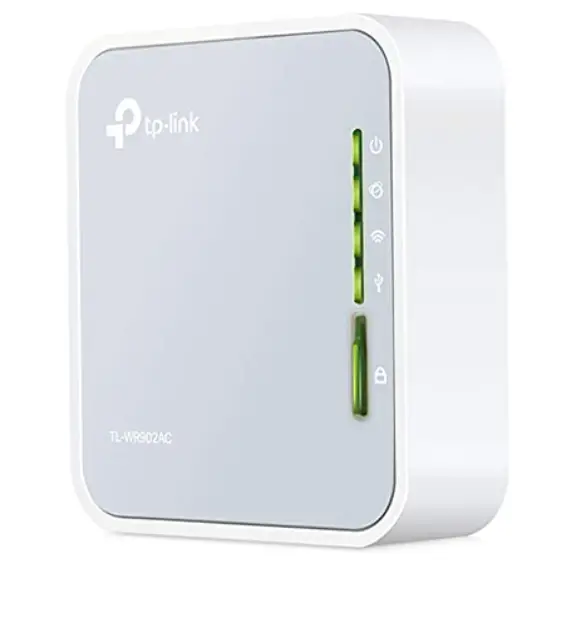
These small, battery-powered devices connect to cellular networks and broadcast their own Wi-Fi signal, typically supporting 10–15 connected devices, without touching your phone’s battery or data plan.
Most major US carriers sell dedicated hotspot plans:
| Carrier | Typical Plan | Data | Approx. Price/Month |
|---|---|---|---|
| T-Mobile | Prepaid Mobile Internet | 100GB | ~$50 |
| Verizon | Plus Hotspot | 50–150GB | ~$40–$60 |
| AT&T | Prepaid Data | 20–100GB | ~$25–$80 |
| Visible | Unlimited Hotspot | Unlimited (deprioritized) | ~$25–$45 |
If you’d rather use your own SIM in an unlocked, carrier-agnostic device instead of a carrier-branded hotspot, a compact travel router like the TP-Link M7200 Plus available on Amazon works with any provider’s SIM and can also double as a Wi-Fi range extender or access point when you’re not using it for cellular data.
The catch: you’re paying for a second data plan on top of your phone plan, and coverage is only as good as the carrier’s network in your area.
Best for: Frequent travelers, remote workers, digital nomads, or anyone who needs internet on multiple devices without draining their phone.
Related: Powerline Adapter vs Wi-Fi Extender: Which Is Best for Wi-Fi Signal Boosting?
3. USB Wi-Fi Dongles / Cellular Modems
A USB cellular modem (sometimes still called an “internet stick”) plugs directly into a laptop and connects to 4G/5G networks using a SIM card. It’s a smaller, cheaper cousin of the standalone hotspot. No separate battery, no screen, just a stick that gives one device a direct cellular connection.
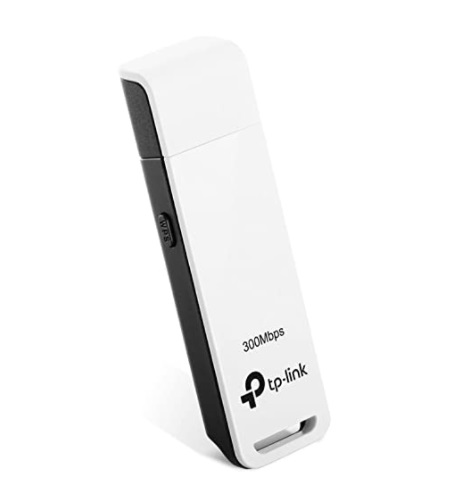
The catch: because it’s not broadcasting its own Wi-Fi network, only the device it’s plugged into gets online. You can’t connect a second laptop or a tablet at the same time without extra software. Signal strength and speed also tend to lag behind a proper hotspot device.
Best for: Solo travelers or remote workers who only need to get one laptop online and want something smaller and cheaper than a full hotspot device.
4. eSIM for International Travel
If you’re traveling internationally, an eSIM is now the simplest way to get data without hunting for a local SIM card or paying your home carrier’s roaming fees. Apps like Airalo let you buy a data plan for a specific country or region, scan a QR code, and be online within minutes of landing. No physical SIM swap required.
Pricing varies by destination and data allowance, but as a general range in 2026: single-country plans start around $4–$15 for a few days of data, regional plans (like all-of-Europe coverage) run roughly $30–$40 for 10GB, and global plans that work across 100+ countries start around $8 and scale up from there depending on data and validity period.
The catch: most eSIM plans are data-only. You won’t get a local phone number for calls or SMS unless you specifically buy a plan that includes it. You’ll also need a phone that supports eSIM, which rules out older devices.
Best for: International trips where you want data the moment you land, without dealing with airport SIM kiosks or roaming charges.
5. Public Wi-Fi
Libraries, coffee shops, airports, hotels, and transit hubs increasingly offer free Wi-Fi, and some cities run municipal networks that cover downtown areas or public parks. It’s free, and for casual browsing it’s often good enough.

The catch and this one matters: public Wi-Fi is genuinely risky if you’re not careful. Not every “Free_Airport_WiFi” network is what it claims to be; fake networks set up specifically to intercept traffic are a known problem in busy public spaces.
If you use public Wi-Fi:
- Avoid logging into banking, shopping, or any site with sensitive personal data unless you’re on a VPN
- Turn off file sharing and AirDrop/Nearby Share while connected
- Stick to HTTPS sites (look for the padlock icon)
- Use a VPN if you plan to do anything beyond casual browsing
Best for: Quick, casual browsing when you’re already out and about. Not for anything involving passwords or payment information.
Related: What to Do When Using Public WiFi? Use Public WiFi Safely
6. Share Someone Else’s Connection (With Permission)
If a neighbor, friend, or family member has a strong internet connection and is willing to share it, both Windows and macOS make it simple to turn their internet into a Wi-Fi hotspot for your devices.
On Windows: Settings → Network & Internet → Mobile Hotspot → toggle on, then select which connection to share.
On macOS: Apple menu → System Settings → General → Sharing → Internet Sharing, choose the connection to share from, and select Wi-Fi as the sharing method.
The catch: this only works if you’re within Wi-Fi range of the sharing device, and it depends entirely on someone else’s goodwill and bandwidth. Heavy use on your end will visibly slow things down for them too.
Best for: Short-term situations where someone nearby already has a strong connection and is happy to share it, moving in with roommates before your own service kicks in, for example.
Related: How to Detect Unauthorized Devices on Your WiFi Network
7. Satellite Internet (Starlink and Similar)
Satellite internet has become a genuinely practical short-term option, especially since SpaceX introduced the portable Starlink Mini. Unlike the earlier bulky satellite dishes, the Mini is roughly laptop-sized, has a built-in router, and can run off a USB-C power bank, making it usable well beyond fixed rural installs.
As of 2026, Starlink’s portable “Roam” plans run roughly:
| Plan | Data | Approx. Price/Month |
|---|---|---|
| Roam 100GB | 100GB high-speed | ~$55 |
| Roam 300GB | 300GB high-speed | ~$80 |
| Roam Unlimited | Unlimited | ~$165 |
The Mini dish itself costs around $199 upfront, and Starlink also offers a low-cost “Standby Mode” (around $5/month) that keeps your account active with basic connectivity for emergencies when you’re not actively using it. This is handy if you only need Starlink a few times a year.
The catch: it needs a clear, unobstructed view of the sky to work, so it’s not ideal indoors or in dense urban areas with tall buildings blocking the horizon. It’s also the priciest option on this list for short-term use.
Best for: Remote areas with no cell coverage, off-grid stays, RV or van life, or as a serious backup when your primary connection goes down for an extended period.
Comparison: Which Temporary Wi-Fi Option Is Right for You?
| Method | Setup Time | Typical Monthly Cost | Best For |
|---|---|---|---|
| Phone Tethering | Instant | $0 (uses existing plan) | Emergency, short-term use |
| Mobile Hotspot Device | Same day | $25–$80 | Regular travel, remote work |
| USB Cellular Modem | Same day | $20–$50 | Single-device, budget travel |
| eSIM (International) | Minutes | $4–$40 per trip | International travel |
| Public Wi-Fi | Instant | Free | Casual browsing on the go |
| Sharing a Neighbor’s Wi-Fi | Instant | Free (with permission) | Short gaps between move-in and ISP install |
| Satellite (Starlink Mini) | 1–2 days | $55–$165 | Remote/off-grid, extended backup |
Related: How Long Do Routers Last? Real Lifespan & 8 Signs It’s Time to Replace
How to Choose the Right Option
Ask yourself three questions:
- How long do you need it? A few hours → tethering. A few days to weeks → mobile hotspot or eSIM. Months, or indefinitely off-grid → satellite.
- How many devices need to connect? One laptop → USB modem is enough. Multiple devices → hotspot device or satellite.
- Where are you? Urban area with decent cell coverage → any cellular option works. Remote, rural, or no cell towers nearby → satellite is likely your only reliable option.
Common Mistakes to Avoid
- Leaving your phone hotspot unsecured. Always set a password. An open hotspot invites strangers onto your connection and your data plan.
- Not checking your carrier’s hotspot data cap. Many “unlimited” phone plans cap quietly or deprioritize hotspot/tethered data specifically, even though on-device browsing stays fast.
- Entering banking or payment info on public Wi-Fi without a VPN. Fake hotspot networks that mimic legitimate ones are a real, documented risk in airports, cafes, and hotels.
- Assuming satellite internet works indoors. Starlink and similar services need a clear view of the sky; a windowsill usually isn’t enough.
- Buying a phone-locked eSIM plan for a trip through multiple countries. Check whether your destination is covered by a regional or global plan before buying single-country data.
Expert Tips
- If you’re between ISP installs at a new address, ask your building management or a neighbor before assuming you need paid data. Many apartment buildings have guest Wi-Fi you’re entitled to use temporarily.
- Set a data usage alert on your phone before tethering for a long work session. It’s the easiest way to avoid a surprise overage charge.
- For international trips, buy your eSIM before you land (most activate the moment you land, not the moment you buy) so you’re not stuck without data at arrivals.
- If you travel a few times a year rather than constantly, look at Starlink’s Standby Mode instead of canceling and re-subscribing each time. It keeps the account live for a small monthly fee.
Related: No Internet Connection? Here’s Why Your Internet Access Is Blocked
Conclusion
You genuinely don’t need a dedicated ISP contract to get online. The right temporary option just depends on how long you need it, how many devices you’re connecting, and where you are. For a quick fix, phone tethering costs nothing and works in minutes.
For regular travel or remote work, a dedicated mobile hotspot or eSIM plan will serve you better and won’t drain your phone’s battery. And if you’re heading somewhere remote with no cell coverage at all, a portable satellite setup like the Starlink Mini is now genuinely practical, not just a novelty.
Whichever option you choose, take a minute to think about security, especially on public or shared networks, before you start sending anything sensitive over the connection.
Frequently Asked Questions
What’s the difference between Wi-Fi and the internet?
Wi-Fi is a wireless technology for transferring data over short distances, like from a router to your laptop. The internet is the global network of connected computers and servers. You need an active data source ( a cellular connection, satellite link, or wired ISP line) feeding a router before Wi-Fi can actually get you online.
Can I get Wi-Fi without any internet provider at all?
Yes. Mobile hotspots, phone tethering, eSIMs, public Wi-Fi, sharing someone else’s connection, and satellite internet are all ways to get online without signing up with a traditional, dedicated ISP.
Is it possible to have Wi-Fi without internet access?
Yes. A router can create a local Wi-Fi network with no internet connection at all. That network can still support file sharing, printing, smart home device control, and local media streaming between connected devices, even without any data flowing out to the wider internet.
What’s the cheapest way to get temporary internet?
Phone tethering is free if you already have a data plan with hotspot capability, making it the cheapest option for short, occasional use. For anything longer-term, prepaid mobile hotspot plans and public Wi-Fi are the next cheapest paths.
Is public Wi-Fi safe to use?
It can be, with precautions. Avoid logging into banking or shopping sites without a VPN, stick to HTTPS websites, and turn off file sharing while connected. Fake networks designed to look like legitimate hotspots are a real risk in busy public places like airports and cafes.
How much data does a laptop use compared to a phone?
Laptops generally use significantly more data than phones for the same activities, largely because of higher-resolution video, larger downloads, and background syncing (cloud backups, software updates) that phones often limit automatically. If you’re tethering a laptop, expect your data plan to drain noticeably faster than when just browsing on your phone.
Do all phones support hotspot tethering?
Nearly all smartphones sold in the last decade support tethering natively, but some carriers require a specific plan tier or charge extra for hotspot data, even if the feature is enabled in your phone’s settings. Check your plan details before assuming it’s included.
What is an eSIM, and do I need a special phone for it?
An eSIM is a digital SIM card built into your phone that you can activate remotely, without inserting a physical card. Most phones released since around 2020 support eSIM, but not all. Check your specific model before buying an eSIM plan.
How fast is satellite internet compared to a mobile hotspot?
Modern low-earth-orbit satellite services like Starlink typically deliver faster, more consistent speeds than a cellular mobile hotspot, especially in areas with weak cell coverage. Though actual speed varies by plan, location, and how many other users share your satellite cell.
Can I use a mobile hotspot device internationally?
It depends on the device and plan. Many US carrier-branded hotspots include limited international roaming, but a locked device may not accept a foreign SIM at all. An unlocked travel router paired with a local SIM or eSIM plan is usually more flexible for international trips.
Will using a mobile hotspot drain my phone’s battery?
Only phone tethering drains your phone’s battery, since the phone itself is broadcasting the signal. A dedicated hotspot device has its own battery and won’t touch your phone’s charge at all.
Is Starlink worth it just for temporary use?
It depends on your situation. If you’re in a remote area with no cell coverage for an extended stay, Starlink’s Roam plans and Standby Mode make it a genuinely practical temporary option. For short trips in areas with decent cell coverage, a mobile hotspot or eSIM will almost always be cheaper.
Can I share my home Wi-Fi with a neighbor temporarily?
Yes, using built-in features like Windows Mobile Hotspot or macOS Internet Sharing, as long as the neighbor’s device is within Wi-Fi range and they’re willing to share their connection and bandwidth.
Do I need a VPN for temporary Wi-Fi options?
A VPN isn’t strictly required, but it’s strongly recommended on public Wi-Fi and any shared or unfamiliar network, since it encrypts your traffic and makes it much harder for anyone else on that network to intercept your data.
What happens if I go over my mobile hotspot data limit?
This depends entirely on your plan. Some carriers charge a per-gigabyte overage fee, others throttle your speed down to a crawl once you hit the cap, and unlimited plans typically deprioritize your traffic during network congestion rather than cutting you off outright.
Are there free ways to get temporary internet?
Yes. Public Wi-Fi at libraries, cafes, and transit hubs is free, and sharing a neighbor’s or friend’s connection with their permission costs nothing beyond your relationship with them. Just be mindful of the security tradeoffs that come with public networks.
How do I find free public Wi-Fi near me?
Most cafes, libraries, and transit hubs post their Wi-Fi availability, and dedicated Wi-Fi finder apps can help locate open networks in unfamiliar areas. Just verify the network name with staff before connecting, since fake lookalike networks are a known trick in busy public spaces.
Related: Best Internet Service Providers in the US: Complete Comparison Guide
We hope you found this post informative, and do like and follow us on Facebook and Twitter for regular updates.
We also ask that you bookmark this page for future reference. Sign up for our free newsletter as well to receive fresh information immediately in your inbox and keep technically up to date.
Disclosure: We may receive an affiliate commission on some, but not all, of the products or services we recommend in this article if you proceed and buy them from the retailer’s website. This won’t have an impact on the price you pay.
You May Be Interested in Reading:
- How Long Do Routers Last and When Should You Replace Them?
- What to Do If Your Internet Access Is Blocked or There Is No Internet Connection?
- The Best Major ISPs in the US to Consider
- Powerline Adapter vs Wi-Fi Extender: Which Is Best for Wi-Fi Signal Boosting?
- What to Do When Using Public WiFi? Use Public WiFi Safely

)
Great tips! I never thought of using public hotspots or mobile tethering for temporary internet. This is super helpful, especially when traveling. Thanks for sharing!