

Best Routers With Built-In Malware Protection in 2026 (Tested & Ranked)
Your router sees every single thing that happens on your home network before your antivirus software ever gets a chance to.
Every phishing link your kid almost clicks, every IoT camera phoning home to a server in a country you’ve never visited, every laptop trying to reach a botnet command server at 3 a.m. It all passes through that little box blinking in the corner of your living room first.
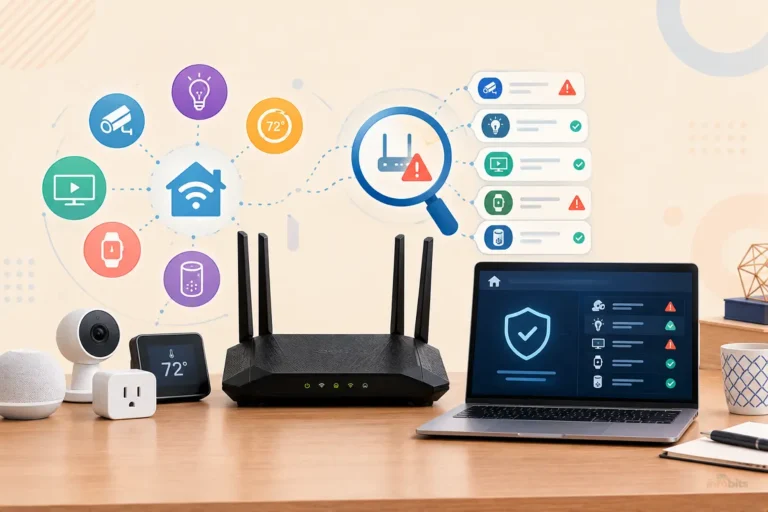
That’s exactly why “router with built-in malware protection” has become one of the most searched router categories of the last two years. A modern security-focused router can block malicious sites, flag compromised devices, and stop threats at the network level, before they ever reach your laptop, your smart TV, or your kid’s tablet.
We spent time comparing the current crop of security-focused routers, pulling apart what’s actually free versus what’s a subscription in disguise, what the protection engines are built on, and which ones are worth your money in 2026. Here’s what we found.
Quick answer: For most households, the ASUS RT-AX88U Pro is the best all-around pick. It includes AiProtection Pro (powered by Trend Micro) free for the life of the router, no subscription required. If you want the deepest protection and don’t mind paying an annual fee, the NETGEAR Nighthawk with Netgear Armor (powered by Bitdefender) and TP-Link Deco BE85 with HomeShield Pro are excellent. For privacy-focused households who never want a subscription at all, the Firewalla Gold Plus is the strongest option on the market.
Comparison at a Glance:
| Router | Protection Engine | Subscription Required? | Best For | Approx. Price |
|---|---|---|---|---|
| ASUS RT-AX88U Pro | Trend Micro (AiProtection Pro) | No; free for life | Best overall value | $200–$250 |
| NETGEAR Nighthawk (Armor) | Bitdefender | Yes ($99.99/yr after trial) | Deepest antivirus-style protection | $150–$300 + Armor |
| TP-Link Deco BE85 | Avira / Norton (HomeShield Pro) | Yes for Pro tier | Best mesh Wi-Fi 7 pick | $400–$500 |
| Firewalla Gold Plus | Firewalla’s own IPS + threat feeds | No; one-time cost | No-subscription power users | ~$589 |
| Synology RT6600ax | Signature-based Threat Prevention | Yes ($29.99/yr after trial) | VLAN segmentation, families | ~$330 |
| Gryphon AX | ESET | Yes (built into tiered plans) | Parental controls + security | $279–$479 |
| Eero Pro 6E + Eero Plus | Zscaler DNS + Malwarebytes | Yes ($9.99/mo) | Simplicity, bundled password manager & VPN | ~$299 + Plus |
| GL.iNet Beryl AX | OpenWrt-based, AdGuard Home | No | Budget/travel routers | ~$90–$120 |
If you want to compare current prices and availability before deciding, the ASUS RT-AX88U Pro, NETGEAR Nighthawk with Armor, and Firewalla Gold Plus are all available on Amazon, and checking today’s listing is the fastest way to see real-time stock and any active deals.
How We Evaluated These Routers
Router-level malware protection isn’t one single feature. It’s usually a bundle of technologies working together. Before we get to the picks, here’s what we actually looked at:
- Threat engine and who powers it. Most consumer routers don’t build their own malware databases. They license one. Knowing whether you’re getting Trend Micro, Bitdefender, Avira, ESET, or an open-source engine like Suricata tells you a lot about detection quality and update frequency.
- Free vs. subscription. Some brands (ASUS is the standout) bake protection in for free, for the life of the hardware. Others (NETGEAR, TP-Link’s Pro tier, Gryphon) charge $30–$100 per year for the full feature set.
- IDS/IPS (Intrusion Detection/Prevention). This is the difference between a router that just blocks known-bad websites and one that actively watches traffic patterns for attack behavior. Think port scans, botnet command-and-control traffic, or a compromised smart plug trying to spread sideways across your network.
- Network segmentation. Can the router isolate IoT devices onto their own VLAN so a hacked smart bulb can’t reach your laptop?
- Real-world throughput impact. Deep packet inspection is computationally expensive. We looked at whether turning on the security suite noticeably slows down a connection.
- Firmware update cadence. A malware-blocking feature is only as good as how often its threat signatures and the router’s own firmware get patched.
Related: 7 Best Routers with Built-in VPN for Ultimate Security in 2026
The Best Routers With Built-In Malware Protection
1. ASUS RT-AX88U Pro: Best Overall (Free Protection, No Subscription)
ASUS has quietly built the best value proposition in this entire category, and it’s surprising more people don’t know about it.
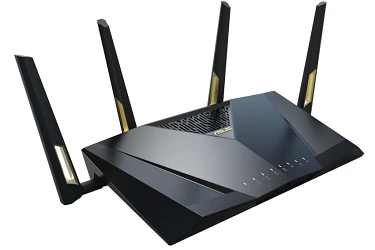
Every ASUS router ( not just the flagship models) ships with AiProtection Pro, a security suite powered by Trend Micro’s threat intelligence network. It includes:
- Malicious site blocking (phishing, malware distribution, command-and-control domains)
- Two-way IPS that inspects both inbound and outbound traffic
- Vulnerability scanning that flags weak passwords or open ports on connected devices
- Infected device detection and quarantine
The part that matters most: this is free for the life of the router. No trial period, no “Pro tier” upsell, no recurring charge. Competing brands (NETGEAR, TP-Link) reserve their strongest protection for paid subscriptions costing $50–$100 per year; over five years, that’s an extra $250–$500 you’re not paying with ASUS.
The RT-AX88U Pro backs this up with genuinely strong Wi-Fi 6 performance, a 5-year firmware support commitment (among the longest in the industry), and a web-based admin interface for people who like to dig into advanced settings rather than being locked into an app.
Note: AiProtection is good but not quite as aggressive at catching brand-new, zero-day threats as Bitdefender-powered Netgear Armor in third-party lab tests. If you want the single strongest malware detection available and don’t mind paying for it annually, see our NETGEAR pick below.
For anyone setting this up for the first time, pairing the RT-AX88U Pro with a UPS with a surge protector like CyberPower CP1500PFCLCD (available on Amazon) is worth considering, since a sudden power loss during a firmware update is one of the more common ways routers get bricked.
2. NETGEAR Nighthawk with Netgear Armor: Best for Maximum Threat Detection
If AiProtection is a strong seatbelt, Netgear Armor is closer to a full security detail. Powered by Bitdefender, one of the highest-rated antivirus engines in independent lab testing, Armor extends protection beyond the router itself and onto the devices connected to it, functioning more like a network-wide antivirus subscription than a simple site blocker.
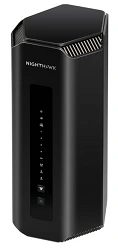
What you get with Armor:
- Real-time vulnerability assessment across every connected device
- Bitdefender-grade malware, ransomware, and phishing protection
- A companion mobile antivirus app included in the subscription
- Automatic security alerts pushed to your phone when something suspicious happens
The catch: Armor isn’t free. After an initial trial (typically 30–90 days depending on the model), it runs $99.99 per year. That’s a meaningful ongoing cost, and it’s worth being honest with yourself about whether you’ll actually renew it every year. A security feature you let lapse is worse than one you never had, since it gives a false sense of protection.
Best for: Households that want antivirus-grade protection and are comfortable treating it like any other subscription (streaming, cloud storage) that they’ll budget for annually.
3. TP-Link Deco BE85: Best Wi-Fi 7 Mesh With Security Built In
If you’re upgrading to Wi-Fi 7 and want mesh coverage across a larger home, the Deco BE85 is one of the strongest picks that also takes security seriously.
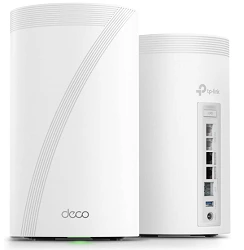
TP-Link’s HomeShield platform (the free tier is powered by Avira; the paid HomeShield Pro tier adds Norton-grade protection) includes:
- Malicious content filtering
- DDoS attack protection
- QoS-based device prioritization with security context
- Family-friendly content filtering by age group
The BE85 brings genuinely fast multi-gig wired backhaul (including a 10Gbps SFP+ combo port), which matters if you’re on a fiber plan north of 1 Gbps or doing heavy NAS transfers between rooms.
Note: The strongest protections are locked behind HomeShield Pro, which is a subscription. The free tier is fine but noticeably thinner than what ASUS gives away permanently. Some testers have also noted the BE85 runs warmer than competitors under sustained heavy load. It is worth keeping in a ventilated spot.
4. Firewalla Gold Plus: Best for Zero Ongoing Subscriptions
Firewalla occupies a different category entirely from typical consumer routers. It’s a dedicated cybersecurity firewall that can run either alongside your existing router or replace it outright.
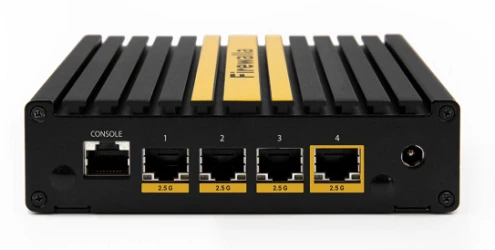
For privacy-conscious households or small home offices, it’s arguably the single strongest option on this list, and it comes with no monthly or annual fee for its core protection.
What makes it stand out:
- Built-in Intrusion Prevention System (IPS) that actively blocks attack patterns, not just known-bad URLs
- Network segmentation; wall off IoT devices, guest traffic, and your main devices from each other
- A local DNS resolver, so your ISP can’t see and log every site you visit
- Built-in WireGuard and OpenVPN server/client for routing your own traffic through a VPN
- Deep Insight traffic monitoring so you can actually see what every device on your network is doing, in real time
Note: Firewalla isn’t a traditional Wi-Fi router. The Gold Plus is a firewall/router hybrid, and getting the most out of it (especially in router mode) benefits from a bit of networking comfort.
If you want a plug-and-forget mesh system, this isn’t it. At roughly $589, it’s also a bigger upfront investment than most consumer routers. Though when you compare that to five years of a $99/year Armor subscription, the total cost of ownership evens out fast.
Best for: Privacy-focused households, small offices, and anyone tired of “free trial, then $9.99/month forever” pricing.
Related: Firewalla vs. UniFi Dream Machine: Which Is Better for a Home Network?
5. Synology RT6600ax: Best for Serious Network Segmentation
Synology is best known for network-attached storage, and that DNA shows up in the RT6600ax’s software. This is the router for people who want granular control.
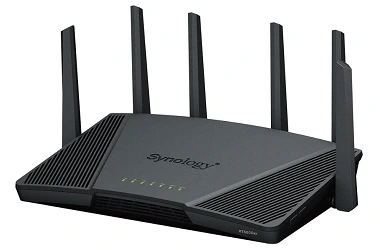
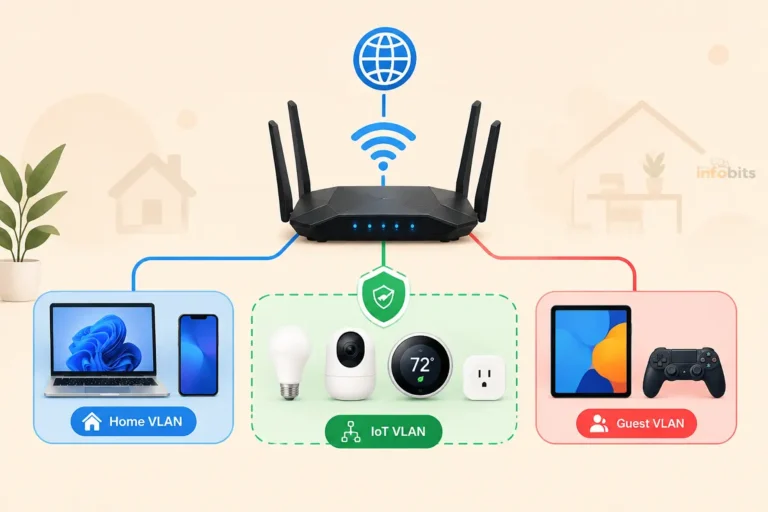
Its standout feature is genuine VLAN segmentation, letting you create up to five separate isolated networks from one router: one for your main devices, one for guests, one for IoT gadgets, and so on. If a smart camera on the IoT VLAN gets compromised, it’s walled off from ever reaching your laptop on the main network.
The Threat Prevention add-on layers a signature-based IDS/IPS on top of that segmentation, giving you both isolation and active threat detection at once; a combination few consumer routers offer together.
Note: Threat Prevention requires a $29.99/year subscription after the free trial. Synology’s SRM operating system, while powerful, has a steeper learning curve than ASUS or TP-Link’s mobile-first apps. This is squarely aimed at people who don’t mind a bit of a learning curve in exchange for control.
Best for: Tech-comfortable families or small offices who specifically want IoT isolation alongside malware protection, all processed on-device rather than in the cloud.
6. Gryphon AX: Best for Families Who Want Security AND Parental Controls in One
Gryphon leans hard into the family-safety angle, and it shows. Security is powered by ESET, providing 24/7 malware and intrusion protection, while the parental control side is genuinely one of the most detailed on the market.
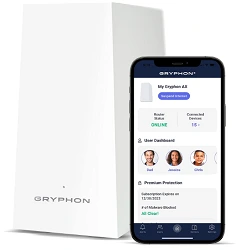
Age-based content filtering from toddler through teen, per-device time schedules, and automatic alerts when a new, unapproved device joins the network.
A nice extra: Gryphon can also work as a “homebound VPN,” letting you route your phone’s traffic back through your home network’s protection even when you’re out and about on public Wi-Fi.
Note: This is one of the pricier options on the list. A single unit runs around $279, and a two-pack mesh kit is roughly $479; Gryphon’s ongoing subscription plans are among the more expensive in this category.
It also requires a mobile app for setup and management; there’s no full web interface for people who prefer configuring things from a browser.
Best for: Families with kids of different ages who want detailed, age-appropriate content controls bundled with real security, not just Wi-Fi filtering.
7. Eero Pro 6E with Eero Plus: Best for Simplicity and Bundled Extras
If the idea of configuring VLANs or reading through an IPS dashboard makes your eyes glaze over, Eero is built for you.
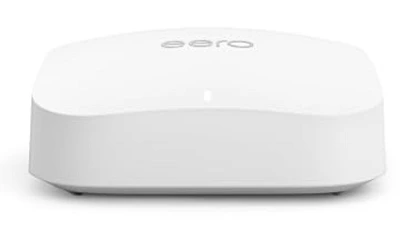
The hardware itself is straightforward mesh Wi-Fi, and the Eero Plus subscription ($9.99/month or $99.99/year) bundles network-level malware and phishing blocking (via Zscaler DNS filtering) with genuinely useful extras: a Malwarebytes Premium license for your devices (normally $3.33–5/month on its own), a 1Password subscription (normally about $3/month), and a VPN powered by Guardian.
Stacked up individually, those three included services are worth close to what Eero Plus costs on its own. So if you were going to buy Malwarebytes and a password manager anyway, the bundle actually saves money rather than costing extra.
Note: Without Eero Plus, the base hardware has very little built-in security beyond basic firewall functions. You’re paying for the subscription to get the protection this article is about. Advanced users will also find Eero’s settings comparatively limited; there’s no equivalent of ASUS or Synology’s deep configuration options.
Best for: Non-technical households who want protection to just work, and who’d rather pay one bundled subscription than manage several separate services.
8. GL.iNet Beryl AX: Best Budget Pick
Not everyone needs (or wants to pay for) a premium security suite. The GL.iNet Beryl AX runs on OpenWrt, an open-source router firmware, which means you can install AdGuard Home or Pi-hole directly on the router itself to block malicious and ad-serving domains at the network level; completely free, with no subscription ever.
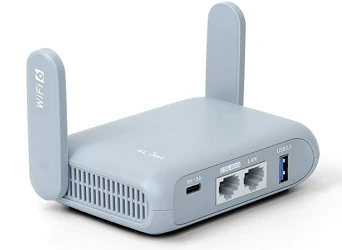
It’s compact, genuinely portable (a favorite among people who travel with their own router for hotel Wi-Fi), and supports OpenVPN, WireGuard, and even Tor routing for the privacy-minded.
Note: This isn’t a plug-and-play experience. Setting up AdGuard Home or configuring firewall rules requires more comfort with router settings than any other pick on this list. Range and multi-device throughput are also modest compared to a full-size mesh system. This is best as a secondary or travel router, not the sole router for a large, device-heavy home.
Best for: Budget-conscious, technically comfortable users and frequent travelers who want free, DIY-level malware blocking.
Myth vs. Fact: Router Malware Protection
Myth: “My router has a firewall, so I’m already protected from malware.” Fact: A basic firewall (which nearly every router has) mostly blocks unsolicited inbound connections. It does very little against outbound malware traffic, phishing sites you click on yourself, or a compromised IoT device calling home. The features in this article ( IPS, DNS-based threat filtering, vulnerability scanning) go well beyond a stock firewall.
Myth: “Antivirus software on my laptop makes router-level protection redundant.” Fact: Antivirus software protects the device it’s installed on. It does nothing for your smart TV, thermostat, robot vacuum, or your kids’ devices that don’t support antivirus apps at all. Router-level protection is the only layer that covers every device on the network, including the ones that can’t run security software themselves.
Myth: “WPA3 encryption means my network is secure from malware.” Fact: WPA3 secures the connection between your devices and the router. It stops someone from cracking your Wi-Fi password or eavesdropping on your traffic. It does nothing to stop malware, phishing, or a compromised device already connected to your network. Encryption and malware protection solve two completely different problems.
Myth: “If a router brand offers ‘free’ protection, it must be worse than the paid options.” Fact: Not necessarily. ASUS’s AiProtection Pro, while free for life, is powered by Trend Micro, a legitimate, well-regarded threat intelligence provider, and performs competitively in independent testing. “Free” in this case reflects ASUS’s business model (bundling it into hardware cost) rather than a lesser product.
Related: Router Security Features That Actually Matter in 2026
Common Mistakes People Make With Router Security
- Never changing the default admin password. The Mirai botnet and its many descendants actively scan the internet for routers still using factory-default logins. This is the single most common way home routers get compromised.
- Leaving remote management enabled when it’s not needed. Unless you specifically manage your network while away from home, this setting is an open door with no upside.
- Ignoring firmware updates. One survey found over half of home router owners had never updated their firmware even once. Malware protection features are only as good as the last security patch.
- Assuming a “smart” device doesn’t need protecting. Cameras, plugs, and light bulbs are frequently the weakest link precisely because they can’t run antivirus software. This is exactly what router-level protection and VLAN segmentation are designed to solve.
- Buying based on Wi-Fi speed alone. A blazing-fast router with no threat detection is still just as vulnerable as a slow one. Speed and security are separate purchasing decisions.
- Letting a paid security subscription quietly lapse. If you choose a router that relies on an annual subscription (Armor, HomeShield Pro, Threat Prevention), set a calendar reminder before it expires; an unrenewed subscription can leave you thinking you’re protected when you’re not.
Expert Tips for Getting the Most Out of Router-Level Protection
- Put IoT devices on their own network. Whether it’s a full VLAN (Synology, Firewalla) or a simple separate guest SSID, isolating smart home gadgets from your main devices limits the damage if one gets compromised.
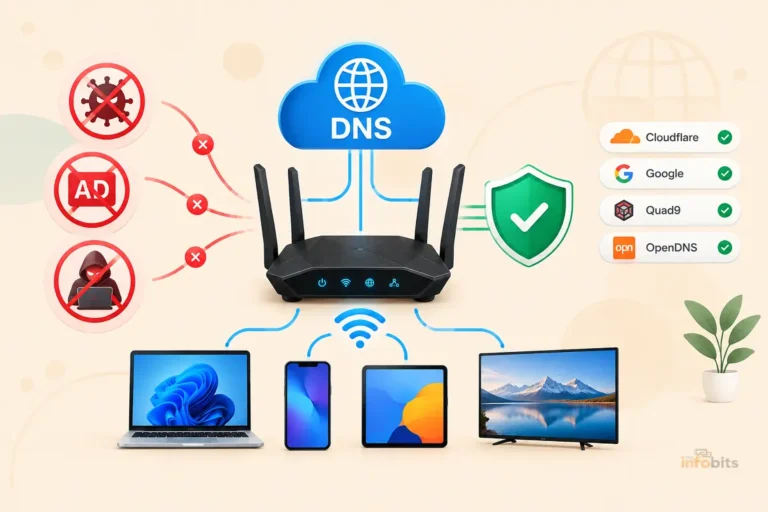
- Pair your router’s protection with encrypted DNS. Services like Cloudflare’s malware-blocking DNS (1.1.1.2) or Quad9 (9.9.9.9) add a second layer of domain-level filtering, and most modern routers let you set this network-wide in a couple of clicks.
- Check your router’s support page before buying. Search the manufacturer’s name plus “firmware support” to see how many years of updates they commit to. A fast router that stops receiving security patches after two years is a liability, not a bargain.
- Don’t skip the vulnerability scan feature if your router has one. Tools like AiProtection’s vulnerability scanner or Netgear Armor’s device assessment will often flag things you didn’t know about; an old smart plug still running outdated firmware, for instance.
- If you’re on an ISP-provided gateway, consider bridge mode. Most ISP routers are adequate for connectivity but weak on security: slow patch cycles, minimal segmentation, no IDS/IPS. Putting the ISP gateway into bridge mode and routing everything through one of the routers above generally gives you meaningfully better protection.
Related: WPA3 Explained: What It Is, How It Works, and Why You Need It in 2026
Troubleshooting: Common Router Security Issues
My router’s security feature is slowing down my internet speed. Deep packet inspection (used by IPS/IDS features) is computationally intensive, and on lower-end hardware it can create a noticeable dip in throughput, especially past 500–600 Mbps. If you’re on a very fast fiber plan, check whether your router model has a known ceiling for deep inspection speeds. Some ASUS models specifically recommend disabling NAT acceleration for full protection, which trades off some top-end speed for wider inspection coverage.
I’m getting constant “malicious site blocked” notifications, and I’m not sure if they’re real. This is more often normal than alarming. Ad networks, tracking scripts, and outdated smart-device apps frequently ping domains that get flagged by threat databases. If the alerts are tied to one specific device, that’s worth investigating (check for outdated apps or firmware on that device); if they’re scattered across many devices, it’s usually your filtering doing its job on ad/tracker traffic.
My subscription-based protection (Armor, HomeShield Pro, Threat Prevention) says it’s expired. Check your account in the manufacturer’s companion app. These subscriptions typically don’t auto-cancel the router’s basic firewall, but they do disable the advanced malware and IPS features silently. It’s worth checking every few months rather than assuming it’s still active.
A device keeps getting flagged as “infected” or “compromised” even after I’ve scanned it. This usually points to firmware-level compromise on the device itself (common with older IoT gadgets) rather than something your antivirus software can fix. A factory reset of the specific device, followed by an immediate firmware update before reconnecting it, resolves this in most cases. If it recurs, it may be time to isolate that device on its own VLAN or replace it.
Related: How to Secure IoT Devices on Your Home WiFi Network
Frequently Asked Questions
Do I really need a router with built-in malware protection?
If you have more than one or two connected devices ( especially smart home gadgets that can’t run antivirus software), router-level protection adds a meaningful layer that device-level antivirus simply can’t cover. It’s not strictly mandatory, but for most modern homes it closes a real gap.
What’s the difference between a router firewall and malware protection?
A basic firewall mostly blocks unsolicited incoming connections. Malware protection actively inspects traffic for known-bad sites, suspicious behavior patterns, and compromised devices. It’s a more active, intelligent layer on top of the passive firewall.
Is free router protection (like ASUS AiProtection) actually as good as paid options?
In independent testing, AiProtection Pro performs competitively, though Bitdefender-powered options like Netgear Armor sometimes edge it out on zero-day threat detection. For most households, free protection from a reputable engine is more than sufficient.
Do I need both antivirus software and router-level protection?
Yes, ideally. They protect different things. Antivirus secures the individual device it’s installed on, while router-level protection covers your entire network, including devices that can’t run antivirus at all.
What is AiProtection Pro and who makes it?
AiProtection Pro is ASUS’s built-in security suite, powered by Trend Micro’s threat intelligence database. It includes malicious site blocking, two-way intrusion prevention, and device vulnerability scanning, and it’s included free with ASUS routers for the life of the hardware.
Is Netgear Armor worth the subscription cost?
If you want antivirus-grade protection powered by Bitdefender and you’re comfortable paying roughly $99.99 per year, it’s one of the strongest options available. If you’d rather avoid recurring fees entirely, ASUS or Firewalla are better fits.
Can a router really stop malware, or just block bad websites?
Modern security-focused routers do more than URL blocking. Features like intrusion prevention systems (IPS) actively monitor traffic patterns for attack behavior, and some routers can detect and quarantine devices already showing signs of compromise- not just prevent new infections.
What is HomeShield on TP-Link routers?
HomeShield is TP-Link’s built-in security platform. The free tier (powered by Avira) covers basic malicious content filtering, while HomeShield Pro adds Norton-grade protection, DDoS defense, and more advanced parental controls for an annual fee.
Does VPN encryption protect against malware?
Not directly. A VPN encrypts and reroutes your traffic, which protects your privacy and can shield you from certain man-in-the-middle attacks, but it doesn’t scan for or block malware itself. You typically want VPN and malware protection as separate, complementary features.
Is WPA3 necessary if my router already has malware protection?
Yes; they solve different problems. WPA3 protects the wireless connection between your devices and the router from being cracked or eavesdropped on. It does nothing to stop malware or phishing once a device is already connected.
How much does router-based malware protection typically cost per year?
It ranges widely: ASUS AiProtection Pro is free for life, GL.iNet’s OpenWrt-based DIY setup is free, Synology’s Threat Prevention runs about $29.99/year, Netgear Armor is about $99.99/year, and Eero Plus is $99.99/year but bundles in a password manager and VPN as well.
Can hackers really take over a home router?
Yes, and it happens more than most people realize. The Mirai botnet and its variants continue to actively scan the internet for routers still using default login credentials, and government cybersecurity advisories have flagged router vulnerabilities more frequently in recent years than ever before.
What is network segmentation and do I need it?
Segmentation splits your network into isolated zones (VLANs). For example, separating IoT devices, guests, and your main devices from each other. It’s not essential for every household, but it’s one of the most effective ways to contain a breach if a single device (like a smart camera) is compromised, since the infection can’t spread across the segment boundary.
Should I put my ISP-provided router in bridge mode?
For most people, yes, if you’re using one of the routers on this list. ISP gateways are typically adequate for basic connectivity but weak on security: slower patch cycles, minimal segmentation, and often no IDS/IPS at all. Bridging it and routing traffic through a dedicated security-focused router generally improves protection meaningfully.
Do mesh routers offer the same malware protection as single-unit routers?
Generally yes; brands like TP-Link Deco, Eero, and Gryphon apply their security suite across the entire mesh network, not just the main unit, so every node benefits from the same protection.
Is it worth buying an expensive router just for the security features?
It depends on your household. If you have many connected devices, kids, or smart home gadgets, the security features can be worth the premium. If you have a simple setup with one or two devices, a budget router with basic protection (or a free DNS-based filter) may be sufficient.
How do I know if my current router already has malware protection?
Check the router manufacturer’s app or admin panel for terms like “AiProtection,” “Armor,” “HomeShield,” or “Threat Prevention.” If none of these appear, your router likely only has basic firewall functionality, and you may want to consider a network-level DNS filter as a lower-cost interim step.
What should I do if I think my router is already infected?
Perform a full factory reset, immediately update to the latest firmware before reconnecting any devices, and change the admin password to something unique. If the router hasn’t received a firmware update in over a year, it may be worth replacing rather than trying to secure it.
Are open-source router firmwares like OpenWrt safer than manufacturer firmware?
They can offer more transparency and community-driven security fixes, and let you install your own protection tools (like AdGuard Home). However, they generally require more technical comfort to set up and maintain properly compared to a manufacturer’s out-of-the-box security suite.
Related: How to Detect Unauthorized Devices on Your WiFi Network
Found this guide useful? Share it with someone who is suffering from networking-related issues. Follow us on Facebook and Twitter for more tips, tricks, and guides.
We also ask that you bookmark this page for future reference, as we are constantly updating our articles with new information.
Sign up for our free newsletter as well to receive fresh information immediately in your inbox and keep technically up to date.
Disclosure: If you follow our links to a retailer’s website and make a purchase, we will get an affiliate commission on some, but not all, of the items or services we promote. This will cause no price change for you.
You May Be Interested in Reading:
- How to Set Up Parental Controls on Your Router
- Can a VPN Secure Your Home WiFi? What It Protects (and What It Doesn’t)
- How to Secure Your Home WiFi Network: 12 Steps You Should Take
- Best Gaming Router: Top Picks + How to Choose the Right One
- Best Long-Range WiFi Routers: Tested for Large Homes & Dead Zones


)