How to Charge a Laptop Without a Charger: 10 Safe Methods
Left your charger at home, or watched it finally give up on you mid-trip? A dead laptop with no charger in sight is stressful, but it’s rarely a dead end.
Depending on your laptop’s ports and how much power you actually need, you likely have several safe backup options already within reach: a power bank, your car, even an HDMI cable in some cases.
Quick answer: If your laptop has a USB-C port that supports charging, a USB-C power bank or wall charger rated for at least 45–65W is your fastest, safest fix. If it doesn’t, a universal power adapter matched to your laptop’s exact voltage is the next best option. Whatever method you use, always double-check the voltage and wattage before connecting anything; using the wrong power source is the single biggest risk here.
This guide covers every practical way to charge a laptop without its original charger, in order of how safe and reliable each one is, plus how to tell your laptop’s actual power needs before you try any of them.
Is It Safe to Charge a Laptop Without Its Original Charger?
Generally, yes, as long as you match the voltage, current, and connector type correctly. The real risk isn’t using a different charger; it’s using one with the wrong specifications.
Supplying too much voltage can damage the battery or the laptop’s charging circuitry, while too little simply won’t charge it (or will charge it very slowly).
Before trying any alternative method, check your laptop’s power requirements. You’ll usually find them printed on:
- The bottom of the laptop itself
- The original charger or power brick
- Your laptop’s official specs page or manual
Look for the voltage (V), current (A), and wattage (W). Most laptops need somewhere between 45W and 100W, though gaming laptops and mobile workstations can require 130W or more.
As a rule of thumb, it’s always safer to use a power source rated equal to or slightly higher in wattage than your laptop’s original charger ( the laptop will only draw what it needs ), but never one with a different voltage than specified.
Related: Is It Bad to Leave a Laptop Plugged in All the Time?
Quick Comparison: Which Method Should You Use?
| Method | Best For | Speed | Needs |
|---|---|---|---|
| USB-C Power Bank | Most modern laptops, on the go | Fast (with PD) | USB-C port with charging support |
| USB-C Wall Adapter | Home, office, when you only forgot the brick | Fast | USB-C PD-compatible laptop |
| Car (USB or Inverter) | Road trips | Moderate | USB-C laptop or power inverter |
| Universal Power Adapter | Laptops without USB-C | Normal | Matching voltage/tip |
| Portable Power Station | Off-grid, outdoors, emergencies | Fast | AC outlet built in, larger and heavier |
| Solar Charger | Camping, extended off-grid trips | Slow | Sunlight, patience |
| HDMI Charging | Emergency only, rare laptops | Very slow | Laptop with HDMI-IN + Power over HDMI |
| External Battery Charger | Laptops with removable batteries | Normal | Compatible external charger |
1. USB-C Power Bank
If your laptop charges over USB-C, a power bank is the most convenient backup you can own, and the one most worth keeping in your bag permanently.
The key thing to check is USB Power Delivery (PD) support. Not every USB-C power bank can charge a laptop; many only output 5W to 10W, which is fine for a phone but far too little for a laptop.
You need one that specifically lists USB-C PD output of 45W or higher (65W+ is safer for most modern ultrabooks, and gaming laptops may need 100W+).
A few things to keep in mind:
- A power bank will typically give you one to two full charges before it needs recharging itself, so it’s a backup, not a long-term replacement.
- USB-C PD negotiates power automatically between the power bank and laptop, so as long as both support PD, you generally don’t need to worry about frying anything by plugging in the wrong wattage. The devices agree on a safe level automatically.
- If you fly often, note that carry-on power banks are capped at 100Wh (roughly 27,000mAh) by most airlines, so check your model’s rating before a flight.
A power bank like the Anker Laptop Power Bank 165W (view on Amazon) is a popular pick for laptop charging on the go, since its 165W PD output covers most ultrabooks and it’s compact enough to keep in a laptop bag permanently.
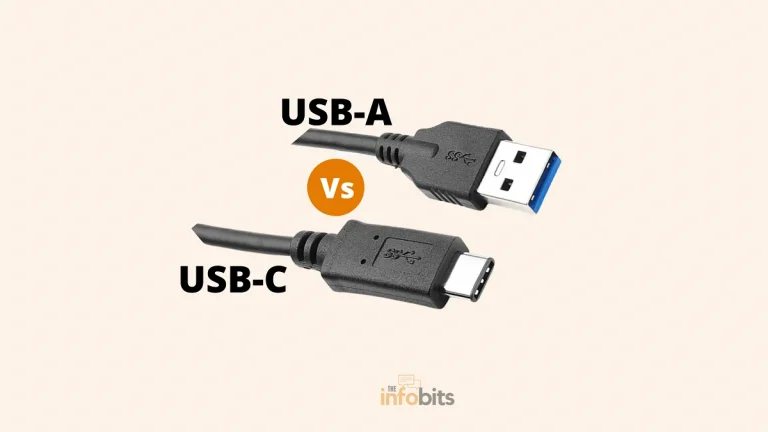
Related: USB-A vs USB-C: What’s the Difference?
2. USB-C Wall Charger or GaN Charger
If you’re near an outlet but just missing your specific laptop brick, any USB-C PD wall charger rated for your laptop’s wattage will work. It doesn’t need to be the original brand.
GaN (gallium nitride) chargers are worth calling out specifically here, since they’ve become the standard for high-wattage USB-C charging in the last few years.
A compact 65W GaN charger can charge many modern laptops nearly as fast as their original brick, while being roughly a third of the size, genuinely useful if you’re trying to pack light or keep a single charger for your phone, tablet, and laptop at once.
To use one: plug the charger into the wall, connect a USB-C cable rated for your wattage (cheap or damaged cables are a common bottleneck), and plug into your laptop’s USB-C port.
If you regularly travel with multiple devices, a multi-port GaN charger like the Anker 737 (view on Amazon) or similar 65–100W model lets you charge a laptop, phone, and tablet from a single compact brick instead of carrying three separate ones.
3. Charging Your Laptop in a Car
Simple USB method: If your laptop charges over USB-C, most modern cars already have a USB port on the dashboard. Plug in with a compatible cable, start the engine (charging with the engine off will drain your car battery), and you’re set.
No USB port, or non-USB-C laptop: You’ll need a car charger adapter (plugs into the 12V socket and provides USB-C PD output) or, for higher-power laptops, a power inverter that converts your car’s 12V DC into standard AC output.
A compact inverter like the BESTEK 150W car power inverter (available on Amazon) plugs directly into a cigarette lighter socket and gives you a standard AC outlet, which lets you use your laptop’s original charger in the car exactly as you would at home.
Important safety note: Never connect a laptop directly to a car battery without an inverter or adapter in between. Car batteries output roughly 12V, which doesn’t match most laptop charging specs and can seriously damage the battery or the laptop.
4. Universal Power Adapter
Universal adapters come with a set of interchangeable tips and adjustable voltage output, which makes them a solid option for older laptops without USB-C charging.
The catch is that you need to set the voltage manually to match your laptop’s exact requirement; most universal adapters list this clearly on a dial or switch.
Getting this wrong is the most common way people damage a laptop with an alternative charger, so double-check the voltage against what’s printed on your laptop or original charger before plugging in.
Some universal adapters also accept 12V DC input, meaning they can be powered from a car’s electrical system too, effectively combining two of these methods into one device.
A universal laptop adapter (find on Amazon) that includes multiple connector tips is worth keeping as a permanent backup if your laptop doesn’t support USB-C, since it covers most non-standard barrel connectors in a single device.
5. Portable Power Station
For longer trips, camping, or genuine emergencies (like a power outage), a portable power station is the most versatile option on this list, since it includes a real AC outlet, meaning you can use your laptop’s original charger exactly as you would at home, no adapters needed.
For most laptops, a power station in the 300–500Wh range is plenty and will give you several full laptop charges plus power for a phone or tablet.
Larger units (800Wh+) add flexibility if you’re powering multiple devices or camping for extended periods, but they’re heavier and pricier, so match the size to how you’ll actually use it.
This isn’t a method you’ll carry daily, but if you travel to areas with unreliable power, or want an emergency backup at home, it’s the most “set it and forget it” option here.
6. Solar Charger
Solar panels won’t charge a laptop directly at any usable speed on their own, but paired with a power bank or power station with a solar input, they let you top up power gradually using sunlight . This is useful for extended off-grid trips like camping or hiking where you won’t see an outlet for days.
Realistically, treat solar as a slow trickle-charge method for topping up a battery pack over the course of a sunny day, not a fast or reliable way to charge a laptop directly. It’s the least practical option here for anything but genuinely off-grid situations.
7. HDMI Charging (Emergency Use Only)
A small number of laptops support Power over HDMI, which lets you draw a small amount of power through an HDMI connection to a TV or monitor.
This is a niche, last-resort option. Check your laptop’s manual for “HDMI charging” or “power over HDMI” support before assuming it will work, since most laptops don’t support it at all.
If yours does:
- Connect an HDMI cable between your laptop’s HDMI-IN port and the HDMI-OUT port on the power source (typically a TV or monitor with power-sending capability).
- Check the battery icon in your system tray. If it shows “plugged in,” charging has started.
- Expect this to be noticeably slower than any other method here, since HDMI wasn’t designed to deliver meaningful power.
If your laptop only has a standard HDMI-out port (the far more common setup), an HDMI-to-USB-C adapter can sometimes route power the other direction, but compatibility varies significantly by laptop model, so treat this as a last resort rather than a plan.
8. External Battery Charger (Removable Batteries Only)
If your laptop has a removable battery ( increasingly rare on modern ultrabooks, but common on older or business-oriented models), you can charge the battery separately using a dedicated external charger, without the laptop itself needing power.
These chargers are almost always brand- and model-specific, so you’ll need one that matches your exact battery.
Most include indicator lights that show charging progress and switch off (or turn steady) once the battery is full. Some external chargers also accept 12V input, meaning you can charge a removable battery from your car as well.
9. Laptop Backpack With a Built-In Battery
Not a charging method exactly, but a genuinely useful way to avoid ever needing one: backpacks with a built-in battery pack and external USB port let you top up your laptop (or phone) directly from the bag while you’re already carrying it.
A travel backpack with a built-in battery and external USB port, like the Matein Travel Laptop Backpack (see on Amazon), is worth considering if you already need a laptop bag. It turns something you’re carrying anyway into a backup power source.
10. Phone Charger (In a Pinch)
If your laptop charges over USB-C and you’re desperate, a phone charger can work; but only if it outputs enough wattage.
Most phone chargers are rated between 18W and 30W, which is enough to slow the rate your laptop loses charge but often not enough to actually charge it while in use.
A phone charger rated 65W or higher (increasingly common with newer phones) stands a much better chance of actually charging a laptop, not just slowing the drain.
Warning Signs You Should Stop and Unplug
Whatever method you use, stop immediately if you notice any of the following:
- The charger, cable, or laptop gets noticeably hot to the touch
- The battery icon shows “plugged in, not charging” for more than a few minutes
- Charging is extremely slow, or the battery percentage keeps dropping despite being connected
- Any burning smell, sparking, or visible damage to the cable or connector
These usually mean the wattage or voltage doesn’t match, the connection is loose, or the cable itself is damaged, not that you need a more aggressive fix. Disconnect, check your laptop’s actual power requirements again, and try a different method rather than pushing through.
My Laptop Won’t Charge Even With a Compatible Charger – What Now?
If you’ve matched the voltage and wattage correctly and your laptop still won’t charge, the problem likely isn’t the lack of an original charger. It’s something else entirely. A few things worth checking before assuming the worst:
- Try charging with the laptop powered off. Some laptops charge more reliably, or only charge at all under heavy load, when off rather than in active use.
- Test the cable and port separately. A damaged USB-C cable is one of the most common causes of “charger not working”. Try a different cable if you have one.
- Check for a stuck power icon. If Windows or macOS shows “plugged in, not charging,” it can sometimes indicate a battery health issue rather than a charging problem.
- Inspect the charging port for debris or damage. Dust, lint, or a bent pin inside the port can prevent a solid connection.
If none of that helps, the issue is more likely a failing battery, damaged charging port, or motherboard-level fault. At that point, it’s worth getting the laptop looked at rather than continuing to troubleshoot power sources.
Related: How to Fix It When Your Laptop Is Not Turning On
Charging Specific Devices
Chromebook: Most Chromebooks charge over USB-C, so any compatible USB-C PD charger, power bank, or car adapter from this list works the same way. Double-check under Settings that USB-C is set as the active power input if charging doesn’t start automatically.
MacBook: Any of the USB-C methods above work for modern MacBooks (2016 and later), since Apple moved entirely to USB-C/MagSafe 3 charging. Older MacBooks with MagSafe 1 or 2 connectors will need a MagSafe-specific charger or adapter rather than USB-C alternatives.
Gaming laptop: Gaming laptops often draw significantly more power (130W–240W) than the alternative methods above can reliably supply, especially under load. A USB-C power bank or wall charger may keep the battery from draining further while the laptop is off or in light use, but often can’t keep up with active gaming. A portable power station with your original charger plugged into its AC outlet is usually the more realistic backup for gaming laptops.
Final Thoughts
Running out of laptop power without a charger can be stressful, but you usually have a few safe options. The best method depends on your laptop, its charging port, and the equipment you already have.
If your laptop supports USB-C Power Delivery, a compatible USB-C charger or power bank can be the easiest solution. A car charger, portable power station, or another compatible charger can also help when you’re away from an outlet. For some older laptops, however, these options may not work.
The most important thing is to avoid unsafe shortcuts. Don’t use a charger with the wrong voltage or a damaged cable just because it fits. You could damage the laptop or create a safety hazard. Always check your laptop’s charging requirements before connecting another power source.
If you’re searching for how to charge a laptop without a charger, focus on methods that match your laptop’s specifications. USB-C charging is convenient, but compatibility is not guaranteed on every model.
Hopefully, these methods help you get your laptop powered up when the original charger isn’t available. Once you’re back up and running, it’s also worth keeping a compatible backup charger or power bank nearby. A little preparation can save you from a dead laptop at the worst possible time.
Frequently Asked Questions
Can I charge my laptop with my phone charger?
Yes, if your laptop supports USB-C charging and the phone charger outputs at least 45–65W. Lower-wattage phone chargers (typically 18–30W) may slow battery drain but often won’t fully charge the laptop while it’s in use.
How to charge a laptop with a USB port?
If your laptop has a USB-C port that supports charging, you can connect it to any USB-C Power Delivery source, including power banks, wall chargers, and some car adapters, as long as the wattage matches your laptop’s requirements.
How to charge a laptop in a car without an inverter?
If your car has a USB port and your laptop charges over USB-C, you can connect them directly with a USB-C cable while the engine is running. Without a USB port or USB-C laptop, you’ll need either a car charger adapter or a power inverter.
How to charge a Chromebook without a charger?
Any USB-C Power Delivery charger, power bank, or car adapter rated for your Chromebook’s wattage will work the same way as with any USB-C laptop. Confirm USB-C is set as the active power source in Settings if it doesn’t start charging automatically.
How to charge a MacBook without a charger?
Any USB-C PD power bank or wall charger works for MacBooks from 2016 onward. Older MagSafe-equipped MacBooks need a MagSafe-compatible charger instead, since they don’t charge over USB-C.
Is it safe to charge a laptop with a universal adapter?
Yes, as long as you set the voltage to exactly match your laptop’s requirement, which is usually printed on the bottom of the laptop or on the original charger. Using the wrong voltage is the most common way people damage a laptop with a universal adapter.
Can I charge a laptop without a battery, using only a power source?
Some laptops can run directly from AC power without a battery installed, but this isn’t universal and can cause instability or shutdowns if power fluctuates even briefly. It’s not recommended as a regular charging method.
Why does my laptop say “plugged in, not charging”?
This usually means the power source isn’t delivering enough wattage, the cable or port has a loose connection, or there’s an underlying battery health issue. Try a different cable or power source first, and if the message persists across multiple chargers, the battery itself may need attention.
How many watts do I need to charge a laptop?
Most ultrabooks need 45–65W, while gaming laptops and mobile workstations often require 100–240W. Check the wattage printed on your original charger or your laptop’s spec sheet to be sure before using an alternative power source.
Can a power bank damage my laptop?
A properly rated USB-C PD power bank won’t damage your laptop, since Power Delivery negotiates safe voltage and current automatically between devices. Damage risk comes mainly from non-PD power banks or mismatched voltage adapters, not standard PD power banks.
How long does it take to charge a laptop with a power bank?
Charging speed depends on the power bank’s wattage output relative to your laptop’s original charger, but expect it to take roughly the same time as the original charger if the power bank matches or exceeds the original wattage, and noticeably longer if it doesn’t.
Can I bring a laptop power bank on a plane?
Yes, most airlines allow power banks up to 100Wh (roughly 27,000mAh) in carry-on luggage without special approval, though larger capacities may require airline permission or aren’t allowed at all. Check your specific airline’s policy before flying.
Does charging a laptop with HDMI actually work?
On the small number of laptops that support Power over HDMI, yes, but it charges significantly slower than any USB-C or adapter method and should only be treated as a last resort.
Can I use a laptop with a removable battery while it charges externally?
No. If you’re using an external battery charger, the battery has to be removed from the laptop to charge, so the laptop itself won’t have power until you reinstall the charged battery.
Is it bad to frequently use alternative charging methods instead of the original charger?
Occasional use of a properly matched alternative charger isn’t harmful, but relying on mismatched or low-quality chargers long-term can lead to slower charging, more heat, or gradual battery wear compared to using a charger built to your laptop’s exact specifications.
We hope you found this post informative, and do like and follow us on Facebook and Twitter for regular updates.
We also ask that you bookmark this page for future reference. Sign up for our free newsletter as well to receive fresh information immediately in your inbox and keep technically up to date.
Disclosure: If you follow our links to a retailer’s website and make a purchase, we will get an affiliate commission on some, but not all, of the items or services we promote. This will cause no price change for you.