How Long Do PC Power Supplies Last? PSU Lifespan Guide
The power supply unit (PSU) converts electricity from your wall outlet into the stable DC power your PC components need. Every part of your computer depends on it, making the PSU one of the most important pieces of hardware in the system.
Ironically, it’s also one of the most overlooked components. Many people don’t think about the PSU until problems appear. A failing power supply can cause symptoms that look like a faulty graphics card, bad RAM, or even a failing motherboard.
This guide covers realistic lifespan expectations by PSU quality tier, how to actually tell whether your power supply is the culprit behind system instability, what shortens a PSU’s life, and what genuinely helps it last longer.
Quick Answer: A budget PSU typically lasts 3–5 years, a solid mid-range unit 5–7 years, and a genuinely high-quality PSU from a reputable brand (Corsair, Seasonic, EVGA, and similar) can run reliably for 7–12 years or more. The single biggest factor isn’t age by itself; it’s heat, dust, and how consistently the unit runs near its rated capacity over that time.
How Long Does a PSU Actually Last?
There’s no single number, because PSU lifespan depends heavily on build quality, not just time in service:
- Budget/generic PSUs: Often 3–5 years, sometimes less under sustained heavy use. These typically use lower-grade capacitors and thinner protection circuitry.
- Mid-range PSUs from known brands: Generally 5–7 years of reliable service under normal use.
- High-quality PSUs from reputable manufacturers: 7–12+ years is realistic, and it’s not unusual to see well-maintained units from top-tier brands still running fine after a decade.
A useful, if imperfect, real-world signal is warranty length. Quality PSU manufacturers back their better units with 7–10 year warranties, because their failure rates at that age are genuinely low enough to make that economical.
A PSU with only a 1–2 year warranty is telling you something about how long the manufacturer expects it to last.
How to Tell If Your PSU Is Actually the Problem
This is the part most guides skip, and it matters. PSU failure symptoms overlap heavily with GPU, RAM, and motherboard problems, which leads a lot of people to replace the wrong part first.
Warning Signs to Watch For
- Random shutdowns or restarts specifically under load (gaming, rendering, heavy multitasking); one of the most classic signs, since it’s when power draw spikes and a weakening PSU can’t keep up.
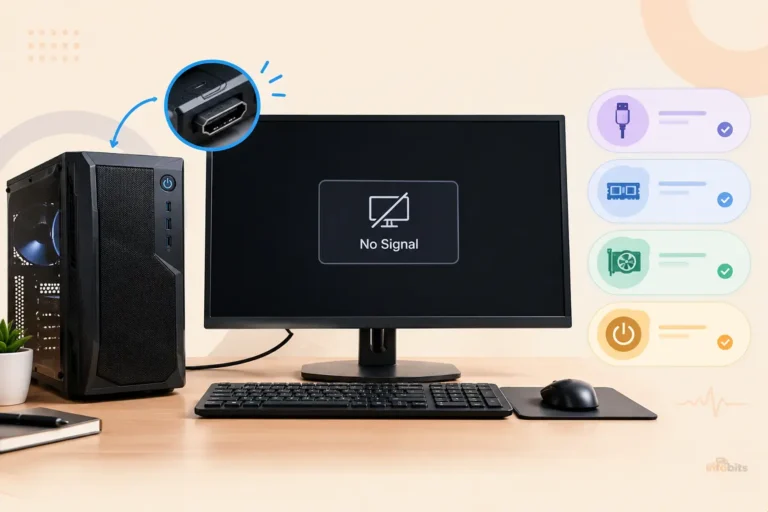
- System won’t power on at all; no fans, no lights, no beeps, or it powers on for a split second and dies. This usually means either total failure or a protection circuit tripping immediately.
- Coil whine or buzzing that’s new or has gotten noticeably louder. Mild coil whine is normal in some units, but a sudden increase or a new grinding/buzzing sound suggests component degradation.
- A burning smell. Power off and unplug immediately; this can indicate a failing capacitor or transformer and, in rare cases, poses a real fire risk. Don’t power the system back on until the PSU has been replaced.
- Unexplained BSODs or crashes with inconsistent error codes, especially under load, which can look exactly like a software or driver problem but actually trace back to unstable power delivery.
- Peripherals losing power intermittently; USB devices disconnecting and reconnecting, drives dropping out, can point to a struggling 5V or 3.3V rail.
- Visible bulging or leaking on capacitors, or discoloration/burn marks on the PSU casing, both of which are unambiguous signs it needs replacing.
Related: How to Fix CPU Fan Error on Boot Time?
How to Actually Test It (Safely)
- The swap test (most reliable). If you have access to a known-good PSU of adequate wattage, swapping it in and seeing if the problem disappears is the single most conclusive test available to most people. This is more reliable than any bench test, because it reproduces your system’s actual load.
- A dedicated PSU tester (available on Amazon). These plug directly onto the PSU’s connectors and display each rail’s voltage on a small screen. It’s the easiest hands-on method and catches a dead or badly out-of-spec rail.
- The paperclip test, with an important caveat. With the PSU disconnected from everything except the 24-pin connector, shorting the green wire (PS_ON) to a black wire (COM) with a paperclip should make the fan spin, confirming the unit powers on. This only proves the PSU turns on. It doesn’t prove it holds steady voltage under real load, which is how PSUs typically actually fail. A PSU that passes the paperclip test can still be the cause of shutdowns during gaming.
- A multimeter, for more detail. Checking the 24-pin connector’s rails directly (yellow ≈ 12V, red ≈ 5V, orange ≈ 3.3V), values should stay within about ±5% of rated voltage: roughly 11.4–12.6V, 4.75–5.25V, and 3.14–3.47V respectively. Like the paperclip test, this is typically a low-load snapshot rather than a true stress test.
- Monitor voltages under real load if you want the most accurate read without opening anything. Software like HWiNFO or HWMonitor can show your 12V rail while running a stress test (Prime95, FurMark, or just a demanding game). A rail that sags noticeably under load, even if it looks fine at idle, is the clearest sign of a genuinely failing PSU.
Safety note: never open a PSU’s casing. Its internal capacitors can hold a dangerous electrical charge even after it’s been unplugged for a long time. All of the testing methods above work entirely from the outside, through the standard connectors.
What’s Actually Inside a PSU (and Why It Wears Out)
A power supply is built around a circuit board packed with components that each degrade differently over time:
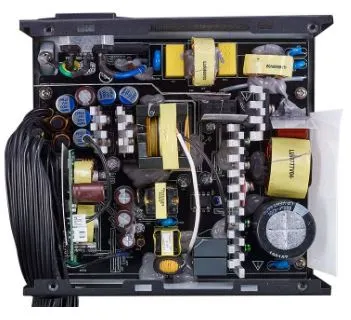
- Capacitors are the most common failure point. Aluminum electrolytic capacitors slowly lose capacitance as their internal electrolyte breaks down, especially when run hot for extended periods. This is the main reason sustained heavy use (gaming marathons, rendering, mining) ages a PSU faster than light, occasional use.
- MOSFETs, transistors, and diodes handle current switching and voltage regulation. Repeated heating and cooling cycles gradually degrade these, sometimes leading to internal leaks or failure.
- Resistors slowly drift in value as they convert electrical energy to heat over years of operation, which can push the PSU toward inefficient or unstable operation, though this is rarely the sole cause of outright failure.
- Inductive components (coils, inductors, transformers) are generally the most durable part of a PSU and are unlikely to fail unless physically damaged.
- The cooling fan typically lasts 3–5 years on its own, shorter if dust builds up and forces it to work harder. A failing or heavily dust-clogged fan lets internal temperatures climb, which accelerates wear on everything else in the unit. This is one of the more preventable failure paths.
Related: How to Test a PC Motherboard: Signs of Failure, Diagnostic Tools & Fixes
What Shortens a PSU’s Lifespan
- Heat, consistently the number one factor. Every component above degrades faster at higher sustained temperatures.
- Dust accumulation, which restricts airflow and drives internal temperatures up even in an otherwise healthy unit.
- Power surges, from unstable grid power or storms, which stress components with sudden voltage spikes.
- Running consistently near maximum rated capacity. A PSU pushed close to its limit for extended periods (heavy gaming, mining, sustained rendering workloads) runs hotter and wears out faster than the same unit given comfortable headroom.
- Undersizing the PSU for your system, which forces it to work harder than it’s comfortably rated for even during normal, non-extreme use.
Choosing a PSU That Will Actually Last
You’ll find plenty of high-quality power supply units (PSUs) on Amazon for every type of PC build. Before making your purchase, take a few minutes to compare your options. The following factors will help you choose the right PSU for your system and future upgrade plans.
Brand Matters More Than the Sticker Wattage
Many PSU brands don’t manufacture their own units. They source from a smaller number of OEM manufacturers and rebrand them, which means quality can vary significantly even within the same product line or PC manufacturer.
Sticking with a reputable brand known for using quality OEMs and backing units with long warranties is a more reliable signal than wattage alone.
Continuous Wattage, Not Peak
Look specifically for a continuous (or “sustained”) wattage rating, not a peak rating. Peak wattage is the maximum a unit can briefly deliver and isn’t sustainable. A PSU advertised around 750W peak might only deliver a genuinely stable 550–600W continuously.
If the packaging doesn’t specify, checking the manufacturer’s spec sheet or contacting them directly is worth the extra few minutes.
Size It Correctly for Your System
Add up your CPU and GPU’s rated power draw (TDP), then add roughly 150W of headroom for the rest of the system and future upgrades.
As a rough guide: a typical gaming PC lands around 550–650W, while a high-end build with a top-tier GPU (RTX 4080/4090-class or newer) often needs 750–1000W.
An online PSU wattage calculator, using your specific component list, gives a more precise number than these general ranges.
80 Plus Efficiency Rating
The “80 Plus” certification (Bronze, Silver, Gold, Platinum, Titanium, in ascending order) indicates how efficiently a PSU converts AC power to DC.
A higher rating means less energy wasted as heat, which also means less thermal stress on the internal components over the PSU’s lifetime, indirectly supporting longevity as well as lowering your electricity use.
Related: Things to Upgrade on PC to Improve Its Performance: A PC Upgrade Advisor
How to Extend Your PSU’s Lifespan
- Clean it regularly. Every 3–4 months is a reasonable interval for most environments; dustier spaces may need it more often. Always fully shut down and unplug the system first, and touch a grounded metal surface (or use an anti-static wrist strap) before working inside the case to avoid a static discharge damaging components.
- Use a surge protector, or better, a proper surge-protection-rated power strip (available on Amazon), to absorb voltage spikes from the mains before they reach your PSU.
- Consider a UPS (uninterruptible power supply) if you experience frequent outages or live somewhere with unstable grid power. Beyond backup runtime, many current UPS models also provide meaningful surge and spike protection (see on Amazon), which shields the PSU from the full force of sudden voltage swings. A UPS is meant to bridge a short outage long enough to save your work and shut down safely, not to run your system for extended periods.
- Avoid running your system at sustained near-maximum load if you can help it. This mainly means buying a PSU with reasonable headroom in the first place, rather than one sized right at the edge of your system’s peak draw.
- Keep decent case airflow. A PSU that’s cramped, poorly ventilated, or positioned to pull in warm exhaust air from other components will run hotter than one with clear airflow, regardless of how good the unit itself is.
Related: How to Choose a Surge Protector For Home Electronic Devices?
When Should You Replace It?
Most quality PSUs will still be functioning at the 5–6 year mark, but subtle performance degradation ( worn capacitors, slightly unstable voltage delivery) can already be affecting system stability in ways that are hard to notice day to day.
Given how inexpensive a decent PSU is relative to the rest of a PC build, proactively replacing one around the 6-year mark, rather than waiting for outright failure, is a reasonable and low-cost way to avoid a failing PSU taking other components down with it.
If you’re already seeing any of the warning signs covered above, that timeline moves up regardless of the unit’s age.
Final Thoughts
A good power supply can last for many years. In fact, it’s often one of the longest-lasting components in a PC. Its lifespan depends on build quality, workload, operating temperature, and how well it’s maintained.
If your PSU is running quietly, delivering stable power, and showing no warning signs, there’s usually no reason to replace it early. But if you notice random shutdowns, strange noises, burning smells, or voltage-related issues, don’t ignore them. Replacing a failing PSU in time can help protect the rest of your computer from more expensive damage.
If your PSU has already failed or you suspect it’s the cause of ongoing instability, checking exactly what power supply your PC currently has is a useful first step before shopping for a properly sized replacement.
Frequently Asked Questions
How long does a power supply typically last?
A budget PSU usually lasts 3–5 years, a solid mid-range unit around 5–7 years, and a high-quality PSU from a reputable brand can reliably run 7–12 years or more, with warranty length from the manufacturer being a decent indicator of expected lifespan.
How do I know if my PC’s power supply is dying?
The clearest signs are random shutdowns or restarts specifically under heavy load, a system that won’t power on at all, new or worsening coil whine, unexplained BSODs, or a burning smell. Because these symptoms overlap with GPU or RAM problems, testing with a PSU tester, multimeter, or, most reliably, swapping in a known-good PSU is the way to confirm it.
Can I test a power supply without opening it?
Yes, and you should never open a PSU’s casing at all. Its capacitors can hold a dangerous charge even after being unplugged. All reliable testing methods (a dedicated PSU tester, a multimeter on the external connectors, the paperclip test, or software voltage monitoring under load) work entirely through the unit’s standard external connectors.
Does the paperclip test prove my PSU is fine?
No, not fully. It only confirms the PSU powers on and its fan spins. It doesn’t test whether the unit holds stable voltage under real load, which is how most PSUs actually fail. A PSU can pass the paperclip test and still be causing shutdowns during gaming or other demanding tasks.
Should I replace my PSU after 10 years even if it still works?
It’s a reasonable precaution, particularly for a heavily used system. Internal components degrade gradually well before outright failure, and given how inexpensive a good PSU is relative to the risk of it damaging other components on failure, replacing proactively around the 6-year mark (sooner for budget units) is a sensible approach even without obvious symptoms yet.
Does running my PC at high load all the time wear out the PSU faster?
Yes. Sustained heavy loads like extended gaming sessions, rendering, and cryptocurrency mining keep internal components running hotter for longer, which accelerates the same degradation process that happens naturally with age, particularly in the capacitors.
Is a higher wattage PSU always better for longevity?
Not exactly. What matters is having comfortable headroom above your system’s actual power draw, not maximizing wattage for its own sake. A correctly sized PSU with roughly 150W of headroom above your components’ combined draw will run cooler and more efficiently than one sized right at the edge, but an excessively oversized unit doesn’t provide more longevity benefit beyond that comfortable margin.
Does a UPS protect my PSU, or just keep my PC running during an outage?
Both, to an extent. A UPS’s main job is bridging a short power outage so you can save work and shut down safely, but many current models also include surge and spike protection, which helps shield your PSU from voltage transients even when the power never actually goes out.
We hope this guide helped you understand how long a PC power supply can last and when it’s time to replace one. If you found it useful, please share it with your friends and family.
Also, follow The Infobits on Facebook and X (formerly Twitter) for more PC hardware guides, troubleshooting tutorials, buying advice, and practical tech tips.
We hope you found this article helpful, and do sign up for our free newsletter to receive new information right in your inbox. In addition, we ask that you bookmark this page for future reference.
Disclosure: If you follow our links to a retailer’s website and make a purchase, we will get an affiliate commission on some, but not all, of the items or services we promote. This will cause no price change for you.